Type text, add images, blackout confidential details, add comments, highlights and more.

02. Sign it in a few clicks
Draw your signature, type it, upload its image, or use your mobile device as a signature pad.

03. Share your form with others
Send it via email, link, or fax. You can also download it, export it or print it out.

How to use or fill out Strayer University District of Columbia Vaccination Form Vaccination
Ease of Setup
DocHub User Ratings on G2
Ease of Use
DocHub User Ratings on G2
Click ‘Get Form’ to open it in the editor.
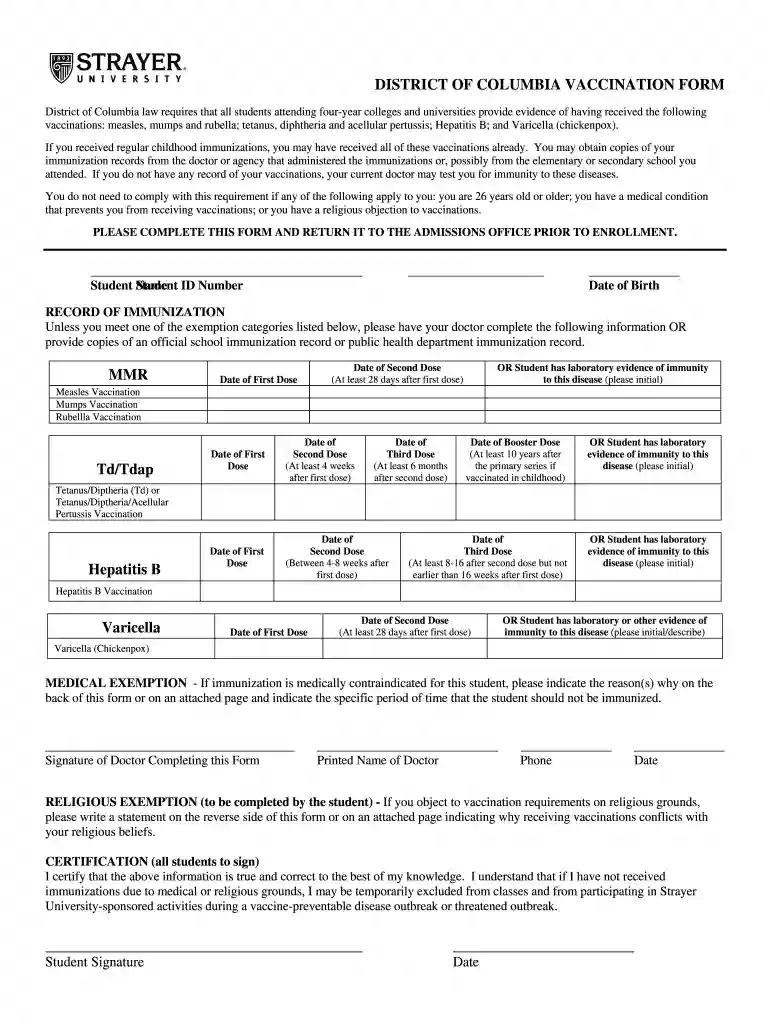
Begin by entering your Student Name and Student ID Number at the top of the form. This information is essential for identification purposes.
Next, provide your Date of Birth. Ensure this is accurate as it may be used for verification.
In the RECORD OF IMMUNIZATION section, have your doctor complete the required vaccination details. If you have official immunization records, you can upload them directly.
For each vaccine listed (MMR, Td/Tdap, Hepatitis B, Varicella), enter the dates of each dose as instructed. If you have laboratory evidence of immunity, please indicate this by initialing where specified.
If applicable, complete the Medical Exemption or Religious Exemption sections by providing necessary details on an attached page.
Finally, sign and date the certification statement at the bottom to confirm that all information provided is accurate.
Start filling out your vaccination form today using our platform for free!
Fill out Strayer University District of Columbia Vaccination Form Vaccination online It's free
Strayer university district of columbia vaccination form vaccination phoneStrayer university district of columbia vaccination form vaccination loginUniversity of the District of Columbia admissionsUdc physical formUniversity of the District of Columbia gpa requirementsUniversity of the district of columbia admissions requirementsUdc tax formUniversity of the District of Columbia acceptance rate
Security and compliance
At DocHub, your data security is our priority. We follow HIPAA, SOC2, GDPR, and other standards, so you can work on your documents with confidence.
Cookie consent notice
This site uses cookies to enhance site navigation and personalize your experience.
By using this site you agree to our use of cookies as described in our Privacy Notice.
You can modify your selections by visiting our Cookie and Advertising Notice.