Type text, add images, blackout confidential details, add comments, highlights and more.
02. Sign it in a few clicks
Draw your signature, type it, upload its image, or use your mobile device as a signature pad.
03. Share your form with others
Send michigan admission without via email, link, or fax. You can also download it, export it or print it out.
How to use or fill out mi application admission without examination with our platform
Ease of Setup
DocHub User Ratings on G2
Ease of Use
DocHub User Ratings on G2
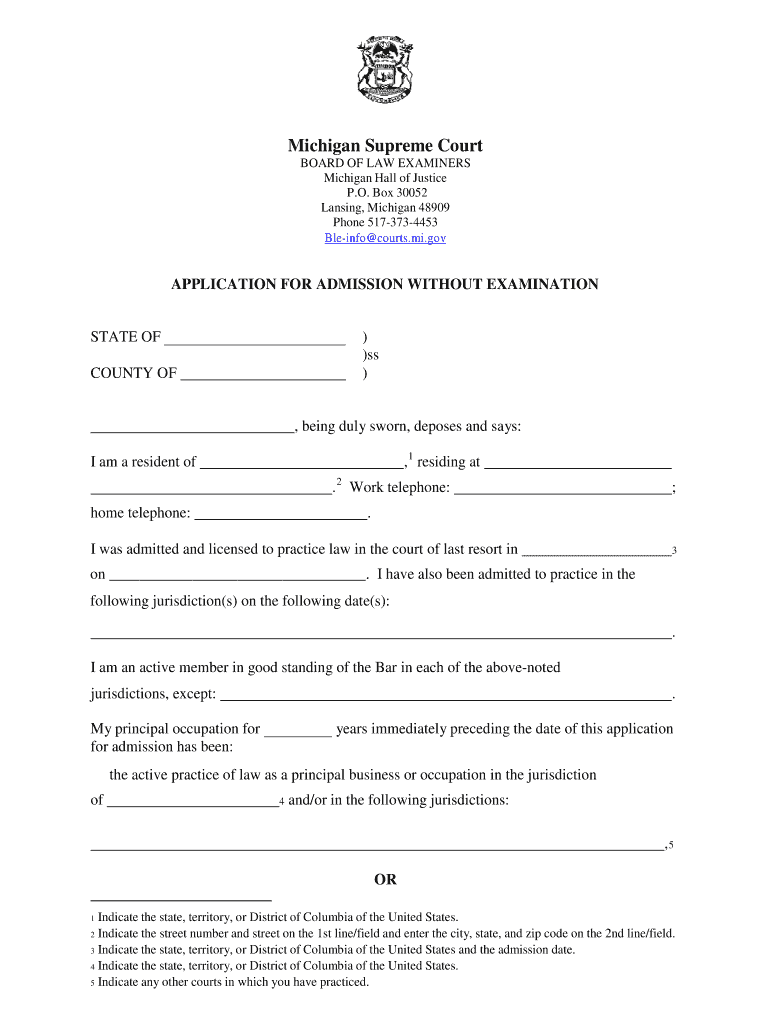
Click ‘Get Form’ to open the mi application admission without examination in the editor.
Begin by filling in your personal information, including your name, address, and contact numbers in the designated fields.
Indicate your state of admission and the date you were licensed to practice law. Ensure this information is accurate as it is crucial for your application.
List any other jurisdictions where you have been admitted to practice law along with their respective dates.
Provide details about your principal occupation over the last years, specifying if it was active practice or teaching at a law school.
Attach necessary documents such as the National Conference of Bar Examiners Request for Preparation of a Character Report and payment details for fees.
Review all entered information for accuracy before signing and submitting your application.
Start using our platform today to complete your application easily and efficiently!
Fill out mi application admission without examination online It's free
Mi application admission without examination californiaMichigan bar admission rule 5Bar reciprocity By StateHow to become a lawyer in michiganAdmission on motion reciprocityBar Application DeadlinesMi boleBar test
Security and compliance
At DocHub, your data security is our priority. We follow HIPAA, SOC2, GDPR, and other standards, so you can work on your documents with confidence.
Jan 29, 2025 You must also take 15 hours of CLE on Maine practice and procedure in the year immediately prior to the application for admission. A personRead more
Beginning March 1, 2023, all applicants for Admission without Examination MUST complete the Michigan Basics Online Law Training if submitting an application
Cookie consent notice
This site uses cookies to enhance site navigation and personalize your experience.
By using this site you agree to our use of cookies as described in our Privacy Notice.
You can modify your selections by visiting our Cookie and Advertising Notice.