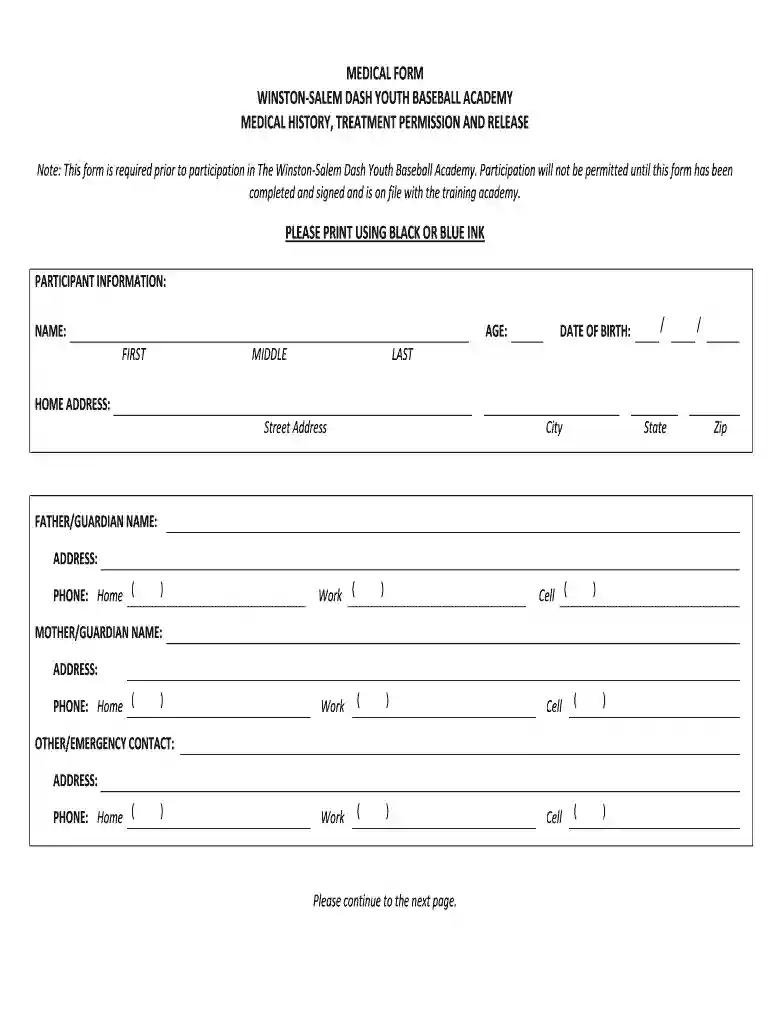
medical form winston-salem dash youth baseball academy Preview on Page 1

Medical form winston-salem dash youth baseball academy 2026

Here's how it works

  • 01. Edit your form online

    Type text, add images, blackout confidential details, add comments, highlights and more.

  • 02. Sign it in a few clicks

    Draw your signature, type it, upload its image, or use your mobile device as a signature pad.

  • 03. Share your form with others

    Send it via email, link, or fax. You can also download it, export it or print it out.

How to use or fill out medical form winston-salem dash youth baseball academy with DocHub

Form edit decoration
9.5
Ease of Setup
DocHub User Ratings on G2
9.0
Ease of Use
DocHub User Ratings on G2
  1. Click ‘Get Form’ to open it in the editor.
  2. Begin by filling out the 'Participant Information' section. Enter the participant's name, age, and date of birth using black or blue ink.
  3. Provide the home address, including street, city, state, and zip code. Ensure all details are accurate for emergency contact purposes.
  4. Complete the 'Father/Guardian' and 'Mother/Guardian' sections with names, addresses, and phone numbers for home, work, and cell.
  5. List an emergency contact in case parents cannot be reached. Include their address and phone number.
  6. Fill in the 'Family Physician' and 'Insurance Company' sections along with ID number if applicable.
  7. Address any medical history questions thoroughly. Indicate if the participant is under a provider's care or taking medication.
  8. Review the release of liability and consent for injury sections carefully before signing at the bottom of the form.

Start filling out your medical form today on our platform for free!

be ready to get more

Complete this form in 5 minutes or less

Got questions?

We have answers to the most popular questions from our customers. If you can't find an answer to your question, please contact us.

With DocHub, you can rapidly approve your medical form winston-salem dash youth baseball academy or any other paperwork on iOS, even without installing extra programs. You can access your DocHub account from any internet-connected browser and complete and sign your document in any preferred method with just a few clicks.

You can easily edit fill out your medical form winston-salem dash youth baseball academy on any iOS gadget. Open an internet browser of your choice, go to the DocHub site, authorize or create a new account, add your file for editing, and make your required alterations. Our service is mobile-friendly, so using its features on your smartphone will be a no-brainer, even on the first try.

Security and compliance

At DocHub, your data security is our priority. We follow HIPAA, SOC2, GDPR, and other standards, so you can work on your documents with confidence.

Related links

Athletic Training OutDocHub Program

The Wake Forest Baptist Health certified athletic trainer outDocHub program provides treatment and injury prevention guidance for athletes of all ages high

Learn more
2026-2027 middle/junior high school athletic manual

To be eligible to participate in interscholastic athletics, a student shall receive a medical examination every 395 days by a licensed physician, nurseRead more

Learn more
If you believe that this page should be taken down, please follow our DMCA take down process here