Type text, add images, blackout confidential details, add comments, highlights and more.

02. Sign it in a few clicks
Draw your signature, type it, upload its image, or use your mobile device as a signature pad.

03. Share your form with others
Send pawn ticket sample via email, link, or fax. You can also download it, export it or print it out.

How to use or fill out pawnbroker ticket with our platform
Ease of Setup
DocHub User Ratings on G2
Ease of Use
DocHub User Ratings on G2
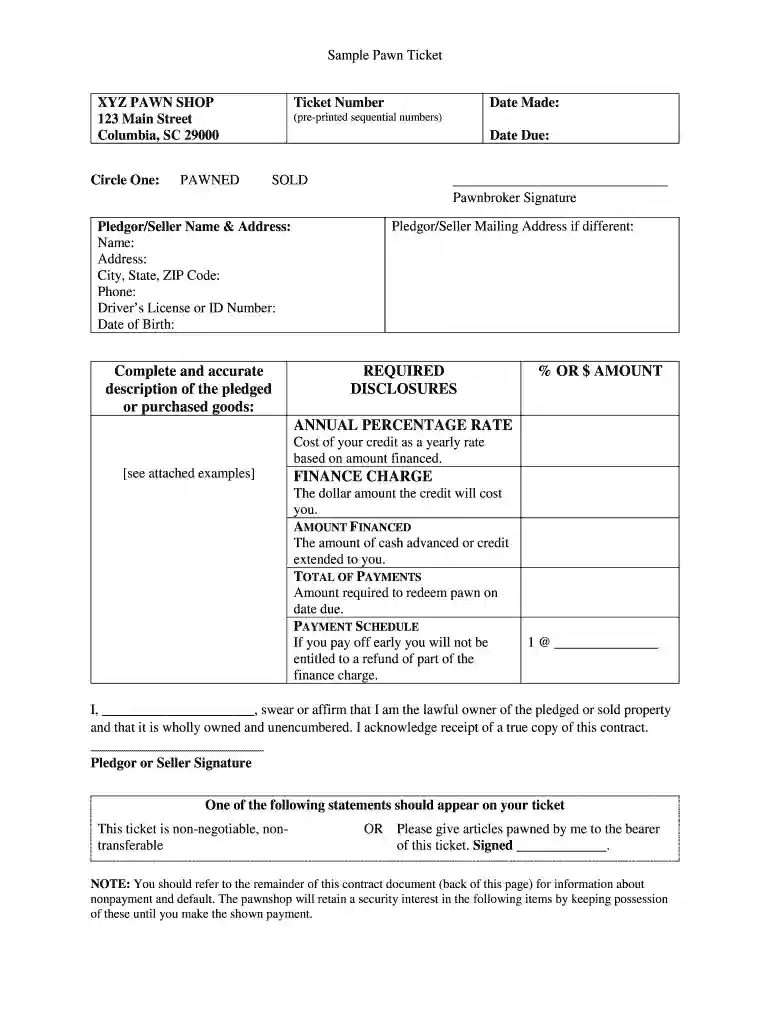
Click ‘Get Form’ to open the pawnbroker ticket in the editor.
Begin by entering the Ticket Number and Date Made at the top of the form. Ensure these are accurate as they are essential for tracking your transaction.
Select whether the item is PAWNED or SOLD by circling the appropriate option.
Fill in the Pledgor/Seller Name & Address section, including all required details such as Phone and Driver’s License or ID Number.
Provide a complete description of the pledged or purchased goods. Be specific about brand, model, and any unique identifiers like serial numbers.
Review and complete the REQUIRED DISCLOSURES section, ensuring you understand terms like Annual Percentage Rate and Finance Charge.
Sign where indicated as both Pledgor/Seller and Pawnbroker to finalize the document.
Start using our platform today to easily fill out your pawnbroker ticket online for free!
Cookie consent notice
This site uses cookies to enhance site navigation and personalize your experience.
By using this site you agree to our use of cookies as described in our Privacy Notice.
You can modify your selections by visiting our Cookie and Advertising Notice.