eco maps Preview on Page 1

Eco maps blank 2026

Here's how it works

  • 01. Edit your eco maps online

    Type text, add images, blackout confidential details, add comments, highlights and more.

  • 02. Sign it in a few clicks

    Draw your signature, type it, upload its image, or use your mobile device as a signature pad.

  • 03. Share your form with others

    Send it via email, link, or fax. You can also download it, export it or print it out.

How to use or fill out eco maps blank with our platform

Form edit decoration
9.5
Ease of Setup
DocHub User Ratings on G2
9.0
Ease of Use
DocHub User Ratings on G2
  1. Click ‘Get Form’ to open the eco maps blank in the editor.
  2. Begin by entering your name at the top of the form. This personalizes your eco-map and helps identify your unique resources.
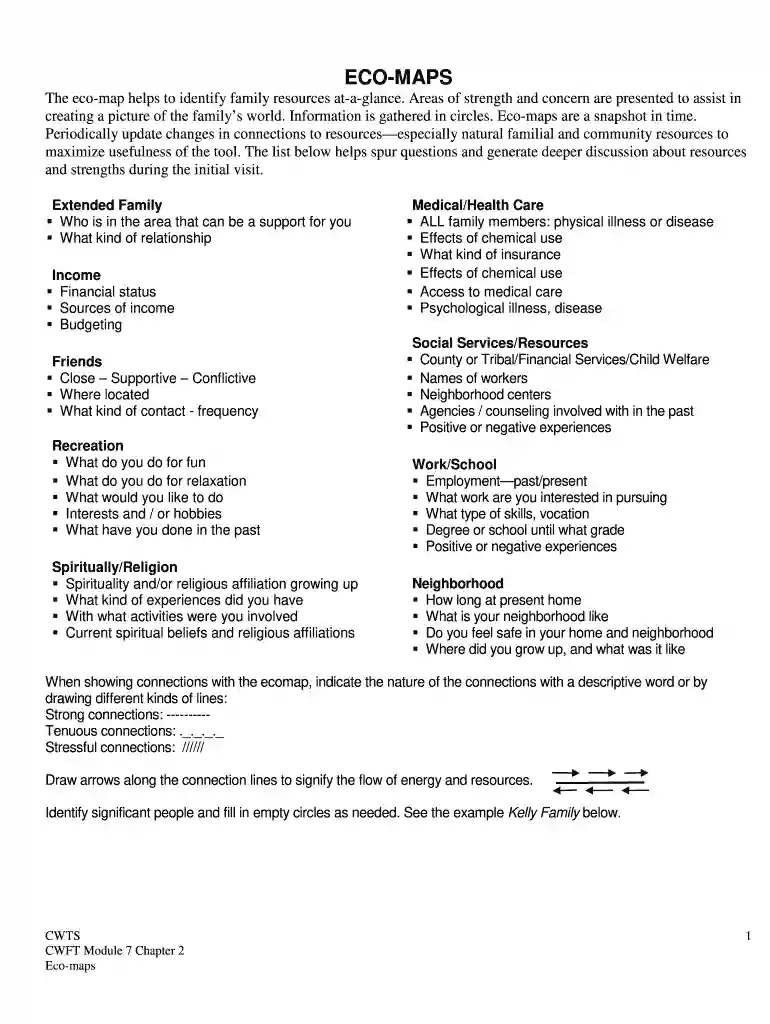
  3. In the 'Extended Family/Significant Others' section, list family members who provide support. Use descriptive words to indicate the nature of these relationships.
  4. Fill in the 'Income' section with details about your financial status, sources of income, and budgeting practices.
  5. In the 'Friends' area, categorize your friendships based on their supportiveness and frequency of contact.
  6. Complete sections for 'Recreation', 'Medical/Health Care', 'Social Services/Resources', and 'Work/School' by reflecting on past experiences and current situations.
  7. Use lines to connect different circles, indicating strong or tenuous connections as described in the instructions. Draw arrows to signify energy flow.

Start filling out your eco map today for free and empower yourself with a clearer understanding of your resources!

be ready to get more

Complete this form in 5 minutes or less

Got questions?

We have answers to the most popular questions from our customers. If you can't find an answer to your question, please contact us.

Creating an Ecomap Begin with a Central Circle: On a whiteboard or paper, draw a large circle in the centre, labelling. Identify Key Elements: Encourage the client to list various aspects of their life, such as: Map Out Relationships: Surround the central figure with smaller circles for each person or service.
a solid or thick line represents an important, strong or positive connection. a broken line represents a tenuous or weak connection. lines with crosses through them indicate a stressful relationship. arrows along the line point towards the direction or flow of resources, energy or interest.
An ecomap is a picture that maps the connection the family has with their community, the quality of those connections and how much energy those connections use up.
When creating an ecomap, make sure to have your subjects name in the center of the graph. Put down the relationships, environments, and external factors in different circles around the subject, connecting them with lines and arrows that depict the quality of the bonds.
Its performed outside your body. A sonographer places a hand-held wand (called a transducer) on the outside of your chest to send sound waves to your heart. These sound waves bounce off the different parts of your heart. These echoes then appear as pictures on the sonographers computer screen.

Security and compliance

At DocHub, your data security is our priority. We follow HIPAA, SOC2, GDPR, and other standards, so you can work on your documents with confidence.

Related links

Tools

Can be used when you have a blank canvas. Can be used to draw a landscape or character on the map. Crafting at the Tinkers table. Palmia, Lumiest. BlankRead more

Learn more
Eco-map template

Eco-map template. Instructions: Use this template to document patient relationships with friends, family, and community members/resources.Read more

Learn more
***************.0:**********************************************

by CT Goodluck 1990 Cited by 15 The eco-map is a map of a family in its environment. The eco-map is used by counselors, social workers, and many. Should you carry around blank Eco-maps to use

Learn more
If you believe that this page should be taken down, please follow our DMCA take down process here