Young persons risk assessment 2026

Get Form
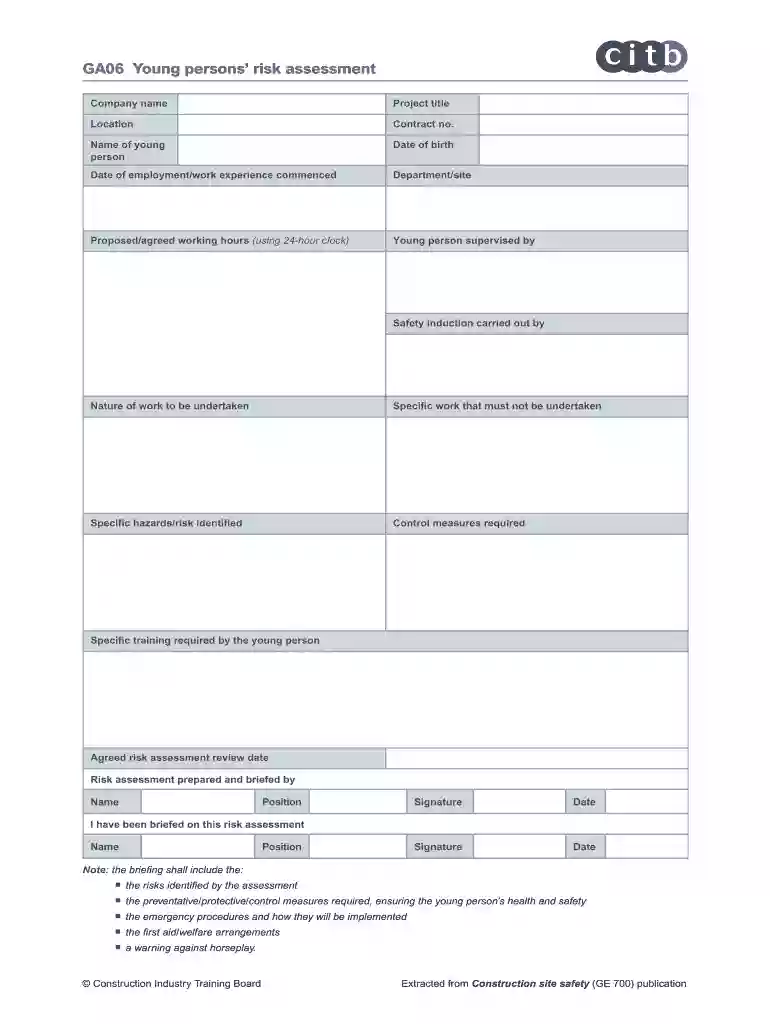
young persons risk assessment Preview on Page 1

Here's how it works

01. Edit your young persons risk assessment online
Type text, add images, blackout confidential details, add comments, highlights and more.

02. Sign it in a few clicks
Draw your signature, type it, upload its image, or use your mobile device as a signature pad.

03. Share your form with others
Send young persons risk assessment word document via email, link, or fax. You can also download it, export it or print it out.

How to use or fill out young persons risk assessment with our platform

Form edit decoration
9.5
Ease of Setup
DocHub User Ratings on G2
9.0
Ease of Use
DocHub User Ratings on G2
  1. Click ‘Get Form’ to open the young persons risk assessment in the editor.
  2. Begin by entering the company name, project title, and location at the top of the form. This sets the context for the assessment.
  3. Fill in the contract number, name of the young person, and their date of birth. Accurate personal information is crucial for effective monitoring.
  4. Specify the date employment or work experience commenced, along with department/site details. This helps track their engagement duration.
  5. Outline proposed working hours using a 24-hour clock format. Ensure clarity to avoid scheduling conflicts.
  6. Indicate who will supervise the young person and who conducted their safety induction. This ensures accountability and safety awareness.
  7. Detail the nature of work to be undertaken and any specific tasks that must not be performed. Highlighting hazards is essential for safety.
  8. Identify specific hazards/risks and outline control measures required to mitigate them. This section is vital for ensuring health and safety.
  9. List any specific training required by the young person before commencing work. Training is key to empowering them in their roles.
  10. Set an agreed risk assessment review date to ensure ongoing evaluation of risks as conditions change.
  11. Complete sections for preparation and briefing by including names, positions, signatures, and dates as required at the end of the form.

Start filling out your young persons risk assessment today on our platform for free!

be ready to get more

Complete this form in 5 minutes or less

Get form

Security and compliance

At DocHub, your data security is our priority. We follow HIPAA, SOC2, GDPR, and other standards, so you can work on your documents with confidence.

Learn more
ccpa2
pci-dss
gdpr-compliance
hipaa
soc-compliance
be ready to get more

Complete this form in 5 minutes or less

Get form