
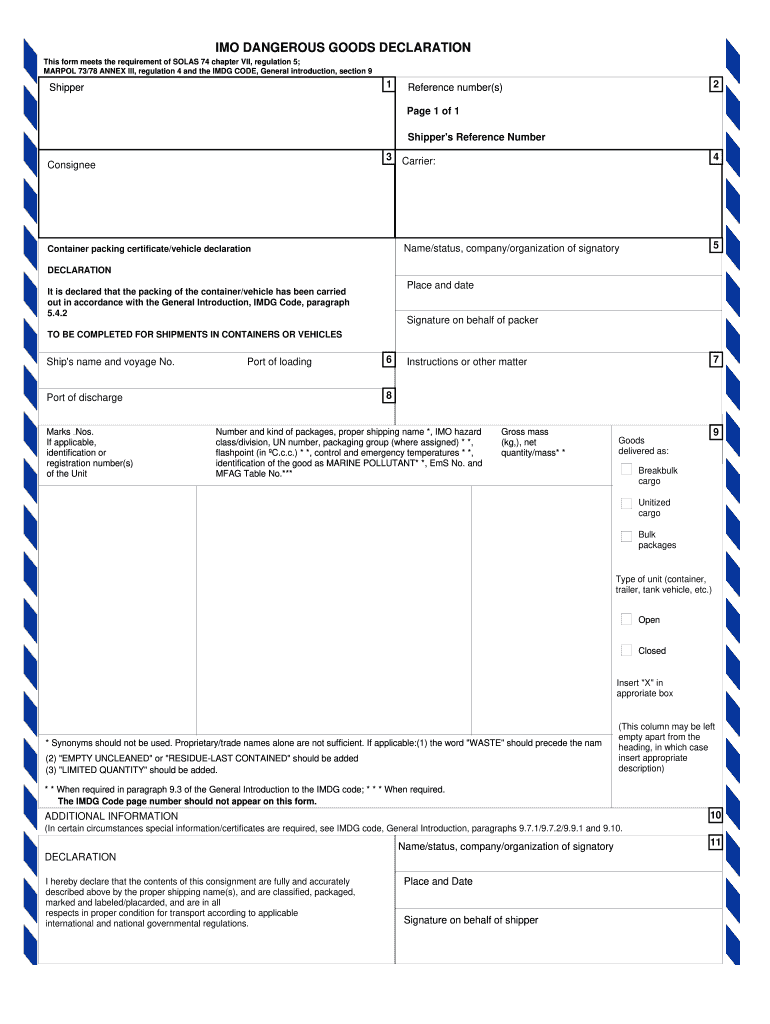



Imo dangerous goods declaration form 2025

Get Form
dangerous goods declaration form Preview on Page 1

Here's how it works

01. Edit your dangerous goods declaration form online
Type text, add images, blackout confidential details, add comments, highlights and more.

02. Sign it in a few clicks
Draw your signature, type it, upload its image, or use your mobile device as a signature pad.

03. Share your form with others
Send imo forms via email, link, or fax. You can also download it, export it or print it out.

How to use or fill out imo dangerous goods declaration form with our platform

Form edit decoration
9.5
Ease of Setup
DocHub User Ratings on G2
9.0
Ease of Use
DocHub User Ratings on G2
  1. Click ‘Get Form’ to open the imo dangerous goods declaration form in the editor.
  2. Begin by filling in the 'Shipper' section with your company's name and contact information. This is crucial for identifying the sender of the goods.
  3. Enter the 'Reference number(s)' to help track your shipment. This can include any internal tracking numbers you use.
  4. Complete the 'Consignee' section with the recipient's details, ensuring accuracy for smooth delivery.
  5. In the 'Declaration' area, confirm that packing complies with IMDG Code regulations by providing a signature on behalf of the packer.
  6. Fill out details regarding the goods, including 'Number and kind of packages', 'proper shipping name', and other required classifications such as IMO hazard class and UN number.
  7. Specify additional information if necessary, particularly if special certificates are required as per IMDG code guidelines.
  8. Finally, review all entries for accuracy before signing off on behalf of the shipper in the designated area.

Start using our platform today to streamline your document editing and ensure compliance with international shipping regulations!

be ready to get more

Complete this form in 5 minutes or less

Get form

Got questions?

We have answers to the most popular questions from our customers. If you can't find an answer to your question, please contact us.
Contact us
I hereby declare that the contents of this consignment are fully and accurately described above by the proper shipping name, and are classified, packaged marked and labelled/placarded, and are in all respects in proper condition for transport according to applicable international and national governmental regulations.
You can download the appropriate declaration form for your dangerous goods shipments from the IATA (International Air Transport Association) website. For more information, please visit our dangerous goods page.
Key sections of DGD Shipper and Consignee Information. Firstly, details about who is sending and receiving the goods. Proper Shipping Name (PSN) and UN Number. Hazard Class and Division. Packing Group. Subsidiary Risks. Quantity and Type of Packaging. Technical Name (if required). Emergency Contact Information.
The shipper or operator must complete the Air Waybill. The Air Waybill is attached to the Shippers Declaration for Dangerous Goods Form. shippers reference number for their ownrecords. Passenger and Cargo aircraft have restrictions on shipment ofinfectious substances.
The IMO is a specialized agency of the United Nations. Before you transport the goods, you must fill out the IMO dangerous goods declaration form. This declaration is often required for dangerous goods. It ensures these goods are identified, classified, packaged, and labeled correctly.

People also ask

The declaration of dangerous goods should contain the: Shippers name, address and contact information. Recipients name, address and contact information. AWB, the number of pages and the shippers reference number. Aircraft restrictions (if any) Airport od departure and destination information.

imo declaration form pdf

