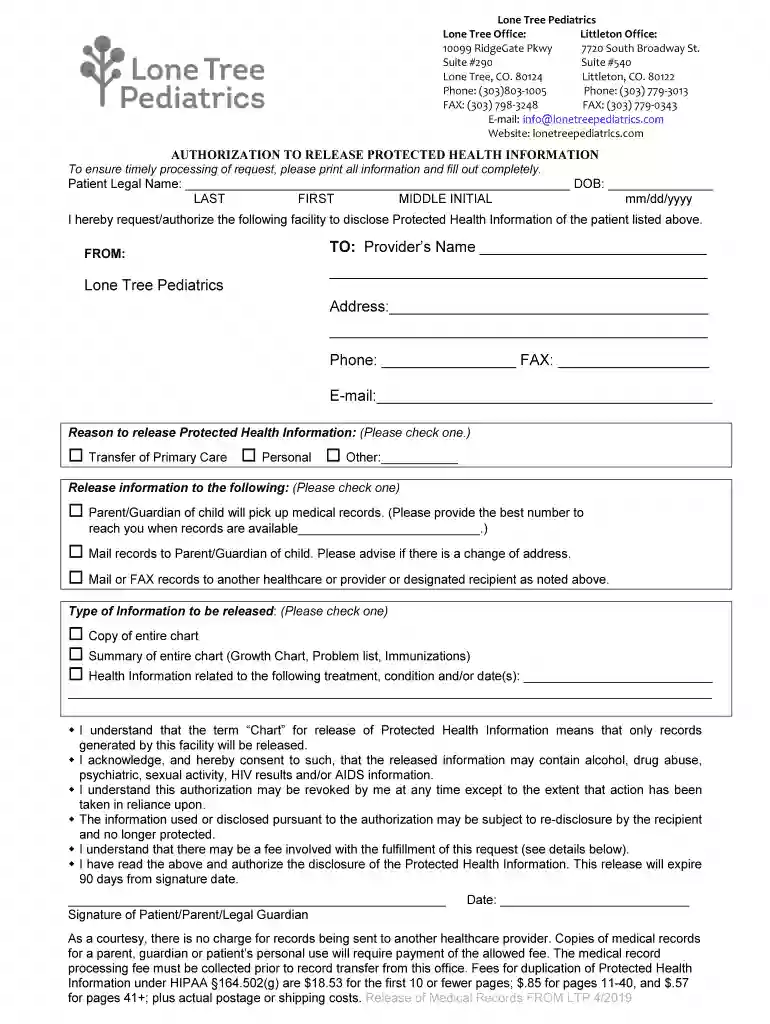
Our Lone Tree Pediatricians at Lone Tree Pediatrics Preview on Page 1

Our Lone Tree Pediatricians at Lone Tree Pediatrics 2026

Here's how it works

  • 01. Edit your form online

    Type text, add images, blackout confidential details, add comments, highlights and more.

  • 02. Sign it in a few clicks

    Draw your signature, type it, upload its image, or use your mobile device as a signature pad.

  • 03. Share your form with others

    Send it via email, link, or fax. You can also download it, export it or print it out.

How to use or fill out Our Lone Tree Pediatricians at Lone Tree Pediatrics

Form edit decoration
9.5
Ease of Setup
DocHub User Ratings on G2
9.0
Ease of Use
DocHub User Ratings on G2
  1. Click ‘Get Form’ to open it in the editor.
  2. Begin by entering the patient's legal name, including last, first, and middle initial, along with their date of birth in the specified format (mm/dd/yyyy).
  3. In the 'FROM' section, confirm that 'Lone Tree Pediatrics' is pre-filled. In the 'TO' section, provide the recipient's name, address, phone number, and email as required.
  4. Select a reason for releasing Protected Health Information by checking one of the options provided: Transfer of Primary Care, Personal, or Other.
  5. Indicate how the records will be released by checking either for pick-up by a parent/guardian or mailing/FAXing to another provider.
  6. Choose the type of information to be released by selecting from options such as a copy of the entire chart or specific health information related to treatment.
  7. Finally, ensure you read and understand all consent statements before signing and dating the form at the bottom.

Start using our platform today to easily fill out your forms for free!

be ready to get more

Complete this form in 5 minutes or less

Got questions?

We have answers to the most popular questions from our customers. If you can't find an answer to your question, please contact us.

With DocHub, you can quickly sign your Our Lone Tree Pediatricians at Lone Tree Pediatrics or any other document on iOS, even without setting up additional programs. You can access your DocHub account from any internet-connected browser and fill out and sign your document in any preferred method with just a few clicks.

If you store your paperwork in Google Drive, there is no need to download your Our Lone Tree Pediatricians at Lone Tree Pediatrics on your computer and upload it back to our editor. A much easier way is to set up a browser extension created by DocHub to simplify this flow. The extension allows editing PDFs right in your web browser. Alternatively, you can integrate your DocHub and Gmail accounts for more efficient editing.

Security and compliance

At DocHub, your data security is our priority. We follow HIPAA, SOC2, GDPR, and other standards, so you can work on your documents with confidence.

If you believe that this page should be taken down, please follow our DMCA take down process here