




Here's how it works



How to use or fill out Pulmonary Associates, LTD with our platform

- Click ‘Get Form’ to open the Pulmonary Associates, LTD document in the editor.
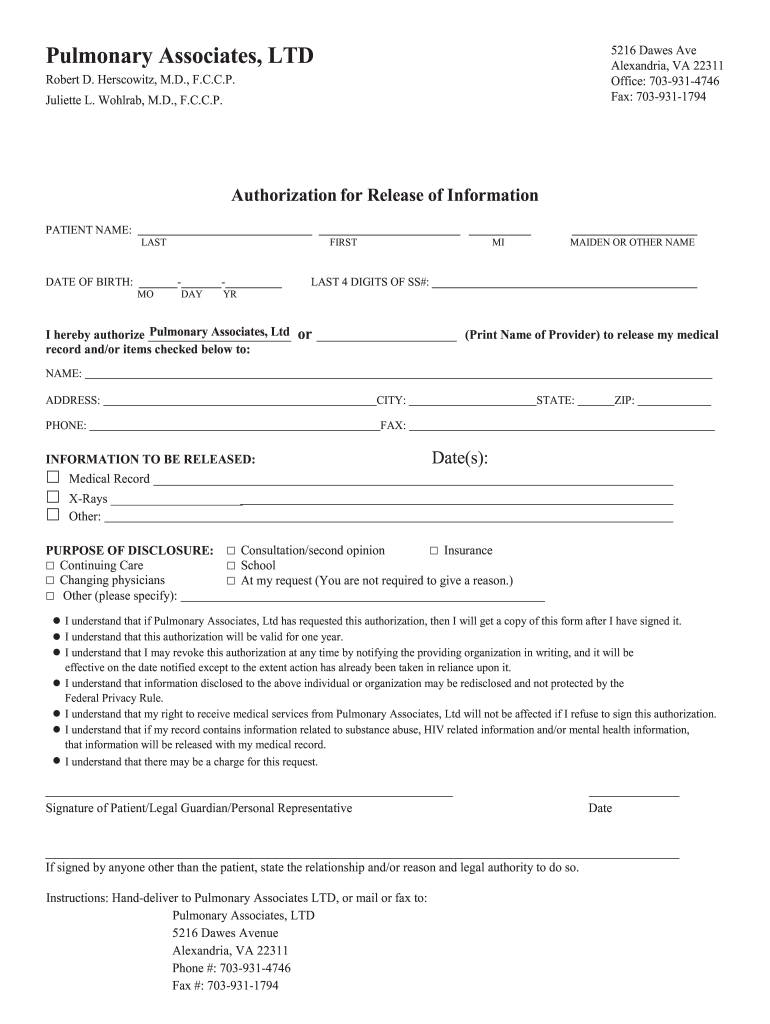
- Begin by entering your full name in the 'PATIENT NAME' field, ensuring you include your last name, first name, and middle initial.
- Fill in your date of birth using the format provided: month (MO), day (DAY), and year (YR).
- Provide the last four digits of your Social Security Number in the designated field.
- In the 'INFORMATION TO BE RELEASED' section, check all applicable boxes for medical records, X-rays, or other information you wish to authorize for release.
- Specify the purpose of disclosure by selecting from options such as 'Continuing Care', 'Changing physicians', or others as needed.
- Sign and date the form at the bottom. If someone else is signing on your behalf, indicate their relationship and authority.
Start filling out your Pulmonary Associates, LTD form online for free today!
It's free
Got questions?
How do I sign my Pulmonary Associates, LTD without printing?
eSignatures are an excellent alternative to traditional signing, as they save time, effort, and money people spend on printing, scanning, and paper delivery. You can eSign your Pulmonary Associates, LTD utilizing a reliable and robust online document management services like DocHub. It complies with major eSignature regulations (ESIGN and UETA), so all documents approved there are legally binding and have the same validity as manually signed ones.
How to manage my Pulmonary Associates, LTD from Gmail?
In case your go-to email service is Gmail, you can easily integrate your DocHub editor into your work. Modify your Pulmonary Associates, LTD with DocHub tools and connect it to your drafts in Gmail. See how easy it can be to exchange files and work together having a swift PDF editing solution at hand.
Security and compliance
At DocHub, your data security is our priority. We follow HIPAA, SOC2, GDPR, and other standards, so you can work on your documents with confidence.
Learn more


