




Here's how it works



How to use or fill out phlebotomy certificate template with our platform

- Click ‘Get Form’ to open the phlebotomy certificate template in the editor.
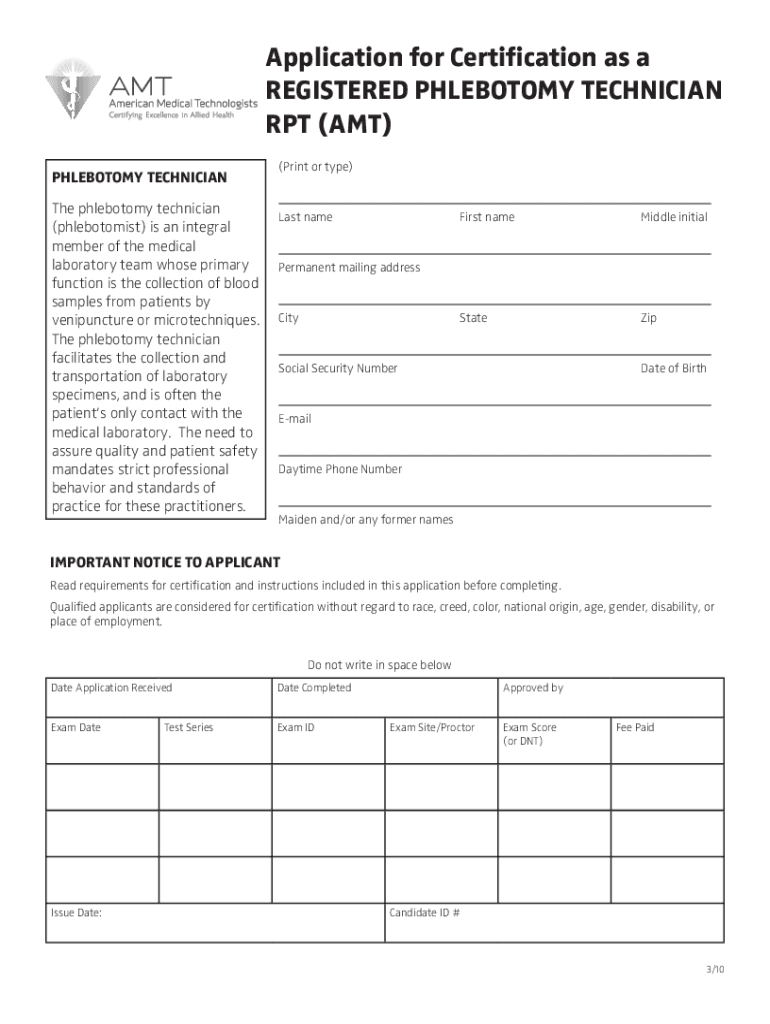
- Begin by filling in your personal information. Enter your last name, first name, middle initial, state, zip code, and permanent mailing address. Ensure all details are accurate for effective communication.
- In the eligibility section, check the box that corresponds to your qualifications. This includes options like graduation from an accredited program or relevant work experience.
- Complete the personal information section by answering the felony question and optionally providing demographic details. This is crucial for processing your application.
- List your approved phlebotomy experience in Part III. Include names of labs, directors, and dates of employment to validate your practical training.
- In Part IV, document your education and training history. Be sure to include any relevant phlebotomy training programs you have completed.
- Finally, review all sections for completeness before signing the agreement in Part VI and submitting your application along with the payment information.
Start using our platform today to easily fill out your phlebotomy certificate template for free!
It's free
Got questions?
Can I sign my phlebotomy certificate template on a mobile?
Sure, you’ll find many different apps for this on the web. Nonetheless, if you need to eSign your phlebotomy certificate template without installing additional software, DocHub is the best choice you can make. This robust editor works on mobile devices just like on desktops. Open our editor in any internet browser, register or log in to your account, and start processing your forms.
How to complete and sign phlebotomy certificate template online?
You can quickly complete, edit, and even eSign your phlebotomy certificate template using DocHub. Create a new profile and begin your free trial. After that, you can upload the document with the form and easily make all the needed edits. No need to print on paper or use a third-party application to sign it, as you can put your electronic signature on your document faster via DocHub.
Security and compliance
At DocHub, your data security is our priority. We follow HIPAA, SOC2, GDPR, and other standards, so you can work on your documents with confidence.
Learn more




