




Here's how it works



How to use or fill out rabies serology certificate with our platform

- Click ‘Get Form’ to open the rabies serology certificate in the editor.
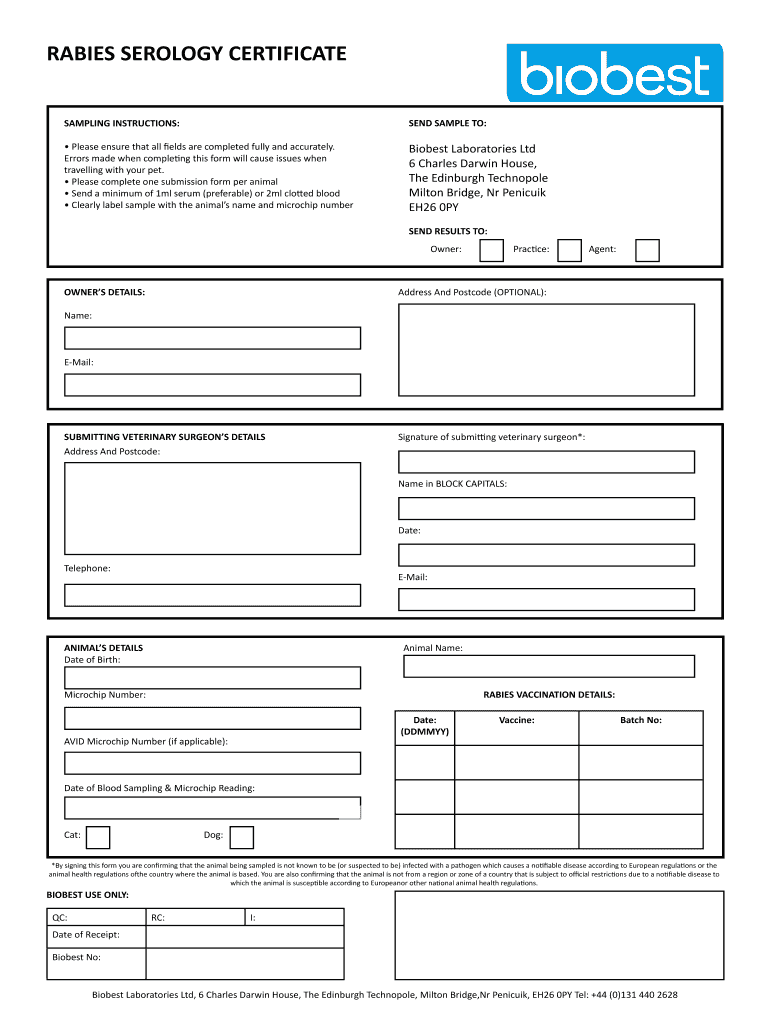
- Begin by filling out the 'Owner’s Details' section. Include your name, email, and any optional address information.
- In the 'Submitting Veterinary Surgeon’s Details', provide the veterinarian's name, signature, and contact information.
- Complete the 'Animal’s Details' section with your pet's name, date of birth, microchip number, and vaccination details.
- Ensure all fields are filled accurately to avoid issues when traveling with your pet. Review each section for completeness.
- Once completed, save your document. You can easily share it or print it directly from our platform.
Start using our platform today to streamline your rabies serology certificate process for free!
It's free
Got questions?
Can I type my eSignature on my rabies serology certificate?
Yes, a typed name is accepted as a valid electronic signature when you create it on your form utilizing a compliant solution like DocHub. Simply upload your rabies serology certificate to our editor, click Sign in the top tool pane → Create your signature → Type your name in the appropriate tab, and choose how it will look on your document.
How do you get rabies serology certificate for my state?
If you are looking for a state-specific rabies serology certificate sample, you can find it in our DocHub Forms & Templates catalog. Use the search field, enter your form’s name, and search through the results for your state. You may also filter out irrelevant results while browsing our catalog by groups.
How to read a rabies certificate?
What is a rabies serology test?
What does a rabies certificate mean?
Security and compliance
At DocHub, your data security is our priority. We follow HIPAA, SOC2, GDPR, and other standards, so you can work on your documents with confidence.
Learn more


