




Here's how it works



How to use or fill out sunscreen consent form with our platform

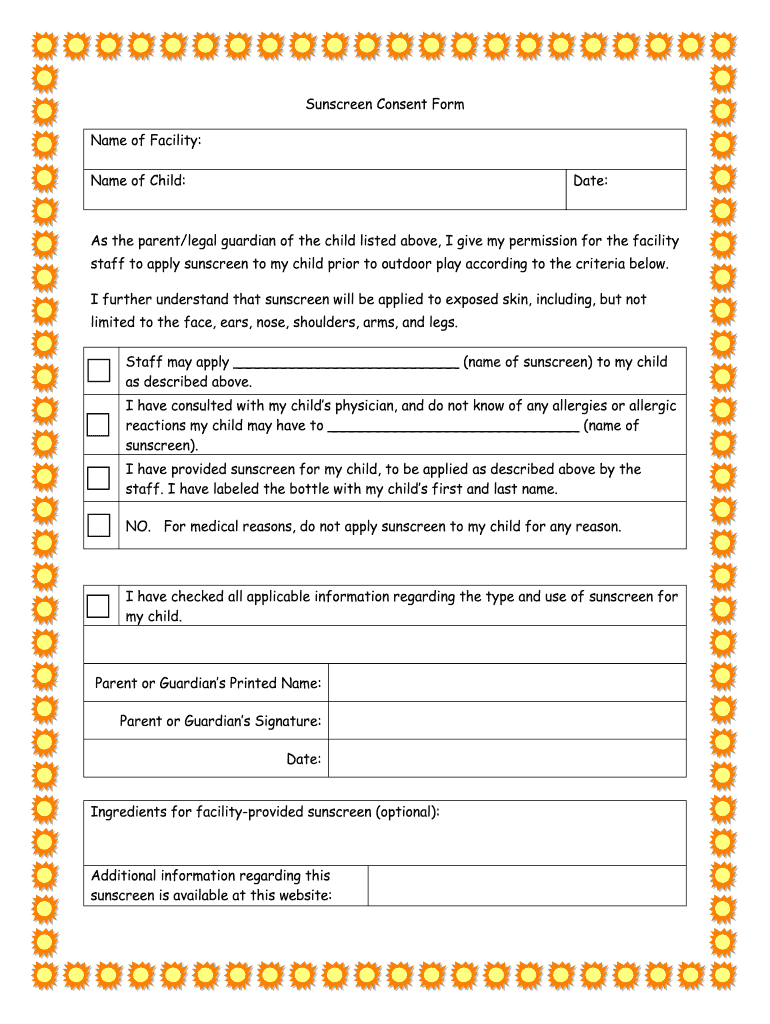
- Click ‘Get Form’ to open the sunscreen consent form in the editor.
- Begin by entering the 'Name of Facility' and 'Name of Child' in the designated fields at the top of the form.
- Fill in the 'Date' field to indicate when you are completing this consent form.
- Review the permission statement and check the box next to your chosen option regarding sunscreen application. Specify the name of the sunscreen if applicable.
- If your child has allergies, check the relevant box and provide details about any known allergies related to sunscreen.
- Indicate whether you have provided sunscreen for your child, ensuring it is labeled with their name.
- If you do not wish for sunscreen to be applied for medical reasons, select that option accordingly.
- Complete the form by entering your printed name, signing it, and adding the date at the bottom.
Start using our platform today to easily complete your sunscreen consent form online for free!
It's free
Got questions?
How can I eSign my sunscreen consent form from Gmail?
With DocHub, it’s pretty simple. The service offers users an add-on called DocHub for Gmail, which you can locate in the Google Workspace Marketplace without being charged. Install it and give it access to your Google account. Open your email with your sunscreen consent form attached and click on the add-on button in the right-side panel. Sign in to your DocHub account, and upload the form to our editor, where you can complete it and sign.
Can I edit sunscreen consent form on my phone?
As a comprehensive document editing service, DocHub is available on smart phones. Open DocHub in your choice of mobile internet browser and use our smart mobile-friendly toolset to complete your sunscreen consent form.
Does sunscreen stop working after 4 hours?
Can I apply sunscreen 2 hours before going out?
What is the rule for applying sunscreen?
Security and compliance
At DocHub, your data security is our priority. We follow HIPAA, SOC2, GDPR, and other standards, so you can work on your documents with confidence.
Learn more


