Type text, add images, blackout confidential details, add comments, highlights and more.
02. Sign it in a few clicks
Draw your signature, type it, upload its image, or use your mobile device as a signature pad.
03. Share your form with others
Send polwizjer login via email, link, or fax. You can also download it, export it or print it out.
How to use or fill out haslo with our platform
Ease of Setup
DocHub User Ratings on G2
Ease of Use
DocHub User Ratings on G2
Click ‘Get Form’ to open it in the editor.
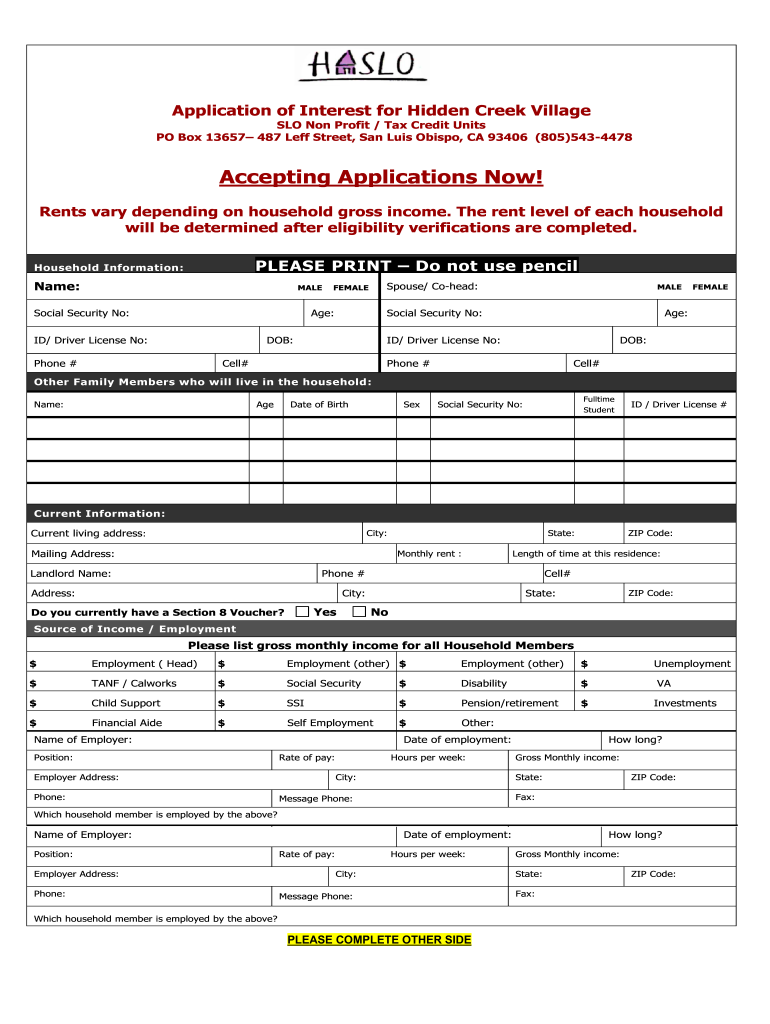
Begin by filling out the Household Information section. Enter the names, social security numbers, and ages of all household members. Ensure you select the correct gender for each member.
In the Current Information section, provide your current living address, monthly rent, and landlord details. Be sure to indicate if you have a Section 8 Voucher.
Next, list all sources of income for each household member in the Source of Income / Employment section. Include gross monthly income from various sources like employment, social security, and any other relevant income.
Proceed to answer eligibility questions regarding bedroom size requests and any special accommodations needed. Check appropriate boxes as required.
Finally, review your application for accuracy before signing at the end of the document. Make sure all signatures are provided by household members aged 18 or older.
Start filling out your haslo application today on our platform for free!
Oct 8, 2023 Global warming is DocHubly affecting the flowering time of many plant species [1]. This especially concerns plants flowering in spring,Read more
The Housing Authority of San Luis Obispo (HASLO) is committed to improving the communities of San Luis Obispo County by providing quality affordable housing andRead more
Cookie consent notice
This site uses cookies to enhance site navigation and personalize your experience.
By using this site you agree to our use of cookies as described in our Privacy Notice.
You can modify your selections by visiting our Cookie and Advertising Notice.