




01. Edit your form online
Type text, add images, blackout confidential details, add comments, highlights and more.

Type text, add images, blackout confidential details, add comments, highlights and more.

Draw your signature, type it, upload its image, or use your mobile device as a signature pad.

Send it via email, link, or fax. You can also download it, export it or print it out.
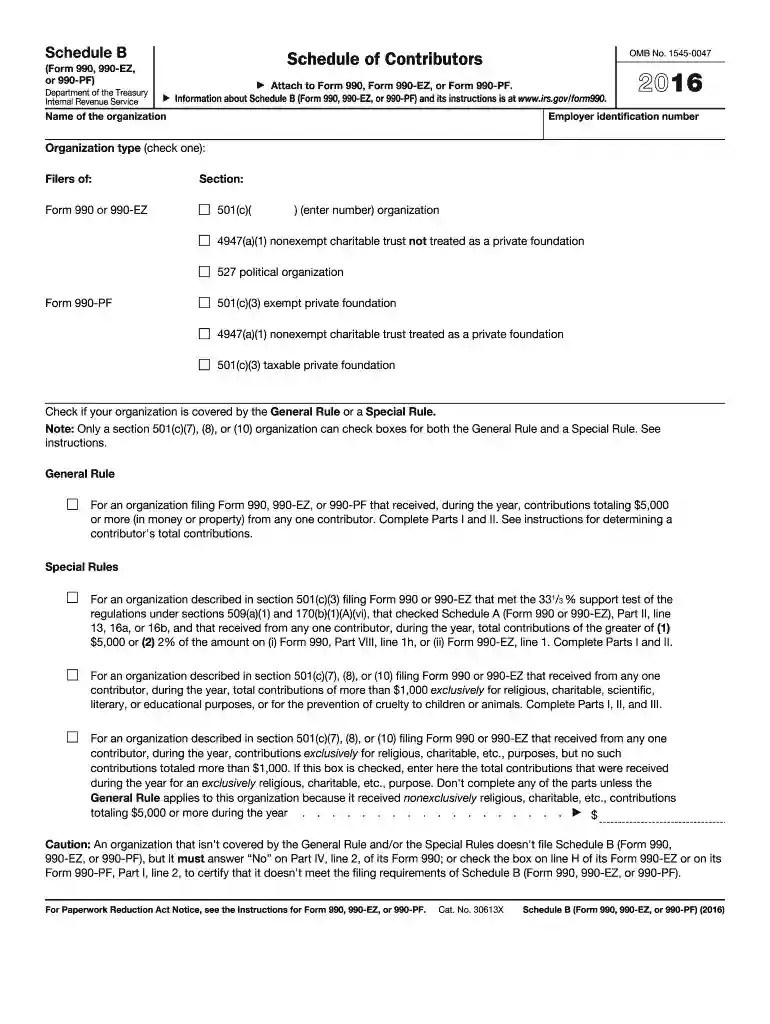
IRS Form 990 Schedule B for the year 2016 is a supplementary schedule required by the Internal Revenue Service (IRS) for certain tax-exempt organizations. It serves the critical purpose of reporting contributions that an organization received during the tax year. Specifically, it details information about donors who contributed $5,000 or more, ensuring transparency and accountability in non-profit financial disclosures. By completing this form, organizations adhere to IRS regulations, facilitating accurate tax filing and compliance.
Organizations must attach Schedule B to their main forms, such as Form 990, 990-EZ, or 990-PF, depending on their specific tax filing requirements. This schedule is a crucial element for nonprofit entities in demonstrating their adherence to federal tax laws, particularly those concerning charitable contributions.
To obtain the 2016 version of IRS Form 990 Schedule B, organizations can download the form directly from the official IRS website. This ensures that the form is the correct version and is acquired from a reliable source.
Additionally, many tax software programs, such as TurboTax or QuickBooks, include this form within their non-profit modules. These software solutions offer the benefit of integration with existing financial data, streamlining the process of completing and filing the form. Organizations may also request a hard copy by contacting the IRS, although digital access is the most efficient method.
Filling out IRS Form 990 Schedule B involves several clear steps:
Identify Contributors: Gather information about any donor who contributed $5,000 or more.
Detail Noncash Contributions: Provide specifics on the type and value of any noncash donations.
Religious and Charitable Contributions: Note any contributions specifically directed towards religious or charitable sections, with adequate explanations.
Complete the Required Sections: Carefully follow instructions on the form’s instructions to ensure each section is completed accurately and comprehensively.
Review and Attach to Main Form: Before submission, review for accuracy, attach to the primary Form 990 series being filed, and retain a copy for the organization’s records.
Completing these steps accurately helps avoid compliance issues and ensures transparency.
This form is typically used by non-profit organizations, including charities, religious entities, and certain foundations that receive significant donations. Organizations that fit within specific tax-exempt categories under the IRS code and meet the donation threshold are required to file this form.
These organizations often include public charities, private foundations, and social advocacy groups, all of which must demonstrate their fiscal responsibility and transparency to maintain their tax-exempt status.
Contributor Information: Detailed information about each donor who meets the reporting threshold.
Noncash Contributions: Specifics regarding noncash gifts, including their fair market value and description.
Anonymous Donors: Instructions for listing anonymous contributions without disclosing personal donor information.
Contribution Types: Distinctions between cash, noncash, and non-traditional donations like securities or property.
These elements are essential for complete and accurate reporting, meeting federal guidelines on charitable contributions.
The deadline for submitting IRS Form 990 Schedule B typically aligns with the deadline for the main Form 990, which is the 15th day of the fifth month after the end of the organization's fiscal year. For example, if an organization's fiscal year ends on December 31, the filing deadline would be May 15 of the following year.
Organizations should keep updated on any changes to filing deadlines, especially in cases of extensions granted by the IRS due to unforeseen circumstances.
Failure to file IRS Form 990 Schedule B correctly or on time can lead to significant penalties, as stipulated by the IRS. These can include financial penalties based on a percentage of the contributions not properly reported or listed.
Organizations may also risk losing their tax-exempt status if they fail to comply with IRS rules, which can be detrimental to their operations and credibility. Ensuring accurate filing is crucial to avoid these potential pitfalls.
Understanding key terms is essential for completing and filing this form:
Familiarity with these terms aids in accurately interpreting and implementing the form’s requirements for compliance.
We've got more versions of the irs form 990 schedule b 2016 form. Select the right irs form 990 schedule b 2016 version from the list and start editing it straight away!
| Versions | Form popularity | Fillable & printable |
|---|---|---|
| 2024 | 4.5 Satisfied (23 Votes) | |
| 2023 | 4.7 Satisfied (51 Votes) | |
| 2022 | 4.7 Satisfied (34 Votes) | |
| 2021 | 4.8 Satisfied (140 Votes) | |
| 2020 | 4.3 Satisfied (48 Votes) | |
| 2019 | 4.4 Satisfied (102 Votes) | |
| 2018 | 4.1 Satisfied (85 Votes) | |
| 2017 | 4.2 Satisfied (58 Votes) | |
| 2016 | 4.3 Satisfied (186 Votes) | |
| 2015 | 4 Satisfied (43 Votes) | |
| 2014 | 4.4 Satisfied (53 Votes) | |
| 2013 | 4 Satisfied (49 Votes) | |
| 2012 | 4.2 Satisfied (39 Votes) | |
| 2011 | 4 Satisfied (36 Votes) |
At DocHub, your data security is our priority. We follow HIPAA, SOC2, GDPR, and other standards, so you can work on your documents with confidence.
Describe in Schedule O the process, if any, used by the organization to review this Form 990. b. Did the organization have a written conflict of interest policyRead more
State the name, address, and telephone number of the person who possesses the organizations books and records:) WILLIAM GONG 510-643-8315. 2299 PIEDMONT AVENUERead more
For an organization filing Form 990, 990-EZ, or 990-PF that received, during the year, contributions totaling $5,000 or more (in money or property) from any oneRead more


