




Here's how it works



How to use or fill out list of similes and metaphors pdf with our platform

- Click ‘Get Form’ to open the list of similes and metaphors PDF in the editor.
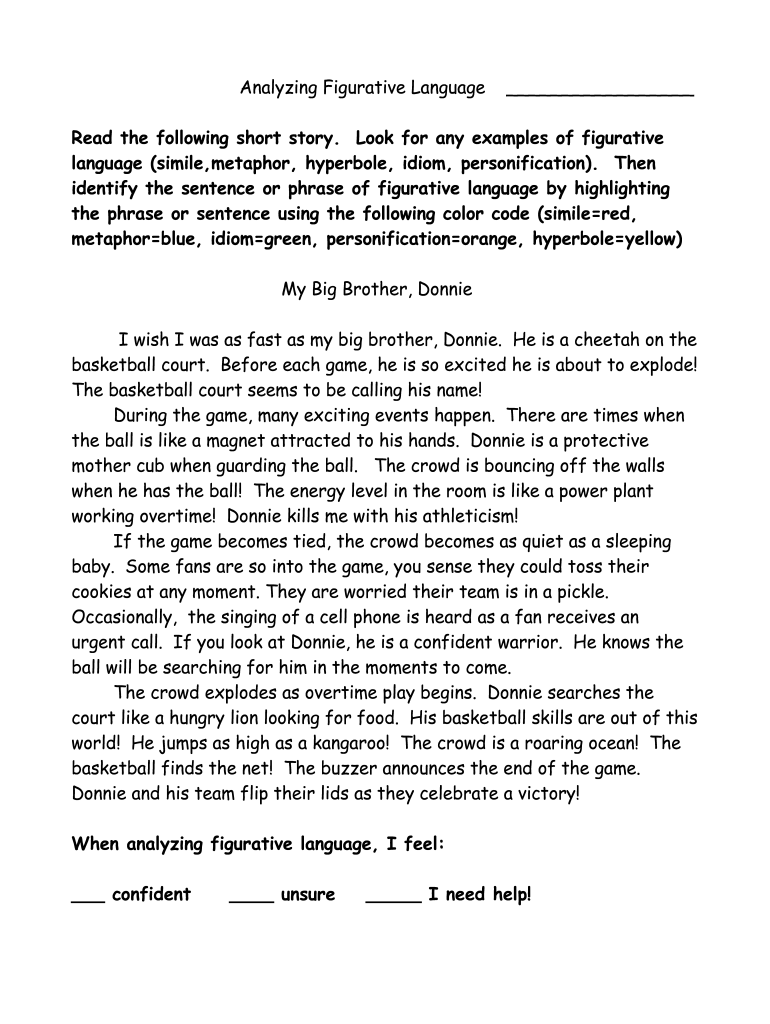
- Begin by reviewing the short story provided. Identify examples of figurative language such as similes, metaphors, idioms, personification, and hyperbole.
- Use the color code provided in the instructions: highlight similes in red, metaphors in blue, idioms in green, personification in orange, and hyperbole in yellow.
- Once you have highlighted all relevant phrases, navigate to the section where you can express your confidence level regarding analyzing figurative language. Select one of the options: confident, unsure, or needing help.
- After completing your highlights and selections, save your changes. You can then download or share your completed document directly from our platform.
Start using our editor today for free to enhance your understanding of figurative language!
It's free
Got questions?
How can I eSign my 100 similes examples in Word?
Microsoft Word doesn’t have signing tools to create valid eSignatures and enforceable forms. Luckily, DocHub is an online eSignature-compliant editor that works with various file formats, such as .doc files. Sign in to your account and add the Word edition of your 100 similes examples from your device and cloud, or URL - our editor will automatically turn it into an editable PDF. Make all essential alterations in your document and click Sign to create your own legally-binding electronic signature. You will find four signing methods from which to choose.
How do you edit short stories with figurative language pdf online?
With DocHub, there are several convenient methods to edit your short stories with figurative language pdf online. You can drag and drop the form and edit it straight at the DocHub website or use our browser extension to fill out your form right away. Additionally, you can edit your PDF on your phone, as DocHub works with all the accessible mobile platforms.
Security and compliance
At DocHub, your data security is our priority. We follow HIPAA, SOC2, GDPR, and other standards, so you can work on your documents with confidence.
Learn more




