Type text, add images, blackout confidential details, add comments, highlights and more.
02. Sign it in a few clicks
Draw your signature, type it, upload its image, or use your mobile device as a signature pad.
03. Share your form with others
Send pest control log book template via email, link, or fax. You can also download it, export it or print it out.
How to use or fill out pest sighting log with our platform
Ease of Setup
DocHub User Ratings on G2
Ease of Use
DocHub User Ratings on G2
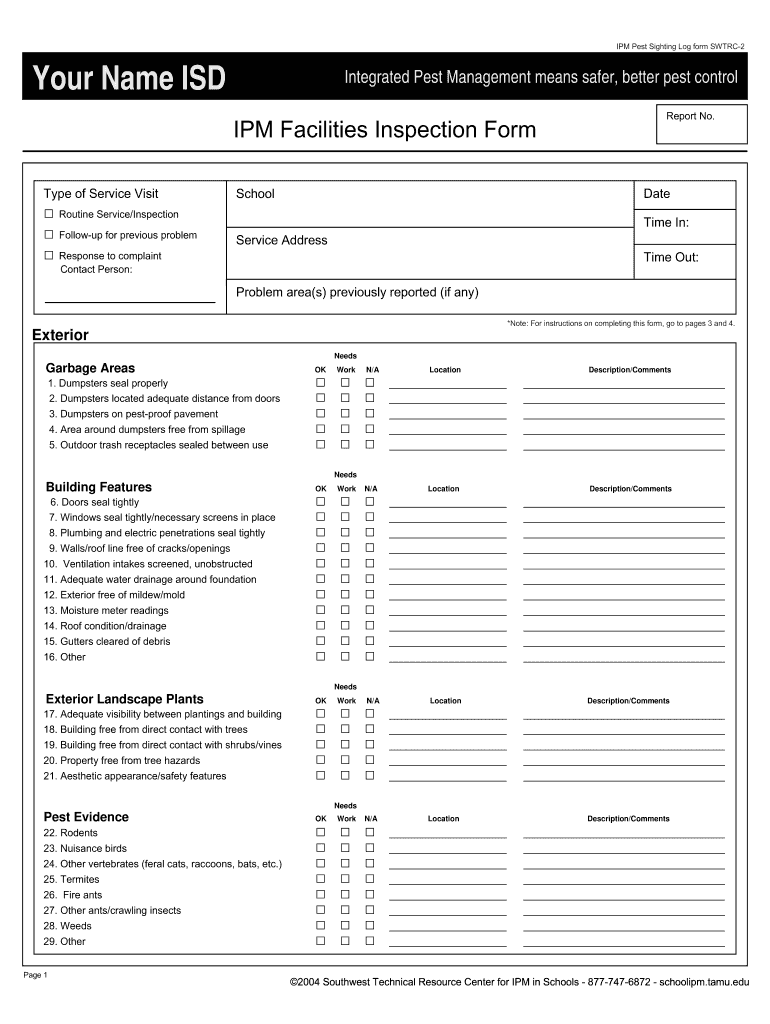
Click ‘Get Form’ to open the pest sighting log in the editor.
Begin by entering your name and the date at the top of the form. This information is essential for tracking and accountability.
Select the type of service visit from the options provided: Routine Service/Inspection, Follow-up for previous problem, or Response to complaint.
Fill in the report number, school name, service address, and times for entry and exit. This ensures accurate documentation of your inspection.
In the 'Exterior Needs' section, check off items that are OK, require work, or are not applicable. Provide detailed comments in the description fields to clarify any issues.
Repeat this process for 'Interior Needs' and 'Pest Evidence', ensuring all relevant observations are noted clearly.
Finally, review your entries for accuracy before saving or sharing your completed log directly from our platform.
Start using our platform today to streamline your pest sighting log process for free!
Pest sighted. Number of pests. Who reported. Action taken. PEST SIGHTING LOG. This pest sighting form template is available on the website Wyoming School IPMRead more
Sep 6, 2023 Keep record on file at establishment and share with pest management company for targeted treatment. Work to seal any outer openings.Read more
Mar 20, 2026 Visuals: The Looney Tunes characters are seen standing beside the 1972 WBTV logo (the Big W logo, 1972-1984) or the Warner Bros. shieldRead more
Cookie consent notice
This site uses cookies to enhance site navigation and personalize your experience.
By using this site you agree to our use of cookies as described in our Privacy Notice.
You can modify your selections by visiting our Cookie and Advertising Notice.