




Here's how it works



How to use or fill out gary business license with our platform

- Click ‘Get Form’ to open the gary business license in the editor.
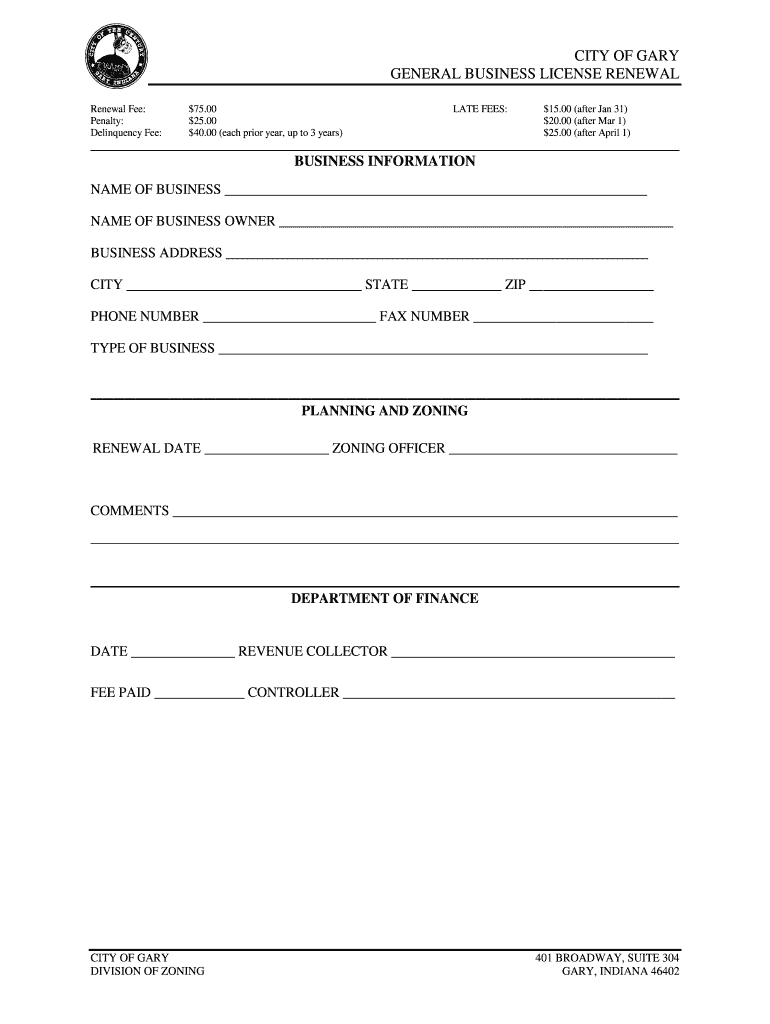
- Begin by entering your business information. Fill in the 'NAME OF BUSINESS' and 'NAME OF BUSINESS OWNER' fields accurately.
- Next, provide your 'BUSINESS ADDRESS', including city, state, and ZIP code. Ensure all details are correct to avoid any processing delays.
- Input your contact information by filling out the 'PHONE NUMBER' and 'FAX NUMBER' sections.
- Specify the 'TYPE OF BUSINESS' you operate. This helps in categorizing your business for licensing purposes.
- In the PLANNING AND ZONING section, enter the 'RENEWAL DATE' and name of the 'ZONING OFFICER'.
- Finally, review all entries for accuracy before submitting. Use our platform’s features to save or print your completed form.
Start using our platform today to fill out your gary business license online for free!
It's free
Got questions?
How do I create an eSignature on my gary indiana business license from Google Chrome?
Managing your documents with DocHub this way is very easy once you have downloaded its extension for Google Chrome. Navigate to the Chrome Web Store and set up DocHub - Sign PDF from Gmail to obtain it. Give our tool access to your Google account, and then open an email containing gary indiana business license as an attachment and point to the file with your cursor - the DocHub extension key will automatically appear there. Click on it to open your document in our editor. Make any required adjustments, fill out the blanks, and click Sign to create your legally-binding eSignature.
How do you edit city of gary general services online?
With DocHub, you have several convenient ways to edit your city of gary general services online. You can drag and drop the form and modify it directly at the DocHub site or use our browser extension to fill out your form immediately. Additionally, you can modify your PDF on your smartphone, as DocHub is compatible with all the accessible mobile platforms.
Security and compliance
At DocHub, your data security is our priority. We follow HIPAA, SOC2, GDPR, and other standards, so you can work on your documents with confidence.
Learn more




