Navmed 6100 5-2026

Get Form
navmed 6100 5 Preview on Page 1

Here's how it works

01. Edit your navmed 6100 5 online
Type text, add images, blackout confidential details, add comments, highlights and more.

02. Sign it in a few clicks
Draw your signature, type it, upload its image, or use your mobile device as a signature pad.

03. Share your form with others
Send navmed 6100 5 pdf via email, link, or fax. You can also download it, export it or print it out.

How to use or fill out navmed 6100 5 with our platform

Form edit decoration
9.5
Ease of Setup
DocHub User Ratings on G2
9.0
Ease of Use
DocHub User Ratings on G2
  1. Click ‘Get Form’ to open the navmed 6100 5 in the editor.
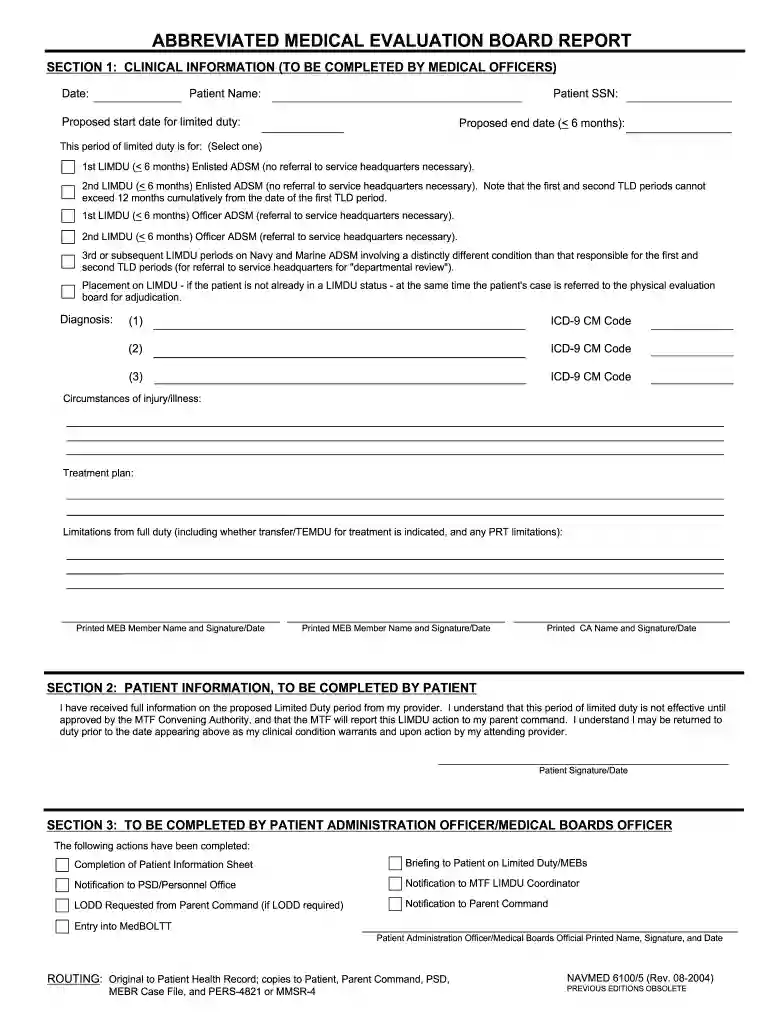
  2. Begin with Section 1, where medical officers will input clinical information. Fill in the date, patient name, and SSN. Specify the proposed start and end dates for limited duty, selecting the appropriate LIMDU option based on the patient's status.
  3. Continue by entering diagnosis codes in the designated fields. Use ICD-9 CM codes as required and provide details about the circumstances of injury or illness along with a treatment plan.
  4. Document any limitations from full duty, including transfer needs and PRT limitations. Ensure that printed names and signatures of MEB members are included at the end of this section.
  5. In Section 2, patients should confirm receipt of information regarding their limited duty period by signing and dating the form.
  6. Section 3 requires completion by a Patient Administration Officer. Ensure all actions taken are documented, including notifications to relevant parties and entry into MedBOLTT.

Start using our platform today to streamline your document editing and form completion for free!

be ready to get more

Complete this form in 5 minutes or less

Get form

Got questions?

We have answers to the most popular questions from our customers. If you can't find an answer to your question, please contact us.
Contact us
The MEB is convened once the medical retention decision point is reached or when the Service members physician thinks the Service member will not be able to return to duty for medical reasons.
Abbreviated Medical Evaluation Board Report (AMEBR). A brief summary of the members medical condition limitations, and expected RTD date used to place a member on TLD.
LIMDU will not prohibit personnel from requesting separation, retirement, or transfer to the Fleet Reserve. (1) LIMDU will not delay personnel with an approved separation, retirement, or request for Fleet Reserve transfer.
The number of days a soldier is on a temporary profile after an acute MSI varies but typically ranges from 7 to 90 days. Medical providers may extend a temporary profile up to 12 months.
No permanent change of station (PCS) orders are required. PERS 454 LIMDU Admin will change member into ACC 105 until the Sailor is Returned to Duty (RTD).

Security and compliance

At DocHub, your data security is our priority. We follow HIPAA, SOC2, GDPR, and other standards, so you can work on your documents with confidence.

Learn more
ccpa2
pci-dss
gdpr-compliance
hipaa
soc-compliance

People also ask

Similarly, if a provider knew a Sailors or Marines recovery would be longer than 180 days, they couldnt set a realistic recovery period because of the maximum 180 day limit. This required an extra administrative step to review and extend the LIMDU period at the end of the 180 day limit.

navmed 6000 5