




01. Edit your form online
Type text, add images, blackout confidential details, add comments, highlights and more.

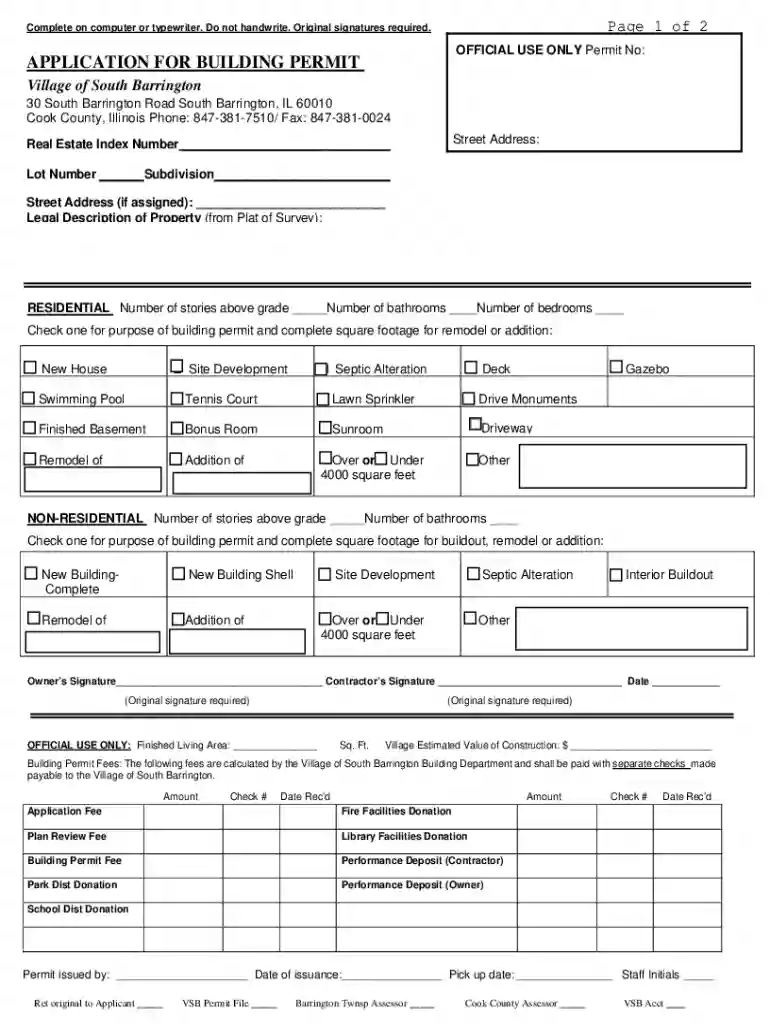
Type text, add images, blackout confidential details, add comments, highlights and more.

Draw your signature, type it, upload its image, or use your mobile device as a signature pad.

Send it via email, link, or fax. You can also download it, export it or print it out.
A "form online" refers to a digital version of a document that individuals or businesses can complete and submit via the internet. This streamlined approach eliminates the need for physical paperwork, making the process more efficient and accessible from virtually anywhere. Online forms are commonly used for applications, registrations, surveys, and data collection, ensuring that users can enter information directly into a digital interface. The convenience of online forms is matched by their ability to automate data processing, reduce human error, and facilitate quicker response times.
Using a form online involves several steps to ensure accurate completion and submission. To begin, locate the specific form needed, often available on the relevant institution's website. Online platforms such as DocHub enable users to access these forms directly from cloud storage or by importing them from their devices. Once the form is opened, users can fill out fields by typing their responses or selecting options from dropdown menus. Features like text boxes and signature fields are often customizable to facilitate ease of use. After completing the form, review the information for accuracy before using the platform's tools to securely submit it online.
Completing a form online involves a series of straightforward steps, facilitated by user-friendly interfaces:
Filling forms online offers numerous advantages, both in personal convenience and operational efficiency. With online forms, individuals can save time by avoiding travel to physical locations and eliminate the risk of losing paperwork. Additionally, businesses benefit from faster data processing, ensuring more prompt decision-making and service delivery. Online forms offer enhanced scalability, allowing organizations to comfortably handle large volumes of submissions without strain on resources. Security features integrated into digital forms often surpass those available for paper forms, providing peace of mind through encryption and authentication options.
Online forms serve a broad demographic across varied sectors. Businesses, educational institutions, government bodies, and non-profits often deploy online forms for data collection, application processes, surveys, and research. Individuals engaging in activities such as job applications, loan requests, educational admissions, and event registrations are typical users of these digital forms. In professional settings, HR departments may use forms for employee onboarding, while customer service teams might handle consumer inquiries or feedback through online submissions.


Understanding key terminology enhances the ability to navigate and utilize online forms effectively:
The legality of online forms is recognized when they conform to specific standards, such as the U.S. ESIGN Act, which gives electronic records and signatures the same legal weight as their paper counterparts. Complying with these requirements ensures that transactions and agreements made via online forms are legally-binding. This legal framework facilitates their use in a variety of settings, including contracts, business agreements, and permission slips. Organizations must ensure that their forms meet regulatory standards, including those relating to data privacy and security, to maintain their enforceability.
Submitting forms online often requires accompanying documents to validate information or fulfill specific criteria. Commonly required documents might include identification copies, proof of residence, financial statements, or supporting paperwork relevant to the form's purpose. Platforms like DocHub support direct uploads from cloud storage, making it convenient for users to attach and transmit these documents securely along with their form submissions. Double-checking document requirements beforehand can prevent delays or rejected submissions.
Form requirements can vary by state, especially when dealing with applications or regulations specific to state governance. For example, building permit applications, like those in South Barrington, Illinois, may have unique stipulations concerning documentation or fees. Understanding state-specific regulations is crucial to avoid compliance issues. Online platforms often provide resources or links to state guidelines, ensuring users are informed and prepared to meet all necessary requirements pertinent to their location and form type.
We've got more versions of the Application for Building Permit form. Select the right Application for Building Permit version from the list and start editing it straight away!
At DocHub, your data security is our priority. We follow HIPAA, SOC2, GDPR, and other standards, so you can work on your documents with confidence.
+. How Long Does It Take to Get a Permit? Allow 2-4 weeks for permit approval. The time is based on the complexity of the work and the completeness of theRead more
Applying for a Construction Permit in New Jersey? Use the forms below to do so. Please note that the nature of the construction project you are undertakingRead more


