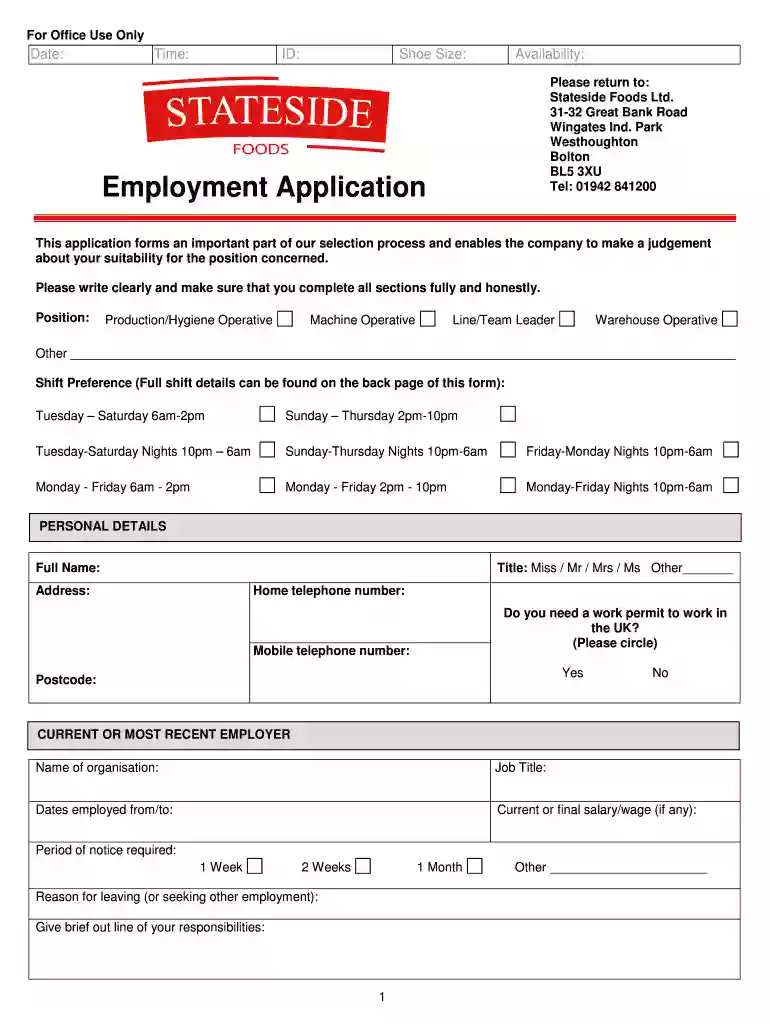
Stateside foods application form 2026

Get Form
stateside foods reviews Preview on Page 1

Here's how it works

01. Edit your stateside foods reviews online
Type text, add images, blackout confidential details, add comments, highlights and more.

02. Sign it in a few clicks
Draw your signature, type it, upload its image, or use your mobile device as a signature pad.

03. Share your form with others
Send it via email, link, or fax. You can also download it, export it or print it out.

How to use or fill out stateside foods application form with our platform

Form edit decoration
9.5
Ease of Setup
DocHub User Ratings on G2
9.0
Ease of Use
DocHub User Ratings on G2
  1. Click ‘Get Form’ to open the stateside foods application form in the editor.
  2. Begin by filling in your personal details, including your full name, title, address, and contact numbers. Ensure all information is accurate and clearly written.
  3. Select the position you are applying for from the options provided. If applicable, indicate your shift preference based on the available schedules listed.
  4. In the 'Current or Most Recent Employer' section, provide details about your last job, including organization name, job title, employment dates, salary, and reason for leaving.
  5. Complete the 'Previous Employment' section by listing all relevant past jobs along with their details.
  6. Fill out the 'Education, Training, and Professional Qualifications' section with your academic history and qualifications.
  7. Answer questions related to equal opportunities and diversity honestly to help monitor compliance with company policies.
  8. Provide information regarding any special requirements you may have for interviews or job performance under the Disability Discrimination Act.
  9. List at least two referees in the designated section along with their contact information.
  10. Finally, review all entries for accuracy before signing and dating the declaration at the end of the form.

Start using our platform today to complete your stateside foods application form easily and for free!

be ready to get more

Complete this form in 5 minutes or less

Get form

Got questions?

We have answers to the most popular questions from our customers. If you can't find an answer to your question, please contact us.
Contact us

A lot of software applications are available on the market for document editing and signing. DocHub is one of the most widely used online solutions that comply with all security and compliance standards and ensures your electronically signed documentation is legally enforceable. All you need to give it a try is to create an account, add your stateside foods application form, fill out the necessary information, and click Sign. Generate your eSignature by typing, drawing it, uploading its image to your form, or scanning a unique QR code.

If you edit your stateside foods application form with DocHub, you simply will not need to look for other applications or services to sign it. An electronic signature is part of DocHub’s extensive editing toolset, which enables you to apply changes in your form without jumping between platforms. Simply complete your form, double-check the correctness of the information and put your electronic signature at the end to make it submission-ready within minutes.

What We Do? To put it very simply, we make pizza. From snack sized 6 inch pizzas to 12inch wood-fired premium products, we cover the entire range of own label chilled pizzas.
Richelieu Foodss revenue is $240.0 million. Richelieu Foods peak revenue was $240.0M in 2022.
How much revenue does STATESIDE FOODS LIMITED make? Based on the latest financial accounts submitted on 2021-02-28, the company made 148M for 2021, which went down by -7.71%.

People also ask

Stateside Foods is a wholly owned subsidiary of the Freiberger Group. In business for over 30 years, we supply leading food retailers with branded and own label chilled pizzas.

Related links