01. Edit your quinnipiac unofficial transcript online
Type text, add images, blackout confidential details, add comments, highlights and more.
02. Sign it in a few clicks
Draw your signature, type it, upload its image, or use your mobile device as a signature pad.
03. Share your form with others
Send quinnipiac transcript request via email, link, or fax. You can also download it, export it or print it out.
How to use or fill out transcripts quinnipiac with our platform
Ease of Setup
DocHub User Ratings on G2
Ease of Use
DocHub User Ratings on G2
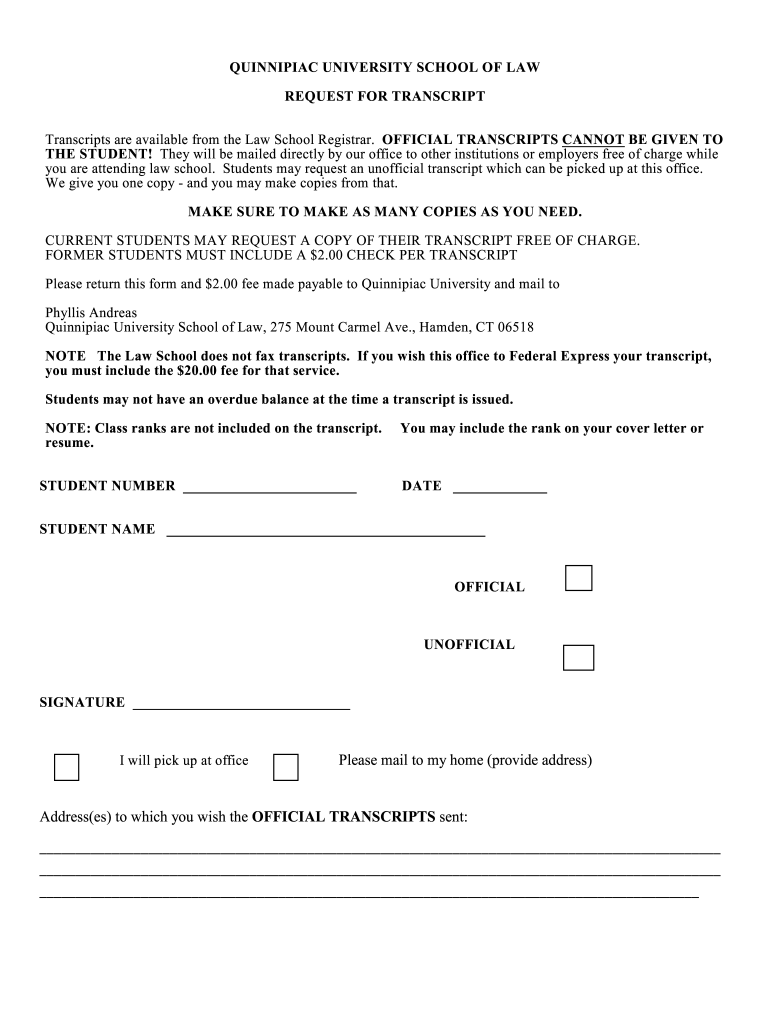
Click ‘Get Form’ to open the transcripts quinnipiac in the editor.
Begin by entering your Student Number and Date at the top of the form. This information is essential for processing your request.
Fill in your full name in the designated field, ensuring it matches your official records for accurate identification.
Select whether you are requesting an Official or Unofficial transcript by checking the appropriate box.
If you wish to pick up your transcript at the office, check that option. Otherwise, provide the address where you want the Official Transcripts mailed.
Sign the form to authorize the release of your transcript. Ensure that all fields are completed before submission.
If applicable, include a $2.00 check for former students or a $20.00 fee if you require Federal Express delivery.
Start using our platform today to easily fill out and manage your transcripts quinnipiac!
How to get transcripts quinnipiacMyQ QuinnipiacParchment QuinnipiacQuinnipiac transcript requestRegistrar QuinnipiacSelf service QuinnipiacQuinnipiac Registrar phone numberSouthern Connecticut State University transcript request
Security and compliance
At DocHub, your data security is our priority. We follow HIPAA, SOC2, GDPR, and other standards, so you can work on your documents with confidence.
Oct 1, 2024 Quinnipiac University has authorized Parchment to provide electronic transcript ordering. Transcripts can be ordered using your credit card.Read more
Cookie consent notice
This site uses cookies to enhance site navigation and personalize your experience.
By using this site you agree to our use of cookies as described in our Privacy Notice.
You can modify your selections by visiting our Cookie and Advertising Notice.