Gps 0179627 form 2026

Get Form
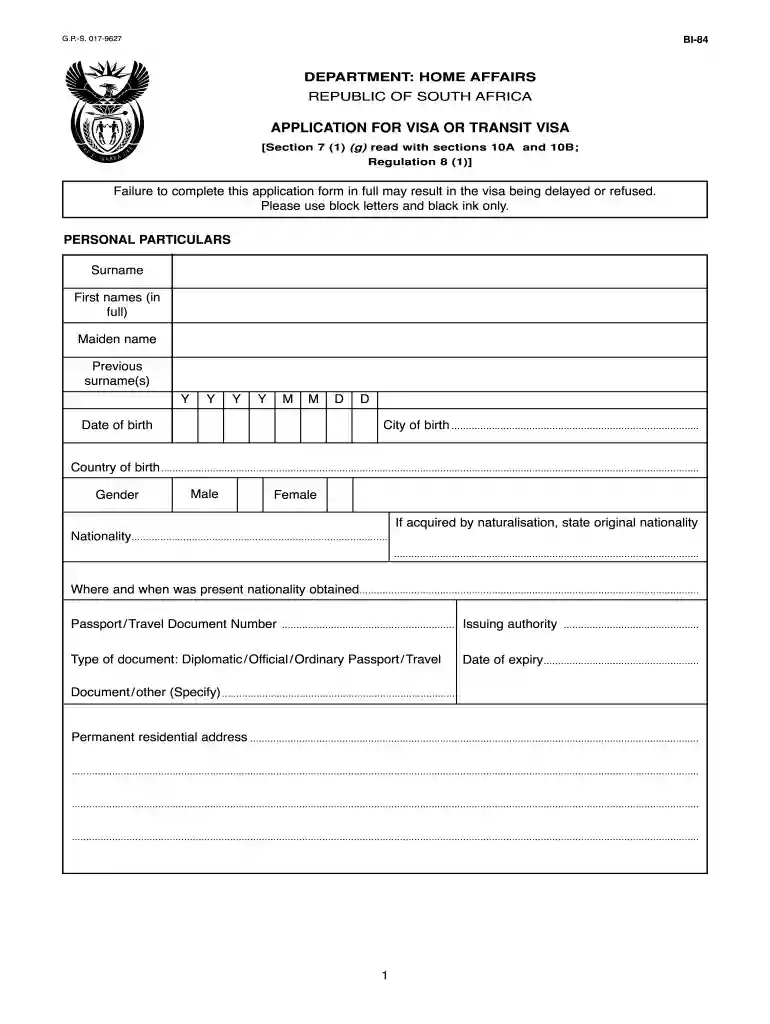
gps 0179627 form Preview on Page 1

Here's how it works

01. Edit your form online
Type text, add images, blackout confidential details, add comments, highlights and more.

02. Sign it in a few clicks
Draw your signature, type it, upload its image, or use your mobile device as a signature pad.

03. Share your form with others
Send it via email, link, or fax. You can also download it, export it or print it out.

How to use or fill out gps 0179627 form with our platform

Form edit decoration
9.5
Ease of Setup
DocHub User Ratings on G2
9.0
Ease of Use
DocHub User Ratings on G2
  1. Click ‘Get Form’ to open the gps 0179627 form in the editor.
  2. Begin by filling out your personal particulars. Use block letters and black ink only. Enter your surname, first names, maiden name, and previous surnames as applicable.
  3. Provide your date of birth, city and country of birth, and gender. If you acquired your nationality through naturalization, include your original nationality.
  4. Fill in your passport or travel document number along with the type of document (Diplomatic, Official, Ordinary). Ensure to note the issuing authority and expiry date.
  5. Complete your permanent residential address and telephone number. Indicate how long you have resided at this address.
  6. Specify your occupation or profession and provide details about your employer or educational institution.
  7. Indicate marital status and provide information about any accompanying children if applicable.
  8. Detail the purpose of your visit to South Africa, including expected arrival date, duration of stay, and proposed residential address during your visit.
  9. Answer all relevant questions regarding previous visa applications or legal issues honestly before signing the declaration at the end of the form.

Start using our platform today for free to streamline filling out the gps 0179627 form!

be ready to get more

Complete this form in 5 minutes or less

Get form

Got questions?

We have answers to the most popular questions from our customers. If you can't find an answer to your question, please contact us.
Contact us

Sure, and it’s really easy! DocHub is a web-based PDF editor with advanced document management capabilities that allow you quickly modify your forms, fill out empty fields and insert new ones for other people to fill out, and create eSignatures in several ways. Upload your gps 0179627 form, provide information as required, and choose how you want to eSign your document - by typing your name, drawing your signature, uploading its picture, or utilizing a QR code.

You can easily edit and complete your gps 0179627 form on any iOS device. Open an internet browser of your choice, go to the DocHub site, authorize or create a new account, upload your file for editing, and make your desired changes. Our service is mobile-friendly, so utilizing its features on your smartphone will be a no-brainer, even on the first try.

Security and compliance

At DocHub, your data security is our priority. We follow HIPAA, SOC2, GDPR, and other standards, so you can work on your documents with confidence.

Learn more
ccpa2
pci-dss
gdpr-compliance
hipaa
soc-compliance
be ready to get more

Complete this form in 5 minutes or less

Get form