




01. Edit your ac form 8050 1 online
Type text, add images, blackout confidential details, add comments, highlights and more.

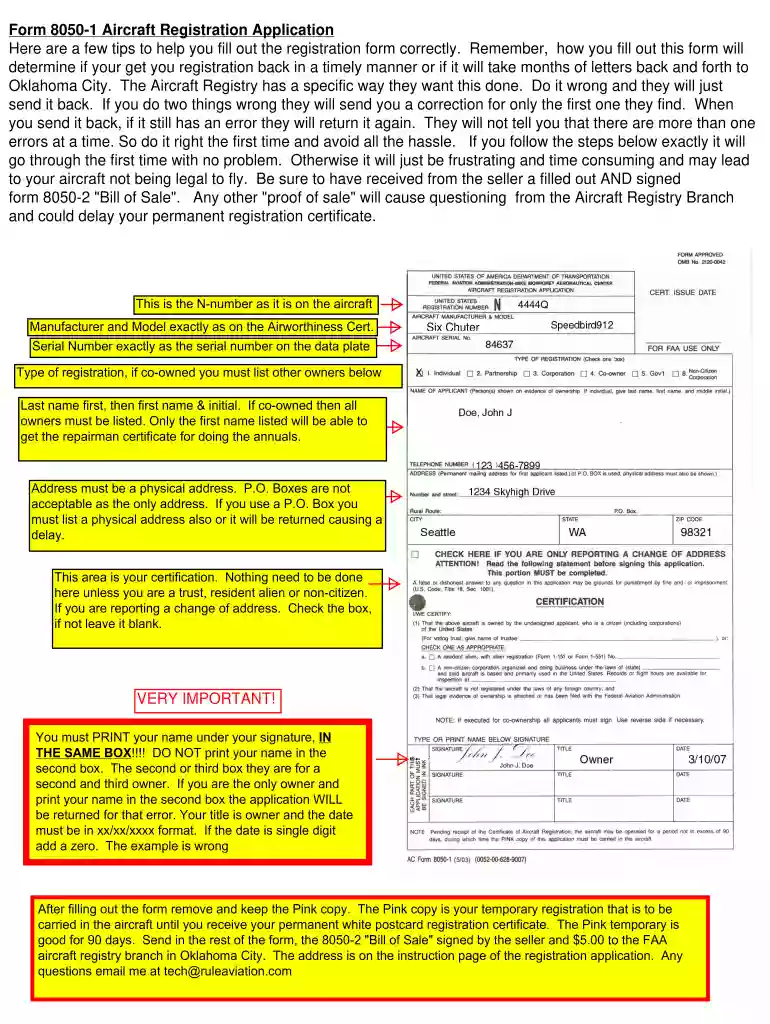
Type text, add images, blackout confidential details, add comments, highlights and more.

Draw your signature, type it, upload its image, or use your mobile device as a signature pad.

Send 8050 1 via email, link, or fax. You can also download it, export it or print it out.

Start filling out your ac form 8050 1 today using our platform for free!
At DocHub, your data security is our priority. We follow HIPAA, SOC2, GDPR, and other standards, so you can work on your documents with confidence.
Except as provided in 47.33 and 47.35, each person that submits an Aircraft Registration Application, AC Form 8050-1 under this part must also submit theRead more
The installer should be guided by the instructions furnished with the boiler, and by local codes and utility company requirements. In the absence of local codesRead more
Form AC 8050-1 - Aircraft Registration Application. Print. Document Information. Prescribing policy: FAR Part 47 - Aircraft Registration.Read more


