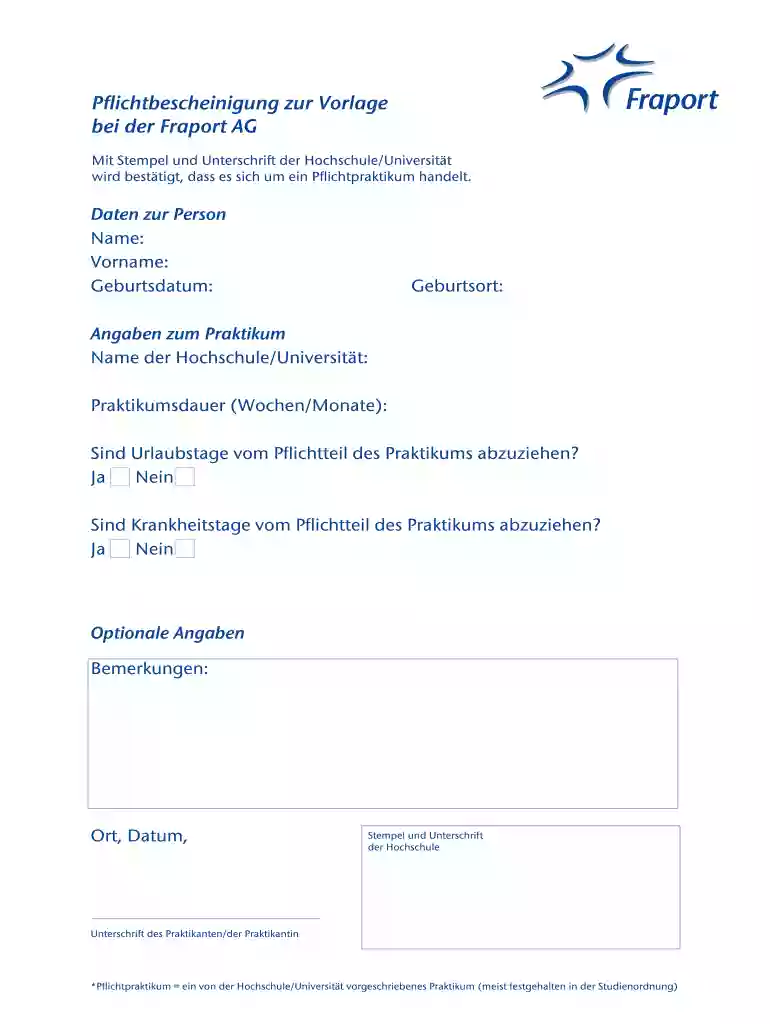
pflichtbescheinigung Preview on Page 1

Pflichtbescheinigung 2026

Here's how it works

  • 01. Edit your form online

    Type text, add images, blackout confidential details, add comments, highlights and more.

  • 02. Sign it in a few clicks

    Draw your signature, type it, upload its image, or use your mobile device as a signature pad.

  • 03. Share your form with others

    Send it via email, link, or fax. You can also download it, export it or print it out.

How to use or fill out pflichtbescheinigung with our platform

Form edit decoration
9.5
Ease of Setup
DocHub User Ratings on G2
9.0
Ease of Use
DocHub User Ratings on G2
  1. Click ‘Get Form’ to open the pflichtbescheinigung in the editor.
  2. Begin by entering your personal data. Fill in your 'Name', 'Vorname' (first name), 'Geburtsdatum' (date of birth), and 'Geburtsort' (place of birth) in the designated fields.
  3. Next, provide details about your internship. Enter the name of your university or college in the 'Name der Hochschule/Universität' field and specify the duration of your internship in weeks or months under 'Praktikumsdauer (Wochen/Monate)'.
  4. Indicate whether vacation days should be deducted from the mandatory part of the internship by selecting either 'Ja' (Yes) or 'Nein' (No). Repeat this for illness days as well.
  5. If you have any additional comments, enter them in the 'Bemerkungen' section. Finally, ensure to fill in the date and location before signing.
  6. Obtain a stamp and signature from your university to validate the document, followed by your own signature as an intern.

Start using our platform today to easily complete your pflichtbescheinigung online for free!

be ready to get more

Complete this form in 5 minutes or less

Got questions?

We have answers to the most popular questions from our customers. If you can't find an answer to your question, please contact us.

eSignatures are a great replacement for traditional signing, as they save time, effort, and money people spend on printing, scanning, and paper delivery. You can eSign your pflichtbescheinigung utilizing a trustworthy and powerful online document processing services like DocHub. It complies with major eSignature standards (ESIGN and UETA), so all forms approved there are legally binding and have the same validity as manually signed ones.

You may get and modify your pflichtbescheinigung online with the help of DocHub. Its simple but feature-rich design enables you to begin productive work right after you register your account. Create your profile and add your file, then our user interface will guide you through our stress-free form completion experience.

Security and compliance

At DocHub, your data security is our priority. We follow HIPAA, SOC2, GDPR, and other standards, so you can work on your documents with confidence.

Related links

Berufspraktikum, Vorgehensweise zur Anerkennung (WiIng

Oct 1, 2025 Das Pflichtpraktikum ist Zulassungsvoraussetzung zur letzten Prfung im Studium (idR. die Abschlussarbeit). Ein einmal abgeleistetes Praktikum,Read more

Learn more
If you believe that this page should be taken down, please follow our DMCA take down process here