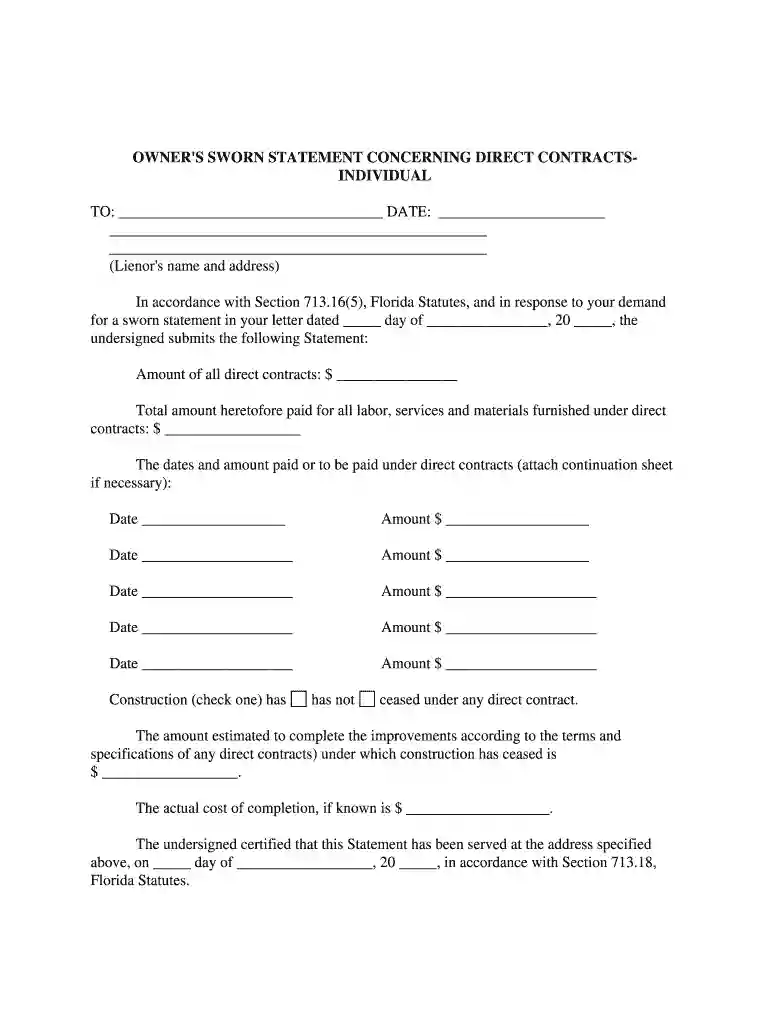
sworn statement of account template Preview on Page 1

Sworn statement of account template 2026

Here's how it works

  • 01. Edit your sworn statement of account template online

    Type text, add images, blackout confidential details, add comments, highlights and more.

  • 02. Sign it in a few clicks

    Draw your signature, type it, upload its image, or use your mobile device as a signature pad.

  • 03. Share your form with others

    Send sworn statement of account via email, link, or fax. You can also download it, export it or print it out.

How to use or fill out sworn statement of account template with our platform

Form edit decoration
9.5
Ease of Setup
DocHub User Ratings on G2
9.0
Ease of Use
DocHub User Ratings on G2
  1. Click ‘Get Form’ to open the sworn statement of account template in the editor.
  2. Begin by entering the lienor's name and address at the top of the form, ensuring accuracy for proper communication.
  3. Fill in the date of your response to the demand letter, which is crucial for record-keeping.
  4. In the section for direct contracts, input the total amount of all direct contracts and any payments made for labor, services, and materials.
  5. List each payment made under direct contracts by entering the date and corresponding amount. If necessary, attach a continuation sheet for additional entries.
  6. Indicate whether construction has ceased under any direct contract by checking the appropriate box.
  7. Provide estimates for completion costs if applicable, filling in both estimated and actual costs where known.
  8. Sign and print your name at the bottom of the form. Ensure you have a notary public witness your signature as required.
  9. Complete the Certificate of Service section to confirm delivery of this statement to the lienor.

Start using our platform today to easily fill out your sworn statement of account template online for free!

be ready to get more

Complete this form in 5 minutes or less

Security and compliance

At DocHub, your data security is our priority. We follow HIPAA, SOC2, GDPR, and other standards, so you can work on your documents with confidence.

sworn statement

BANK AFFIDAVIT FORM

Use this form as evidence of funds to support your expenses at UTEP and submit/upload with the Confirmation of Financial. Resources (CFR).Read more

Learn more
451. F: Sworn Statement of MovantForm DOJ-466

RFPA. Form DOJ-466 -- Sworn Statement of Movant. IN THE UNITED STATES DISTRICT COURT. FOR THE. DISTRICT OF. (Name of District) (StateRead more

Learn more
Characterization, Modeling, Monitoring, and Remediation

This activity was supported by the U.S. Nuclear Regulatory Commission (USNRC) under Grant. No. NRC-04-09-167, the U.S. Department of Energy (NOE) underRead more

Learn more
If you believe that this page should be taken down, please follow our DMCA take down process here