Type text, add images, blackout confidential details, add comments, highlights and more.
02. Sign it in a few clicks
Draw your signature, type it, upload its image, or use your mobile device as a signature pad.
03. Share your form with others
Send even trade bill of sale template via email, link, or fax. You can also download it, export it or print it out.
How to use or fill out even trade bill of sale with our platform
Ease of Setup
DocHub User Ratings on G2
Ease of Use
DocHub User Ratings on G2
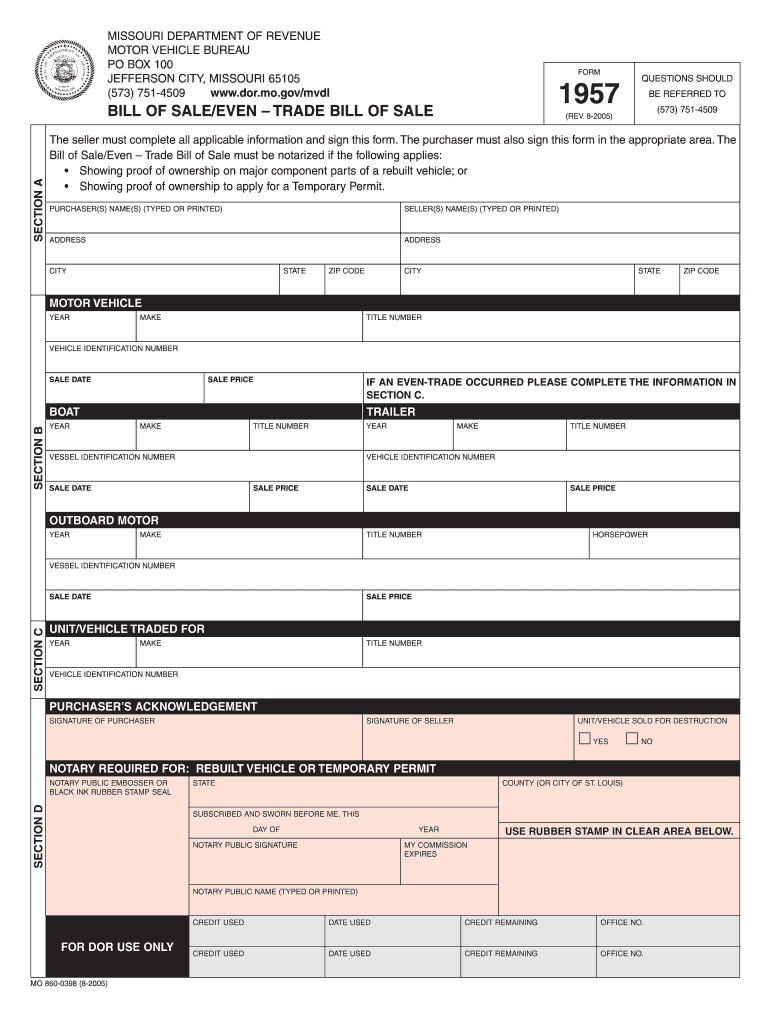
Click ‘Get Form’ to open the even trade bill of sale in the editor.
Begin by entering the purchaser's name(s) and address in the designated fields. Ensure that all information is typed or printed clearly.
Next, fill in the seller's name(s) and address using the same method as above. This section is crucial for identifying both parties involved in the transaction.
Proceed to Section A where you will input details about the motor vehicle, including year, make, title number, and vehicle identification number (VIN).
If an even trade occurred, complete Section C with details about the unit/vehicle traded for, including its year, make, title number, and VIN.
Both parties must sign in their respective areas to validate the document. If applicable, ensure notarization is completed as per requirements stated.
Start using our platform today to easily fill out your even trade bill of sale for free!
Even trade bill of sale templateEven trade bill of sale pdfEven trade bill of sale template freeEven trade bill of sale texasBill of TradeMissouri Even Trade Bill of SaleBill of trade templateBill of Trade for vehicle
Security and compliance
At DocHub, your data security is our priority. We follow HIPAA, SOC2, GDPR, and other standards, so you can work on your documents with confidence.
This research was funded by the Environmental Security Technology Certification Program. (ESTCP). This research was performed by Elisabeth L. Hawley, P.E.;Read more
Cookie consent notice
This site uses cookies to enhance site navigation and personalize your experience.
By using this site you agree to our use of cookies as described in our Privacy Notice.
You can modify your selections by visiting our Cookie and Advertising Notice.