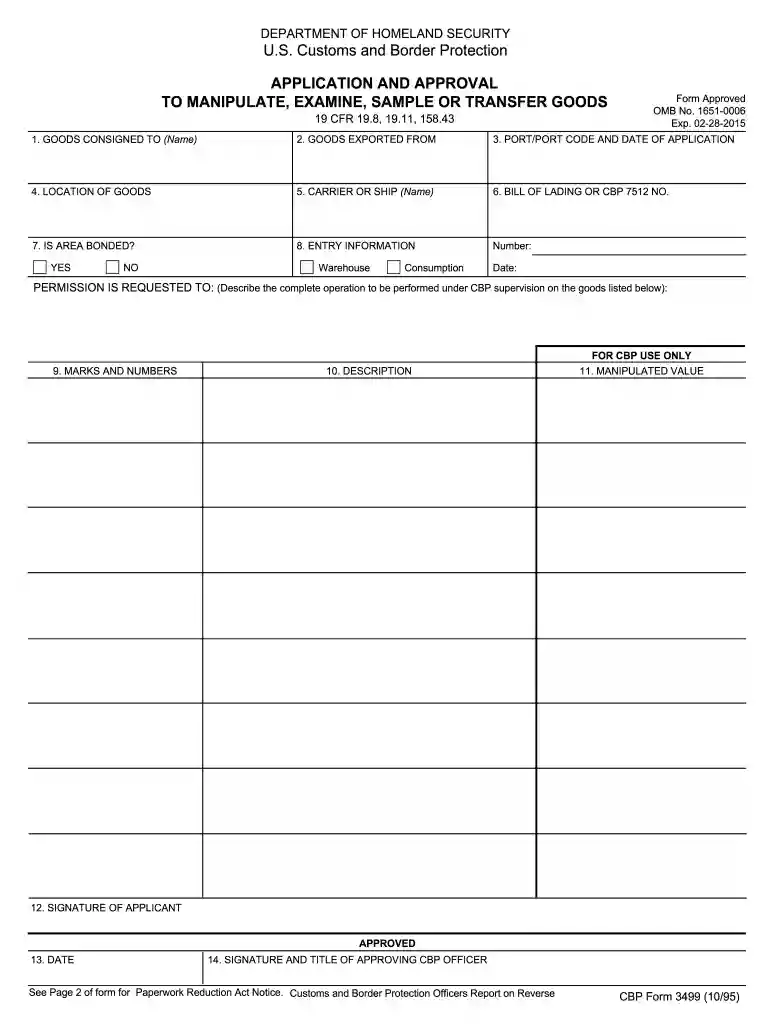
cf3499 Preview on Page 1

Cf3499 2026

Here's how it works

  • 01. Edit your cf3499 online

    Type text, add images, blackout confidential details, add comments, highlights and more.

  • 02. Sign it in a few clicks

    Draw your signature, type it, upload its image, or use your mobile device as a signature pad.

  • 03. Share your form with others

    Send cf 3499 via email, link, or fax. You can also download it, export it or print it out.

How to use or fill out cf3499 with our platform

Form edit decoration
9.5
Ease of Setup
DocHub User Ratings on G2
9.0
Ease of Use
DocHub User Ratings on G2
  1. Click ‘Get Form’ to open the cf3499 in the editor.
  2. Begin by filling in the 'GOODS CONSIGNED TO' field with the name of the recipient. This is crucial for identifying who will receive the goods.
  3. Next, enter the 'GOODS EXPORTED FROM' location. This specifies where the goods are being shipped from, ensuring proper tracking.
  4. In the 'PORT/PORT CODE AND DATE OF APPLICATION' section, provide the relevant port information and date of your application to facilitate processing.
  5. Fill in the 'LOCATION OF GOODS' to indicate where they are currently stored before manipulation.
  6. Complete the 'CARRIER OR SHIP (Name)' field with details about the transport method for your goods.
  7. Input your 'BILL OF LADING OR CBP 7512 NO.' which is essential for tracking and documentation purposes.
  8. Indicate whether the area is bonded by selecting YES or NO, and provide any necessary entry information including number and date.
  9. Describe in detail your request for permission to manipulate, examine, sample, or transfer goods under CBP supervision in the designated section.
  10. Finally, sign as the applicant and include your date of signature. Ensure all fields are completed accurately before submission.

Start using our platform today to fill out cf3499 easily and efficiently!

be ready to get more

Complete this form in 5 minutes or less

Security and compliance

At DocHub, your data security is our priority. We follow HIPAA, SOC2, GDPR, and other standards, so you can work on your documents with confidence.

cbp form 3499 instructions

19 CFR 19.11 - Manipulation in bonded warehouses and

The port director may approve a blanket application to manipulate on Customs Form 3499, for a period of up to one year, for a continuous or a repetitiveRead more

Learn more
CBP Form 3499 - Application and Approval to Manipulate,

Jul 8, 2025 Application and Approval to Manipulate, Examine, Sample, or Transfer Goods.

Learn more
If you believe that this page should be taken down, please follow our DMCA take down process here