Type text, add images, blackout confidential details, add comments, highlights and more.
02. Sign it in a few clicks
Draw your signature, type it, upload its image, or use your mobile device as a signature pad.
03. Share your form with others
Send land appraisal via email, link, or fax. You can also download it, export it or print it out.
How to use or fill out land appraisal form with our platform
Ease of Setup
DocHub User Ratings on G2
Ease of Use
DocHub User Ratings on G2
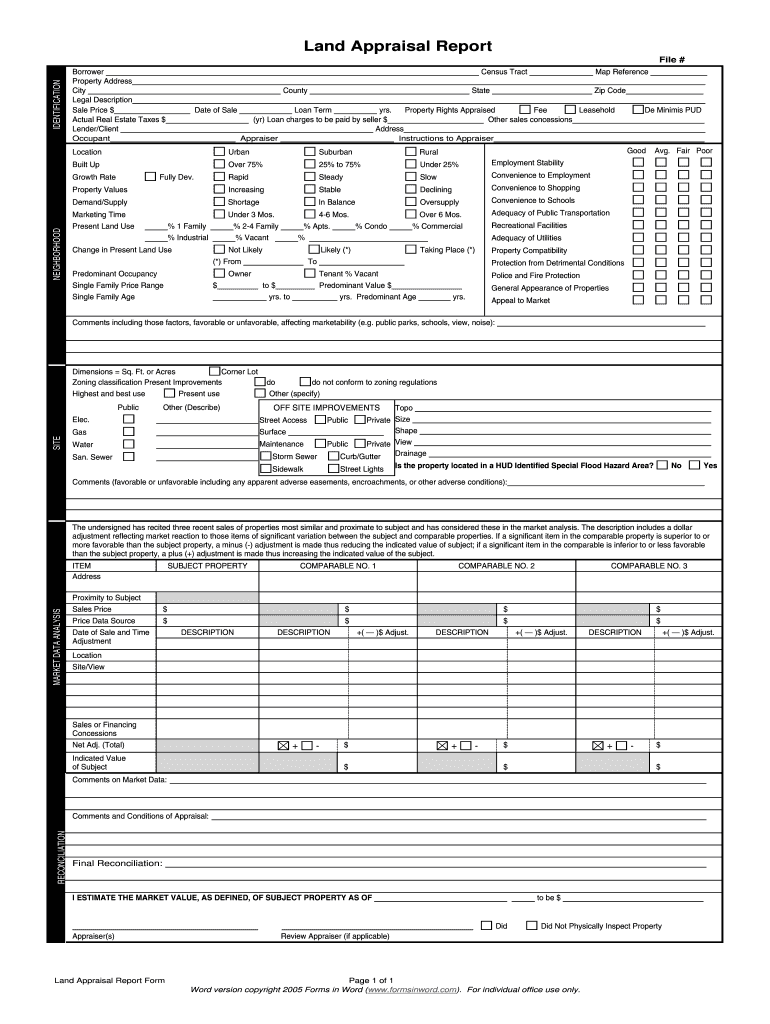
Click ‘Get Form’ to open the land appraisal form in the editor.
Begin by filling in the identification section. Enter the File Number, Borrower’s name, Property Address, City, and Zip Code. Ensure accuracy as this information is crucial for processing.
Next, complete the Sale Price and Actual Real Estate Taxes fields. This financial data is essential for evaluating property value.
In the Neighborhood section, assess factors like Employment Stability and Convenience to Shopping. Use dropdowns or checkboxes to indicate conditions such as 'Good', 'Average', or 'Poor'.
Proceed to the Site section where you will describe Present Improvements and Highest and Best Use of the property. Be detailed in your descriptions for clarity.
Finally, review all entries for accuracy before saving or sharing your completed form. Utilize our platform's features to sign and distribute your document seamlessly.
Start using our platform today to simplify your land appraisal process for free!
Land appraisal form pdfFree land appraisal formLand appraisal Form numberLand appraisal form onlineVacant land appraisal formLand appraisal report sampleFannie Mae land appraisal formNew URAR appraisal form pdf
Security and compliance
At DocHub, your data security is our priority. We follow HIPAA, SOC2, GDPR, and other standards, so you can work on your documents with confidence.
Land Valuation Methodology. Land Valuation is generally a component of the Cost Approach in appraisal of an improved property. In most appraisal analysesRead more
Property Rights Acquisition and Mitigation Plan v.4
Upon review and approval of the Appraisal, the Land Agent shall present the Appraisal to the Property Owner for review. b. Property Owner will have anRead more
Cookie consent notice
This site uses cookies to enhance site navigation and personalize your experience.
By using this site you agree to our use of cookies as described in our Privacy Notice.
You can modify your selections by visiting our Cookie and Advertising Notice.