Type text, add images, blackout confidential details, add comments, highlights and more.
02. Sign it in a few clicks
Draw your signature, type it, upload its image, or use your mobile device as a signature pad.
03. Share your form with others
Send rvcc graduation application via email, link, or fax. You can also download it, export it or print it out.
How to use or fill out rvcc graduation 2021 with our platform
Ease of Setup
DocHub User Ratings on G2
Ease of Use
DocHub User Ratings on G2
Click ‘Get Form’ to open the rvcc graduation 2021 application in the editor.
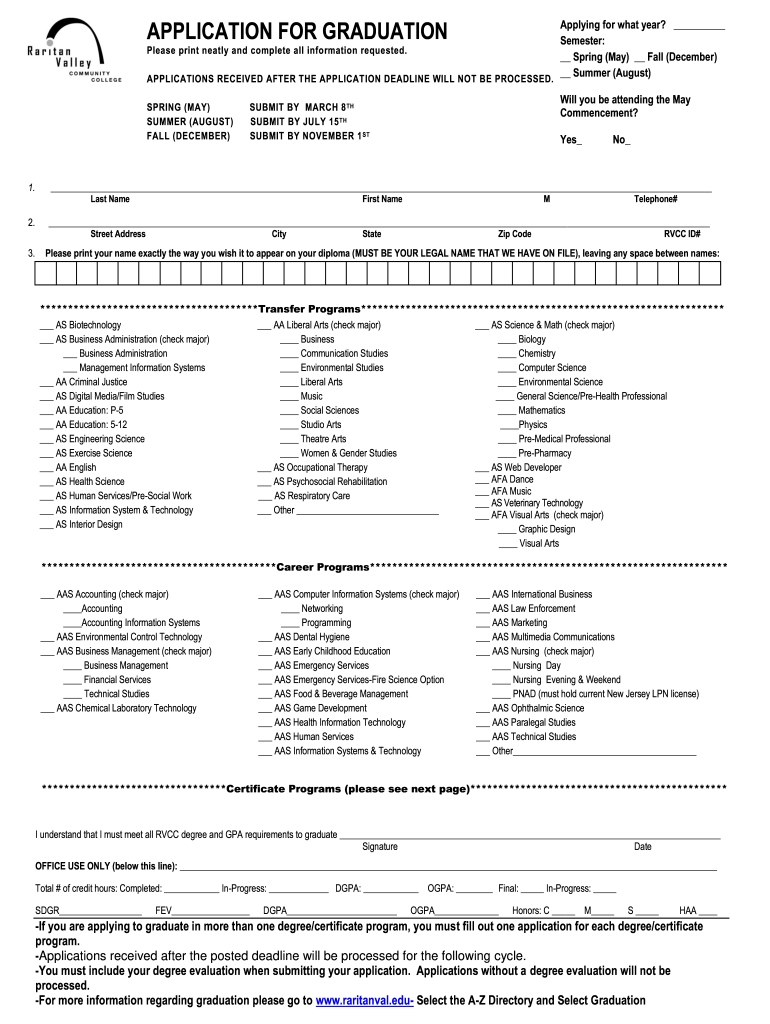
Begin by selecting the year you are applying for and the semester (Spring, Summer, or Fall). Ensure you print neatly and complete all requested information.
Indicate whether you will attend the May Commencement by checking 'Yes' or 'No'.
Fill in your personal details including Last Name, First Name, Street Address, City, State, Telephone Number, Zip Code, and RVCC ID Number.
Print your name exactly as it should appear on your diploma. This must be your legal name as per RVCC records.
Select your transfer program or career program by checking the appropriate boxes. If applicable, specify your major.
Review all sections for completeness and accuracy before submitting. Remember to include your degree evaluation with the application.
Start filling out your rvcc graduation application today for free using our platform!
Each institution can access previously released Data Feedback Reports from 2005 and customize this 2021 report by using a different comparison group and IPEDSRead more
Click here to watch the RVCC Virtual Commencement, Saturday, May 15, at 10AM Spring 2021 and Summer 2021 Graduates GPA at end of the Fall 2020 Semester.Read more
Cookie consent notice
This site uses cookies to enhance site navigation and personalize your experience.
By using this site you agree to our use of cookies as described in our Privacy Notice.
You can modify your selections by visiting our Cookie and Advertising Notice.