01. Edit your peoples gas heating disclosure online
Type text, add images, blackout confidential details, add comments, highlights and more.
02. Sign it in a few clicks
Draw your signature, type it, upload its image, or use your mobile device as a signature pad.
03. Share your form with others
Send peoples gas heat disclosure via email, link, or fax. You can also download it, export it or print it out.
How to use or fill out heating disclosure with our platform
Ease of Setup
DocHub User Ratings on G2
Ease of Use
DocHub User Ratings on G2
Click ‘Get Form’ to open the heating disclosure in the editor.
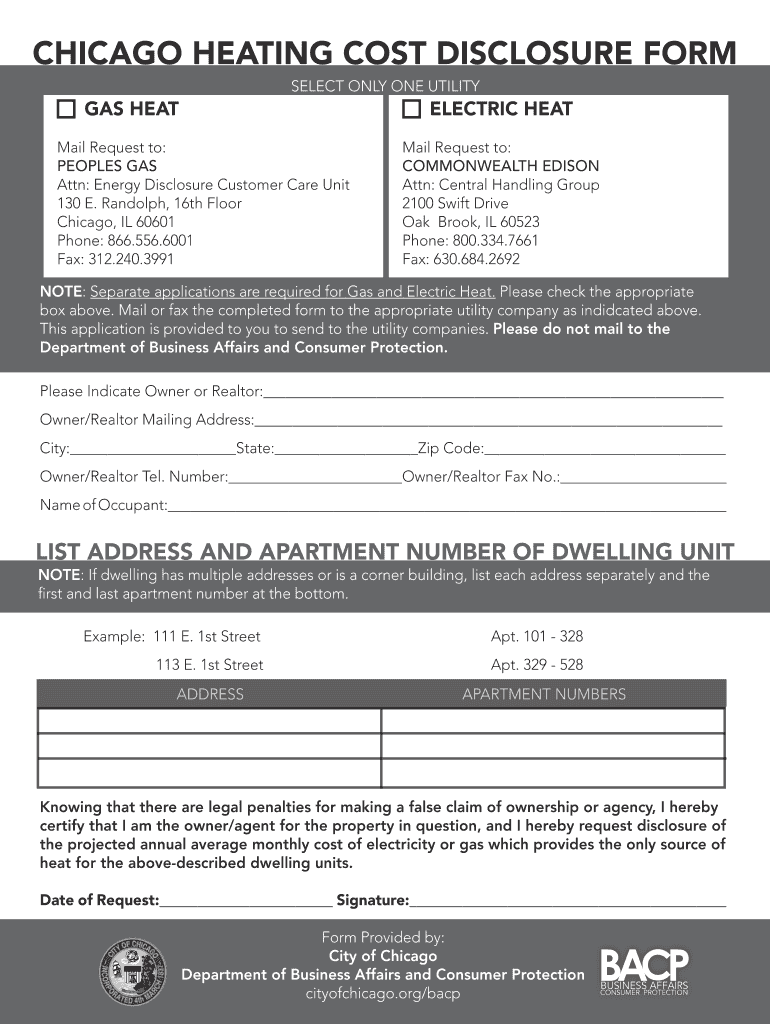
Select your utility type by checking either 'Gas Heat' or 'Electric Heat'. This is crucial as separate applications are required for each.
Fill in the Owner or Realtor's name and mailing address. Ensure all details, including city, state, and zip code, are accurate for proper communication.
Provide the Owner/Realtor's telephone and fax numbers. This information is essential for any follow-up regarding your request.
Enter the name of the occupant and list the address along with apartment numbers of the dwelling unit. If there are multiple addresses, list them separately as instructed.
Certify your ownership or agency status by signing and dating the form at the bottom. This step confirms your authority to request this disclosure.
Start using our platform today to complete your heating disclosure form online for free!
CHICAGO HEATING COST DISCLOSURE FORM. Separate applications are required for Gas and Electric Heat. Please check the appropriate box above. Mail or fax theRead more
02-039 C.M.R. ch. 410, 16 - Heating Disclosure | State
Such information and any other information pertinent to the heating system(s) and/or source(s) shall be conveyed, in writing, to a buyer prior to or during the
Cookie consent notice
This site uses cookies to enhance site navigation and personalize your experience.
By using this site you agree to our use of cookies as described in our Privacy Notice.
You can modify your selections by visiting our Cookie and Advertising Notice.