Type text, add images, blackout confidential details, add comments, highlights and more.
02. Sign it in a few clicks
Draw your signature, type it, upload its image, or use your mobile device as a signature pad.
03. Share your form with others
Send georgia amber light permit online via email, link, or fax. You can also download it, export it or print it out.
How to use or fill out Georgia Amber Light Permit with our platform
Ease of Setup
DocHub User Ratings on G2
Ease of Use
DocHub User Ratings on G2
Click ‘Get Form’ to open the Georgia Amber Light Permit in the editor.
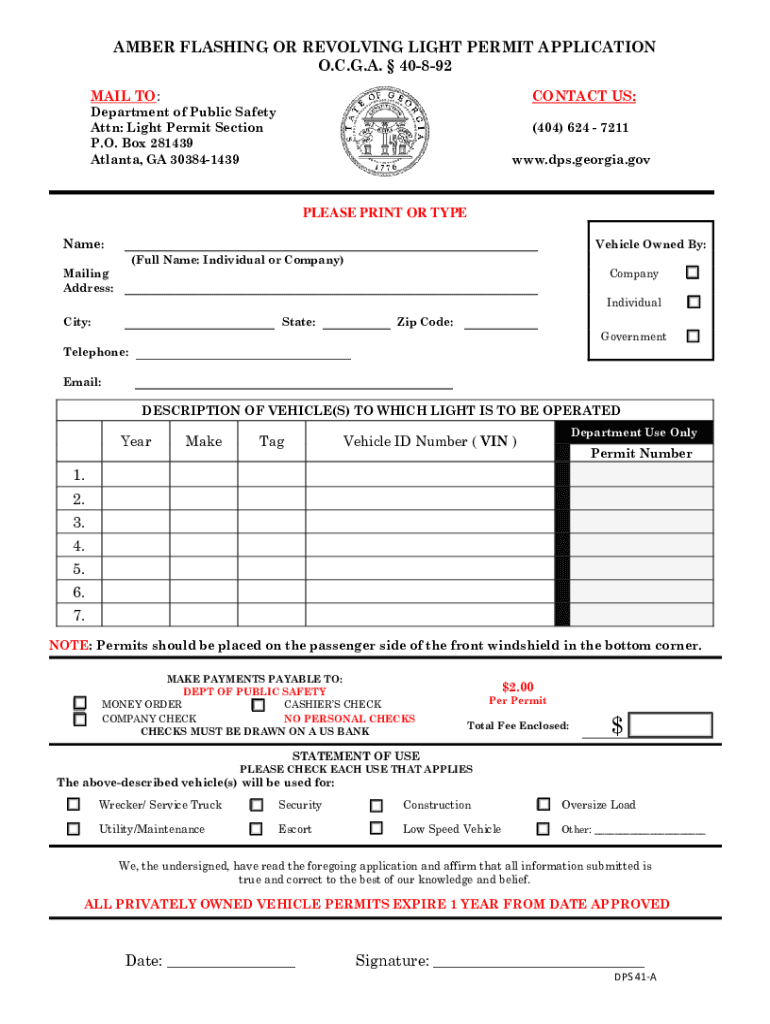
Begin by entering your full name and mailing address in the designated fields. Ensure that all information is typed clearly for accuracy.
Provide vehicle information, including year, make, tag number, and VIN for each vehicle. If you have multiple vehicles, number them accordingly.
Complete the statement of use section. If all vehicles serve the same purpose, one statement will suffice; otherwise, attach a detailed description for each vehicle.
Prepare your payment of $2.00 per vehicle using an acceptable form (money order, cashier’s check, or company check) and ensure it is made payable to the Department of Public Safety.
Sign and date the application at the bottom. Note that notarization is not required for amber light permits.
Finally, review all entries for completeness before submitting your application via mail to the specified address.
Start filling out your Georgia Amber Light Permit today on our platform for free!
Fill out georgia amber light permit online It's free
Georgia amber light permit onlineNevada amber Light permitGeorgia strobe light lawsWhat color lights are illegal on cars in GeorgiaGeorgia amber light lawGeorgia red light permitOcga amber lightsDo you need a permit for amber lights
Security and compliance
At DocHub, your data security is our priority. We follow HIPAA, SOC2, GDPR, and other standards, so you can work on your documents with confidence.
Vehicle Light Permit (Amber, Red, Blue) | Georgia Department
Effective July 1, 2024, House Bill 1193 directs that the State of Georgia will no longer require a permit for the use of amber flashing or revolving lights onRead more
Ga. Comp. R. Regs. R. 570-11-.13 - Governmental Agency
(1) The Commissioner of the Department of Public Safety at his discretion may issue a flashing or revolving amber light permit to a governmental agency on aRead more
Cookie consent notice
This site uses cookies to enhance site navigation and personalize your experience.
By using this site you agree to our use of cookies as described in our Privacy Notice.
You can modify your selections by visiting our Cookie and Advertising Notice.