Annual report green bay packers 2026

Get Form
green bay packers investor relations Preview on Page 1

Here's how it works

01. Edit your green bay packers investor relations online
Type text, add images, blackout confidential details, add comments, highlights and more.

02. Sign it in a few clicks
Draw your signature, type it, upload its image, or use your mobile device as a signature pad.

03. Share your form with others
Send packers annual report via email, link, or fax. You can also download it, export it or print it out.

How to use or fill out annual report green bay packers with our platform

Form edit decoration
9.5
Ease of Setup
DocHub User Ratings on G2
9.0
Ease of Use
DocHub User Ratings on G2
  1. Click ‘Get Form’ to open the annual report in the editor.
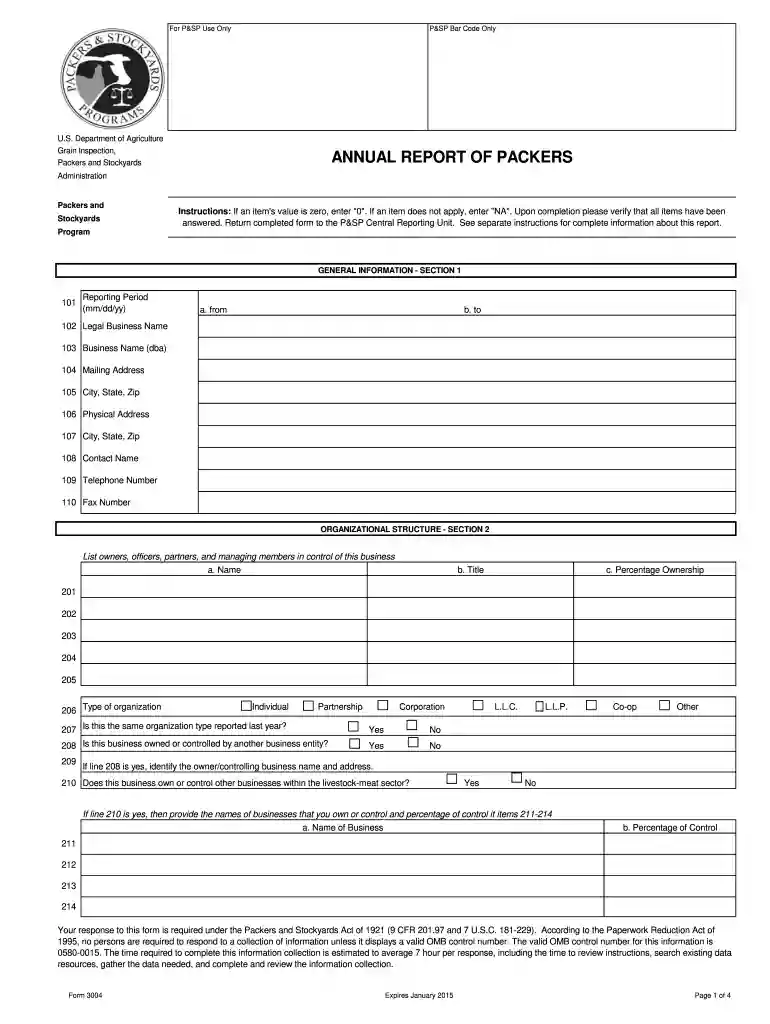
  2. Begin with Section 1: GENERAL INFORMATION. Fill in the reporting period by entering the start and end dates in mm/dd/yy format. Complete fields for your legal business name, business name (dba), mailing address, and contact information.
  3. Move to Section 2: ORGANIZATIONAL STRUCTURE. List all owners, officers, and partners along with their titles and percentage ownership. Indicate the type of organization and whether it has changed from last year.
  4. In Section 3: FINANCIAL INFORMATION, input values for livestock purchases and any collateral agreements. Ensure accuracy as this section is crucial for financial reporting.
  5. Proceed to Section 4: BALANCE SHEET. Enter current and long-term asset values, including cash, accounts receivable, and total liabilities.
  6. Complete Section 5: INCOME STATEMENT by detailing net sales, cost of sales, and operating expenses to calculate net profit or loss.
  7. Finally, certify your report in Section 7 by providing your signature, printed name, phone number, date, and title before submitting it back to the P&SP Central Reporting Unit.

Start using our platform today for free to streamline your document editing process!

be ready to get more

Complete this form in 5 minutes or less

Get form

Security and compliance

At DocHub, your data security is our priority. We follow HIPAA, SOC2, GDPR, and other standards, so you can work on your documents with confidence.

Learn more
ccpa2
pci-dss
gdpr-compliance
hipaa
soc-compliance