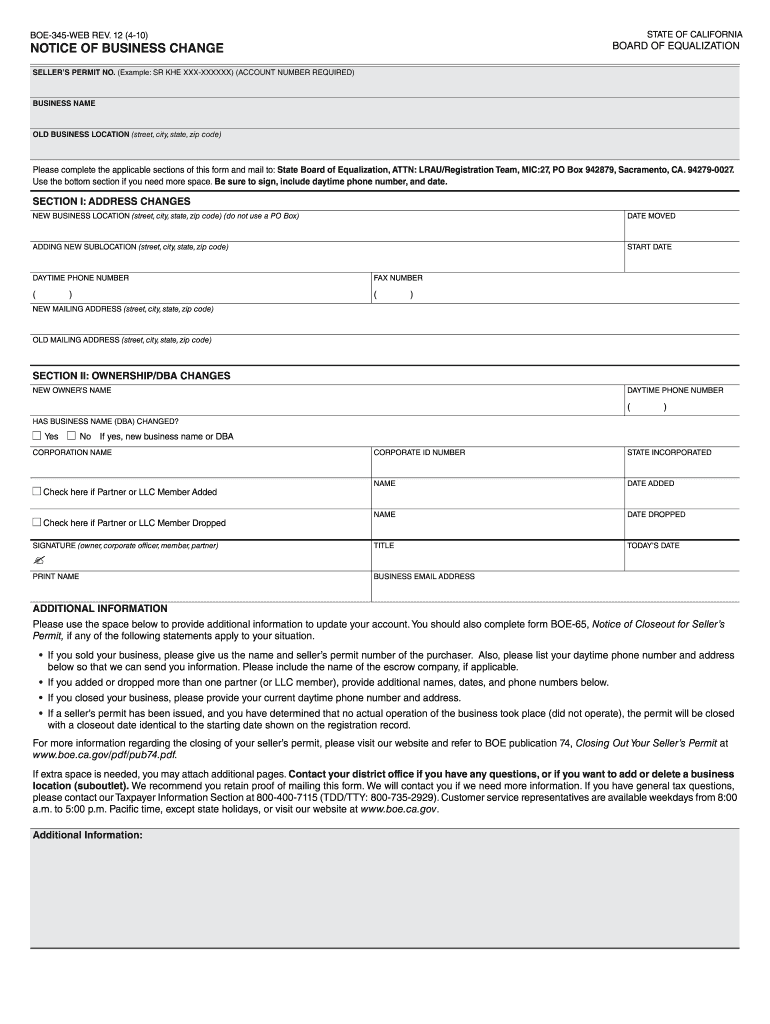
Boe 345 web rev 12 4 10 form 2026

Get Form
boe form Preview on Page 1

Here's how it works

01. Edit your boe form online
Type text, add images, blackout confidential details, add comments, highlights and more.
02. Sign it in a few clicks
Draw your signature, type it, upload its image, or use your mobile device as a signature pad.
03. Share your form with others
Send form 345 via email, link, or fax. You can also download it, export it or print it out.

How to use or fill out boe 345 web rev 12 4 10 form with our platform

Form edit decoration
9.5
Ease of Setup
DocHub User Ratings on G2
9.0
Ease of Use
DocHub User Ratings on G2
  1. Click ‘Get Form’ to open it in the editor.
  2. Begin by entering your Seller’s Permit Number at the top of the form. This is essential for identification.
  3. In Section I, provide your new business location details, including street, city, state, and zip code. Ensure you do not use a PO Box.
  4. Fill in the date you moved to the new location and any additional sublocation information if applicable.
  5. Complete your daytime phone number and fax number in the designated fields.
  6. In Section II, indicate if there has been a change in ownership or DBA (Doing Business As) name. If yes, provide the new owner’s name and business name.
  7. Sign and date the form at the bottom. Make sure to include your title and daytime phone number.
  8. If more space is needed for additional information, utilize the provided section or attach extra pages as necessary.

Start using our platform today to easily fill out your boe 345 web rev 12 4 10 form for free!

be ready to get more

Complete this form in 5 minutes or less

Get form

Got questions?

We have answers to the most popular questions from our customers. If you can't find an answer to your question, please contact us.
Contact us

Approving documents on a mobile device is fast, easy, and doesn’t require software installation if you have an account with DocHub. Sign in from any browser, fill in your blank fields with your data, and click on Sign → Create your signature. You can draw your eSignature the same way you usually do on paper, add its image to your boe 345 web rev 12 4 10 form, or type in your name and stylize its look. No matter what option you choose, your document will be valid.

If your go-to email service is Gmail, it is simple to integrate your DocHub editor in your work. Modify your boe 345 web rev 12 4 10 form with DocHub instruments and connect it to your drafts in Gmail. See how easy it can be to exchange papers and collaborate with a swift PDF editing solution at hand.

Security and compliance

At DocHub, your data security is our priority. We follow HIPAA, SOC2, GDPR, and other standards, so you can work on your documents with confidence.

Learn more
ccpa2
pci-dss
gdpr-compliance
hipaa
soc-compliance
be ready to get more

Complete this form in 5 minutes or less

Get form