Type text, add images, blackout confidential details, add comments, highlights and more.
02. Sign it in a few clicks
Draw your signature, type it, upload its image, or use your mobile device as a signature pad.
03. Share your form with others
Send civil pro se forms via email, link, or fax. You can also download it, export it or print it out.
How to Use or Fill Out Print Form Form 7: Summons and Attached Proof of Service
Ease of Setup
DocHub User Ratings on G2
Ease of Use
DocHub User Ratings on G2
Click ‘Get Form’ to open it in the editor.
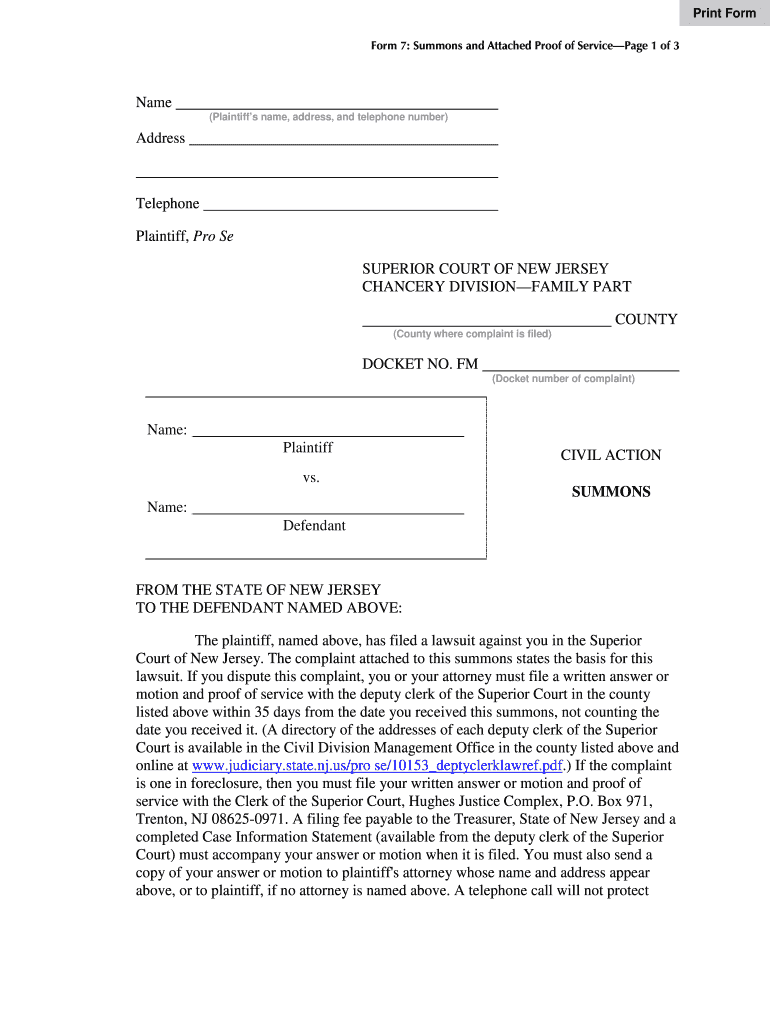
Begin by entering the plaintiff's name, address, and telephone number in the designated fields at the top of the form.
Fill in the county where you are filing the complaint, as well as the docket number associated with your case.
In the 'Defendant' section, provide the name and address of the defendant being served.
Complete the description fields for the defendant, including physical description and best time for service.
Leave the 'Court Officer’s Proof of Service/Return of Service' section blank; this will be filled out by a sheriff’s officer after service is completed.
Start using our platform today to fill out your forms online for free!
Fill out Print Form Form 7: Summons and Attached Proof of ServicePage 1 of 3 Name (Plaintiffs name, address, and telephone number) Address Telephone Plaintiff, Pro Se SUPERIOR COURT OF NEW JERSEY CHANCERY DIVISIONFAMILY PART COUNTY (County where online It's free
Summons form NJNj annulment Forms pdf free downloadNj summons lookupCertification OF insurance coverage NJ divorceCivil ACTION SUMMONS NJWho is the Clerk of the Superior Court of NJForm 1d complaint FOR divorceComplaint summons NJ
Security and compliance
At DocHub, your data security is our priority. We follow HIPAA, SOC2, GDPR, and other standards, so you can work on your documents with confidence.
Form 7: Summons and Attached Proof of Service—Page 1 of 3
Name. (Plaintiff's name, address, and telephone number). Address. Telephone. Plaintiff, Pro Se. SUPERIOR COURT OF NEW JERSEY. CHANCERY DIVISION—FAMILY PART.
Form 7: Summons and Attached Proof of Service—Page 1 of 3
Name. (Plaintiff's name, address, and telephone number). Address. Telephone. Plaintiff, Pro Se. SUPERIOR COURT OF NEW JERSEY. CHANCERY DIVISION—FAMILY PART.
Form 7: Summons and Attached Proof of Service—Page 1 of 3
Name. (Plaintiff's name, address, and telephone number). Address. Telephone. Plaintiff, Pro Se. SUPERIOR COURT OF NEW JERSEY. CHANCERY DIVISION—FAMILY PART.
Cookie consent notice
This site uses cookies to enhance site navigation and personalize your experience.
By using this site you agree to our use of cookies as described in our Privacy Notice.
You can modify your selections by visiting our Cookie and Advertising Notice.