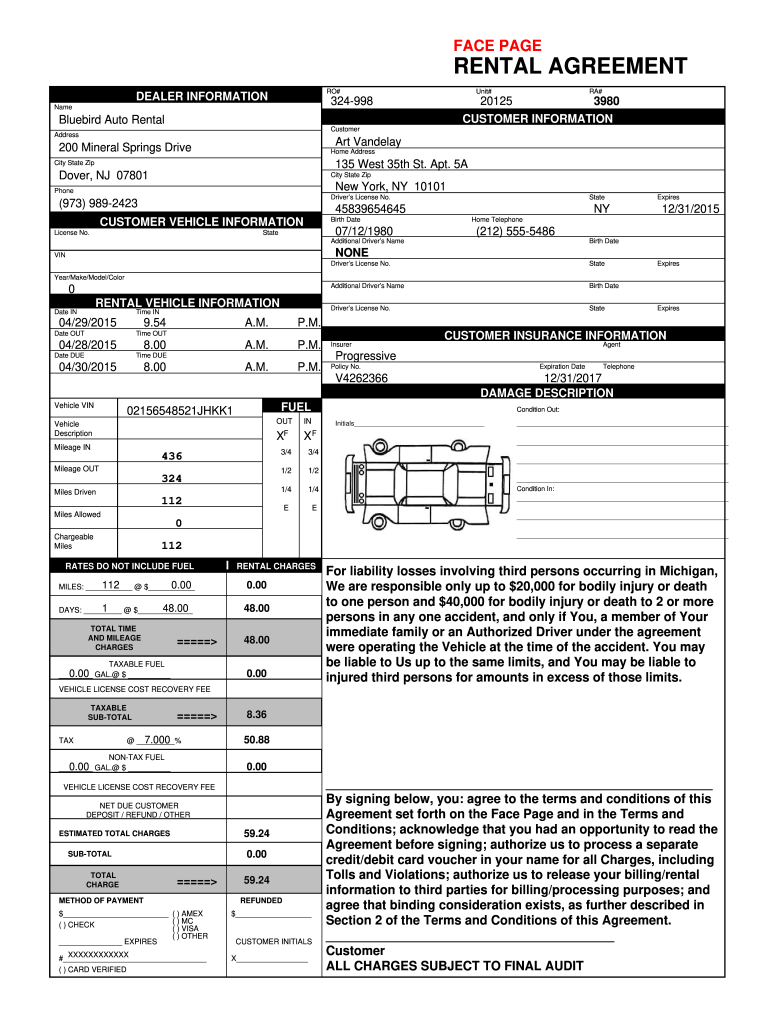
FACE PAGE RENTAL AGREEMENT - Bluebird Auto Rental Systems 2026

Get Form
FACE PAGE RENTAL AGREEMENT - Bluebird Auto Rental Systems Preview on Page 1

Here's how it works

01. Edit your form online
Type text, add images, blackout confidential details, add comments, highlights and more.
02. Sign it in a few clicks
Draw your signature, type it, upload its image, or use your mobile device as a signature pad.
03. Share your form with others
Send it via email, link, or fax. You can also download it, export it or print it out.

How to use or fill out FACE PAGE RENTAL AGREEMENT - Bluebird Auto Rental Systems

Form edit decoration
9.5
Ease of Setup
DocHub User Ratings on G2
9.0
Ease of Use
DocHub User Ratings on G2
  1. Click ‘Get Form’ to open it in the editor.
  2. Begin by entering the dealer information, including the unit number and your name. Ensure that you fill in the rental agreement number for accurate tracking.
  3. Next, provide your customer information. Fill in your full name, home address, city, state, zip code, and phone number. Don’t forget to include your driver’s license number and birth date.
  4. In the customer vehicle information section, input details such as the vehicle's license number and VIN. Make sure to check that all information is correct before proceeding.
  5. Fill out the rental vehicle information by specifying the dates and times for pick-up and drop-off. Include insurer details and policy numbers as required.
  6. Review the damage description section carefully. Note any existing damages on the vehicle before signing off on its condition.
  7. Finally, complete the payment method section by selecting your preferred payment option and signing at the bottom to agree to terms.

Start using our platform today to easily fill out your FACE PAGE RENTAL AGREEMENT!

be ready to get more

Complete this form in 5 minutes or less

Get form

Got questions?

We have answers to the most popular questions from our customers. If you can't find an answer to your question, please contact us.
Contact us

Of course, it is possible with DocHub. This trustworthy and compliant online service has a phone-based signing option. When you log in to your DocHub account and add your FACE PAGE RENTAL AGREEMENT - Bluebird Auto Rental Systems to our editor, complete all required fields and utilize the Sign feature on the upper barf. Click on Create your signature and select Phone from the available options. Here, you scan a QR code using your smartphone and draw your signature on your phone screen, as you usually do when approving hard copies. If you access DocHub right from your mobile device, you can eSign your form by drawing your eSignature, adding its image, or simply with a typed name.

You can easily edit fill out your FACE PAGE RENTAL AGREEMENT - Bluebird Auto Rental Systems on any iOS device. Open an internet browser of your liking, go to the DocHub site, authorize or create a new account, upload your file for editing, and make your desired changes. Our service is mobile-friendly, so utilizing its functions on your smartphone will be a no-brainer, even on the first try.

On the website Open your Trips tab. Find and open the trip. Scroll down to Vehicle documents and click on View car sharing agreement
Yes, you can write your own Residential Lease Agreement no need for a lawyer. However, whether youre a landlord or a tenant, you can always consult a lawyer to review your contract before signing.
How to write a car rental agreement? Include the vehicles identifying details, the rental period, cost and payment schedule, mileage restrictions, insurance terms, and the renters responsibilities for damage or maintenance. Make sure both parties sign the agreement to make it enforceable.

Security and compliance

At DocHub, your data security is our priority. We follow HIPAA, SOC2, GDPR, and other standards, so you can work on your documents with confidence.

Learn more
ccpa2
pci-dss
gdpr-compliance
hipaa
soc-compliance