Type text, add images, blackout confidential details, add comments, highlights and more.
02. Sign it in a few clicks
Draw your signature, type it, upload its image, or use your mobile device as a signature pad.
03. Share your form with others
Send dd1972 via email, link, or fax. You can also download it, export it or print it out.
How to use or fill out dd 1972 with our platform
Ease of Setup
DocHub User Ratings on G2
Ease of Use
DocHub User Ratings on G2
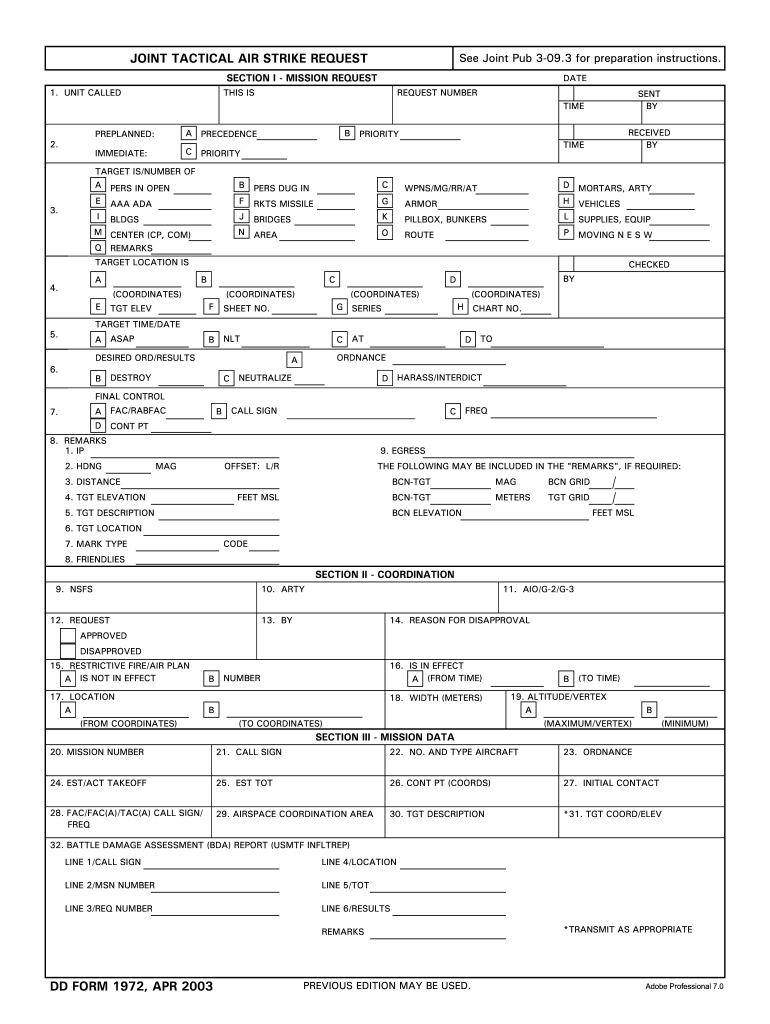
Click ‘Get Form’ to open the dd 1972 in the editor.
Begin with SECTION I - MISSION REQUEST. Fill in your UNIT CALLED and DATE. Indicate if this is a PREPLANNED request and select the appropriate PRIORITY level.
In the TARGET IS section, specify the type of target (e.g., personnel, vehicles) by checking the relevant boxes.
Provide precise coordinates for the TARGET LOCATION and ensure you check all necessary fields for accuracy.
Complete the DESIRED ORD/RESULTS section by selecting from options like DESTROY or NEUTRALIZE, and provide any additional remarks in SECTION I.
Move to SECTION II - COORDINATION. Fill out coordination details as required, including approvals and restrictive fire plans.
Finally, complete SECTION III - MISSION DATA with mission specifics such as CALL SIGN, NO. AND TYPE AIRCRAFT, and TGT DESCRIPTION.
Start using our platform today to fill out your dd 1972 form online for free!
Cookie consent notice
This site uses cookies to enhance site navigation and personalize your experience.
By using this site you agree to our use of cookies as described in our Privacy Notice.
You can modify your selections by visiting our Cookie and Advertising Notice.