Caanet 2026

Get Form
caanet Preview on Page 1

Here's how it works

01. Edit your caanet online
Type text, add images, blackout confidential details, add comments, highlights and more.

02. Sign it in a few clicks
Draw your signature, type it, upload its image, or use your mobile device as a signature pad.

03. Share your form with others
Send it via email, link, or fax. You can also download it, export it or print it out.

How to use or fill out caanet with our platform

Form edit decoration
9.5
Ease of Setup
DocHub User Ratings on G2
9.0
Ease of Use
DocHub User Ratings on G2
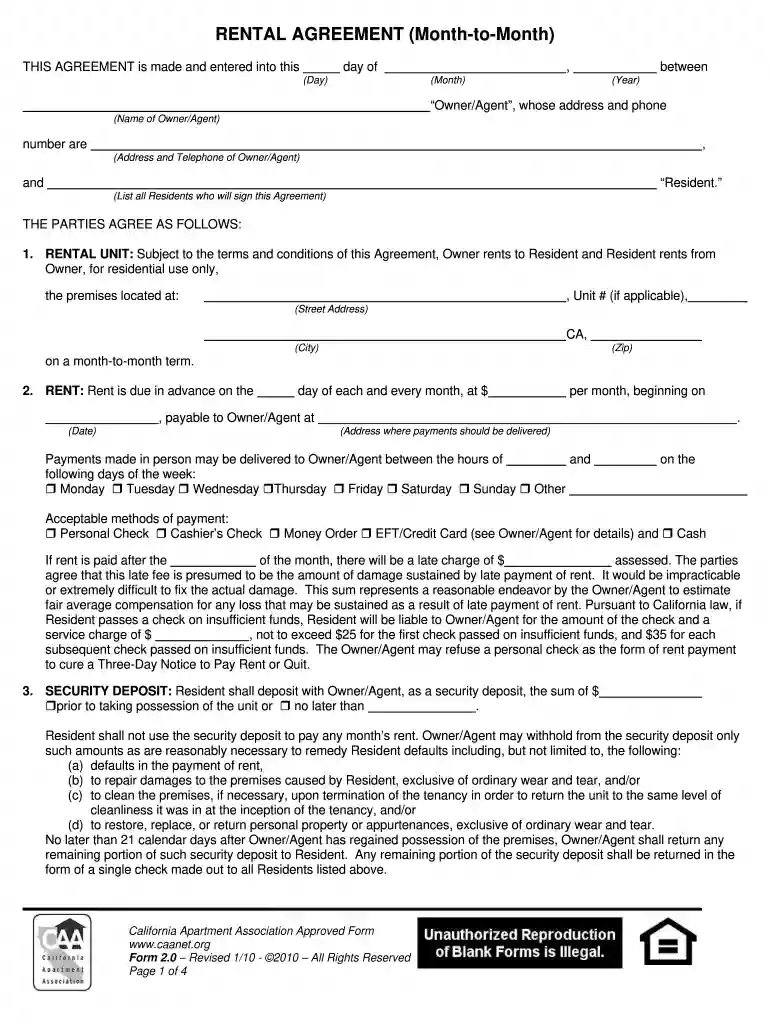
  1. Click ‘Get Form’ to open the caanet rental agreement in the editor.
  2. Begin by entering the date of the agreement at the top of the form. Fill in the day, month, and year as required.
  3. Next, provide the name and contact information for the Owner/Agent. Ensure all details are accurate for effective communication.
  4. List all residents who will sign this agreement in the designated section. This ensures that all parties are legally recognized.
  5. Fill out the rental unit details, including address and unit number if applicable. Specify that it is a month-to-month rental arrangement.
  6. Complete the rent section by indicating the due date and amount. Be sure to check acceptable payment methods and any late fees.
  7. Provide security deposit information, including amount and conditions for its return after tenancy ends.
  8. Review utility responsibilities and check applicable services that must remain connected during your tenancy.
  9. Finally, ensure you read through all terms carefully before signing. Initial where indicated to acknowledge receipt of any addenda.

Start using our platform today to easily fill out your caanet rental agreement online for free!

be ready to get more

Complete this form in 5 minutes or less

Get form

Got questions?

We have answers to the most popular questions from our customers. If you can't find an answer to your question, please contact us.
Contact us

Electronic document signing demands a software solution that works in compliance with data protection and eSignature standards. DocHub is an excellent tool for that, as it fulfills all the above mentioned requirements. Whatever method you prefer to sign your caanet in DocHub, your eSignature will be legally binding and court-admissible.

If you are using Chrome, there are two simple methods to edit your caanet online. First, visit the DocHub website, add your document, and edit it utilizing our toolbar. You may also install our Chrome extension and edit any document by dragging and dropping it in your browser window.

Title:CAA Form 4 (EASA-Ops) Management Personnel - Air Operator Certification. Description:This form is CAA Form 4 (EASA-OPS) \u2013 it is to be used for the nomination of nominated personnel after 28 October 2014.
The landlord can always increase rent with tenant's written consent. Rents may be raised starting September 1st each year by board-determined amount that is no less than 2%, nor more than 5%, of the existing rent. Landlords may "bank" annual rent increases.
California's eviction moratorium has expired.

Security and compliance

At DocHub, your data security is our priority. We follow HIPAA, SOC2, GDPR, and other standards, so you can work on your documents with confidence.

Learn more
ccpa2
pci-dss
gdpr-compliance
hipaa
soc-compliance

People also ask

The CAA has an important ongoing role in improving aviation safety standards. It constantly attempts to bring about lasting improvements in aviation systems, the culture of aviation, its capabilities, and any processes that are carried out.
A Certification Authority Authorization (CAA) record is used to specify which certificate authorities (CAs) are allowed to issue certificates for a domain. CAA records allow domain owners to declare which certificate authorities are allowed to issue a certificate for a domain.
Situations that may be held to affect a tenant's health can include lead paint, mold, unsanitary conditions, improper ventilation, a gas or sewage leak, pest infestations and bacteria causing illness such as Legionnaire's Disease.
EASA aircraft fall under the regulations of the European Aviation Safety Agency (EASA), while non-EASA aircraft are regulated by national aviation authorities. The CAA is the national aviation authority in the UK. Many more aircraft are classified as EASA than non-EASA.
The California Apartment Association is the nation's largest statewide trade group representing owners, investors, developers, managers and suppliers of rental homes and apartment communities.

Related links