Type text, add images, blackout confidential details, add comments, highlights and more.
02. Sign it in a few clicks
Draw your signature, type it, upload its image, or use your mobile device as a signature pad.
03. Share your form with others
Send sblc mt 760 via email, link, or fax. You can also download it, export it or print it out.
How to use or fill out mt760 swift message format 2021 with our platform
Ease of Setup
DocHub User Ratings on G2
Ease of Use
DocHub User Ratings on G2
Click ‘Get Form’ to open the mt760 swift message format 2021 in the editor.
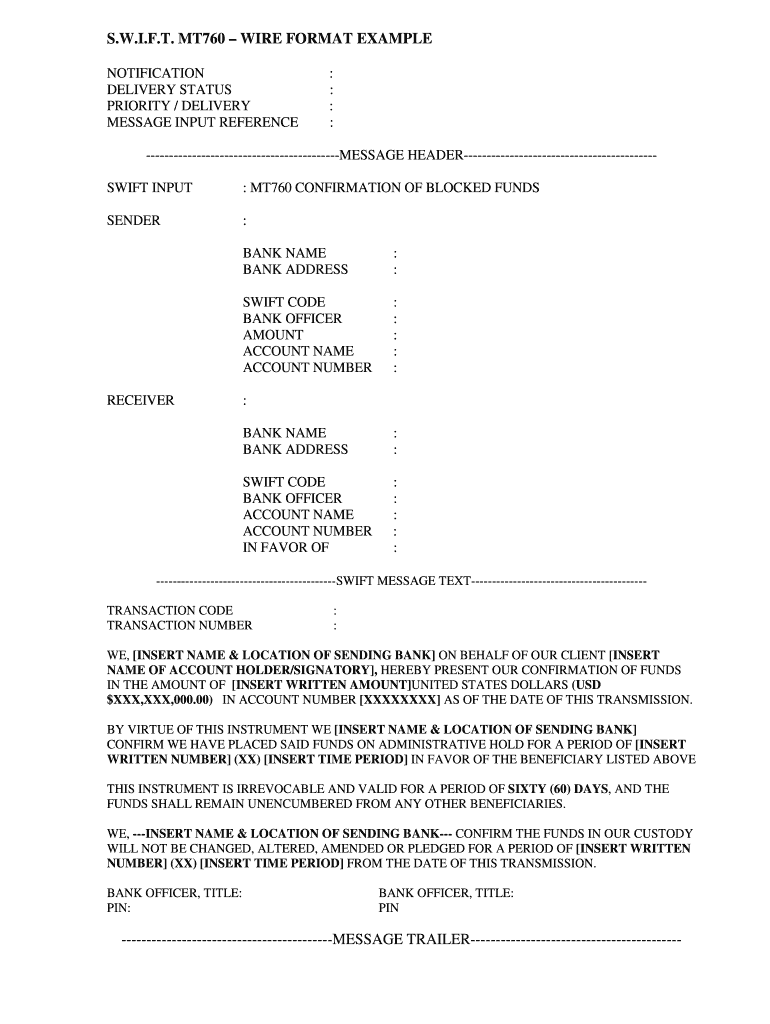
Begin by filling out the 'SENDER' section. Enter your bank name, address, SWIFT code, and the officer's name responsible for this transaction. Specify the amount and account details.
Next, complete the 'RECEIVER' section with the recipient's bank information, including their name, address, SWIFT code, and account details.
In the 'SWIFT MESSAGE TEXT', insert your bank's name and location on behalf of your client. Clearly state the confirmation of funds amount in both written and numerical formats.
Specify the administrative hold period by inserting a written number and time period. Ensure all fields are accurately filled to avoid processing delays.
Finally, have the bank officer sign off by entering their title and PIN in the designated areas before saving or exporting your completed document.
Start using our platform today to streamline your document editing process for free!
Fill out mt760 swift message format 2021 online It's free
Mt760 swift message format 2021 pdfMT 760 Format pdfMt760 swift message format 2021 downloadSblc MT760 sampleHow to convert a MT760 to cashSWIFT MT760 meaningSBLC MT760 VerbiageField 22A in mt760
Security and compliance
At DocHub, your data security is our priority. We follow HIPAA, SOC2, GDPR, and other standards, so you can work on your documents with confidence.
Aug 12, 2014 SWIFT advices of debit and credit (MT900 and MT910 respectively) or MT760 or MT799 message to the. Beneficiary Agent. The ClearingRead more
Swift MT760 (Exhibit B)to the Buyers bank. Seller forwards SBLC Sale and Purchase Agreement: Private Confidential: Page 2 of 23 BUYERS INITIALSRead more
Cookie consent notice
This site uses cookies to enhance site navigation and personalize your experience.
By using this site you agree to our use of cookies as described in our Privacy Notice.
You can modify your selections by visiting our Cookie and Advertising Notice.