Type text, add images, blackout confidential details, add comments, highlights and more.
02. Sign it in a few clicks
Draw your signature, type it, upload its image, or use your mobile device as a signature pad.
03. Share your form with others
Send psa submission form via email, link, or fax. You can also download it, export it or print it out.
How to use or fill out psa submission form with our platform
Ease of Setup
DocHub User Ratings on G2
Ease of Use
DocHub User Ratings on G2
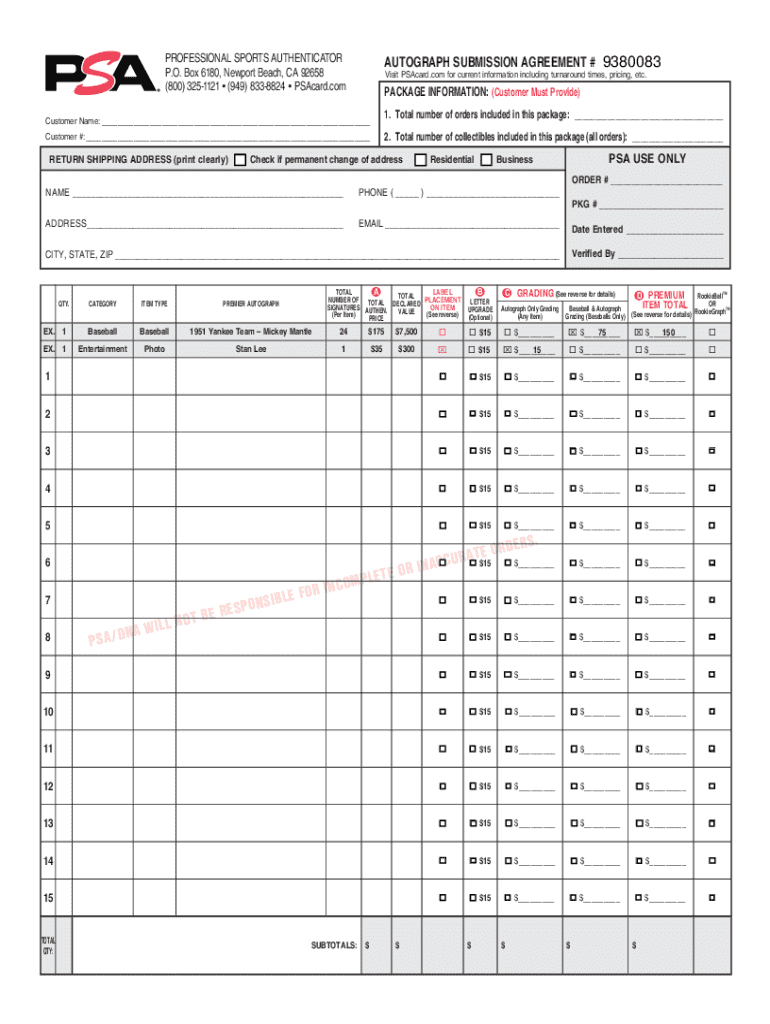
Click ‘Get Form’ to open the psa submission form in the editor.
Begin by entering your Customer Name and Customer Number in the designated fields. This information is crucial for processing your submission.
In the Package Information section, specify the total number of orders and collectibles included in your package. Accurate details here ensure smooth processing.
Clearly print your return shipping address, including name, phone number, and email. If there’s a permanent change of address, check the appropriate box.
Select the Type of Submission (Grading, Review, or Crossover) and choose one service level per submission form. Ensure you understand each option's implications on turnaround time.
Calculate your grading fee based on the selected service level and enter it in the provided field. Don’t forget to include any applicable USPS shipping fees.
Complete the payment method section by providing credit card details or selecting an alternative payment method. Remember that all fees must be paid in advance.
Review all entered information for accuracy before signing and dating the form at the bottom. Your order will not be processed without a signature.
Start using our platform today to streamline your psa submission process for free!
Psa submission form pdfPrintable psa submission formFree PSA submission form pdfPsa submission form onlineFree psa submission formPSA grading submission formPSA submission KitPSA Grading form pdf
Security and compliance
At DocHub, your data security is our priority. We follow HIPAA, SOC2, GDPR, and other standards, so you can work on your documents with confidence.
The Manual is divided into sections stating Medi-Cal program requirements and regulatory/contractual standards to support you in providing high quality andRead more
Undergraduate Document Submission Apply Apply Freshman Program for System Admission Alternative Admission Pathways Engineering Academies Transfer.Read more
Cookie consent notice
This site uses cookies to enhance site navigation and personalize your experience.
By using this site you agree to our use of cookies as described in our Privacy Notice.
You can modify your selections by visiting our Cookie and Advertising Notice.