




Here's how it works

01. Edit your monthly counseling army online
Type text, add images, blackout confidential details, add comments, highlights and more.

02. Sign it in a few clicks
Draw your signature, type it, upload its image, or use your mobile device as a signature pad.

03. Share your form with others
Send memorandum for record signed by three people via email, link, or fax. You can also download it, export it or print it out.
How to use or fill out whole soldier counseling form with our platform

- Click ‘Get Form’ to open the whole soldier counseling form in the editor.
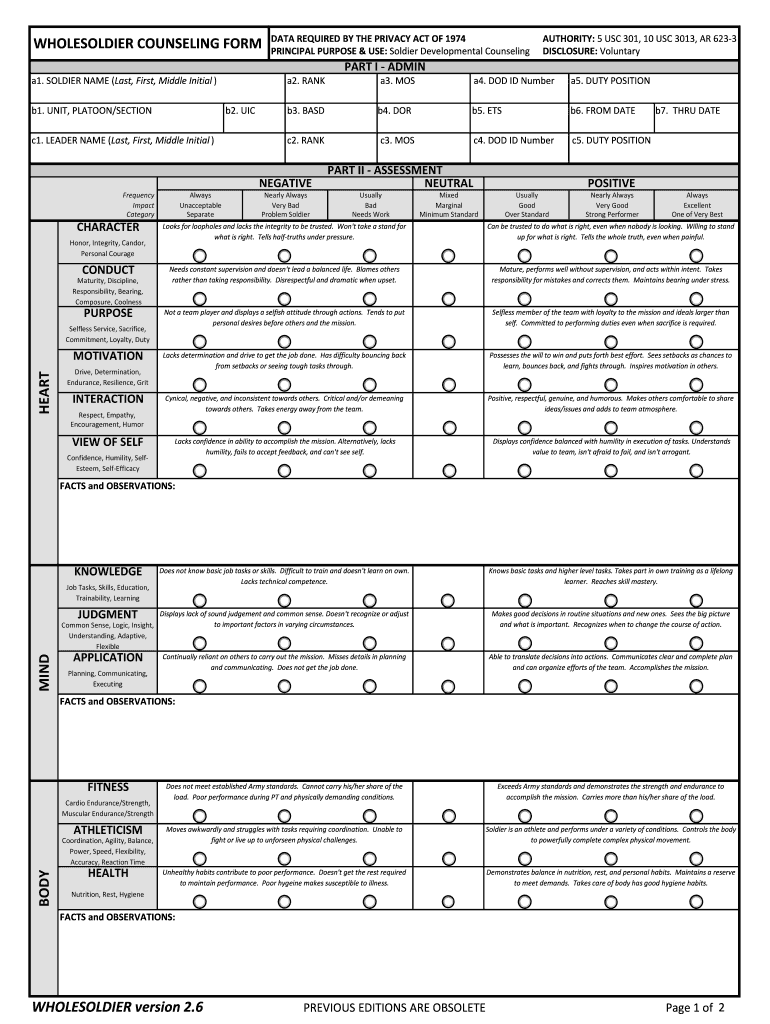
- Begin by filling in the soldier's name, rank, unit, and other personal details in the designated fields at the top of the form. Ensure accuracy for proper identification.
- Proceed to Part I - Admin. Fill out sections such as Duty Position and DOD ID Number. This information is crucial for administrative purposes.
- In Part II - Assessment, evaluate various attributes like Character, Conduct, Purpose, and Heart. Use the provided scales to rate each component honestly.
- Move on to Part III - Analysis. Here, reflect on performance insights and identify areas for improvement. Document any observations that can aid in development.
- Complete Part IV - Agreements by setting SMART goals related to professional development and personal growth. Ensure these are realistic and time-bound.
- Finally, review all entries for accuracy before signing. Once completed, encrypt and email the form as instructed at the bottom of the document.
Start using our platform today to streamline your whole soldier counseling process for free!
Fill out whole soldier counseling form online
It's free
It's free
Security and compliance
At DocHub, your data security is our priority. We follow HIPAA, SOC2, GDPR, and other standards, so you can work on your documents with confidence.
Learn more


