Type text, add images, blackout confidential details, add comments, highlights and more.
02. Sign it in a few clicks
Draw your signature, type it, upload its image, or use your mobile device as a signature pad.
03. Share your form with others
Send gideon membership application via email, link, or fax. You can also download it, export it or print it out.
How to use or fill out gideons international member sign with our platform
Ease of Setup
DocHub User Ratings on G2
Ease of Use
DocHub User Ratings on G2
Click ‘Get Form’ to open the gideons international member sign in the editor.
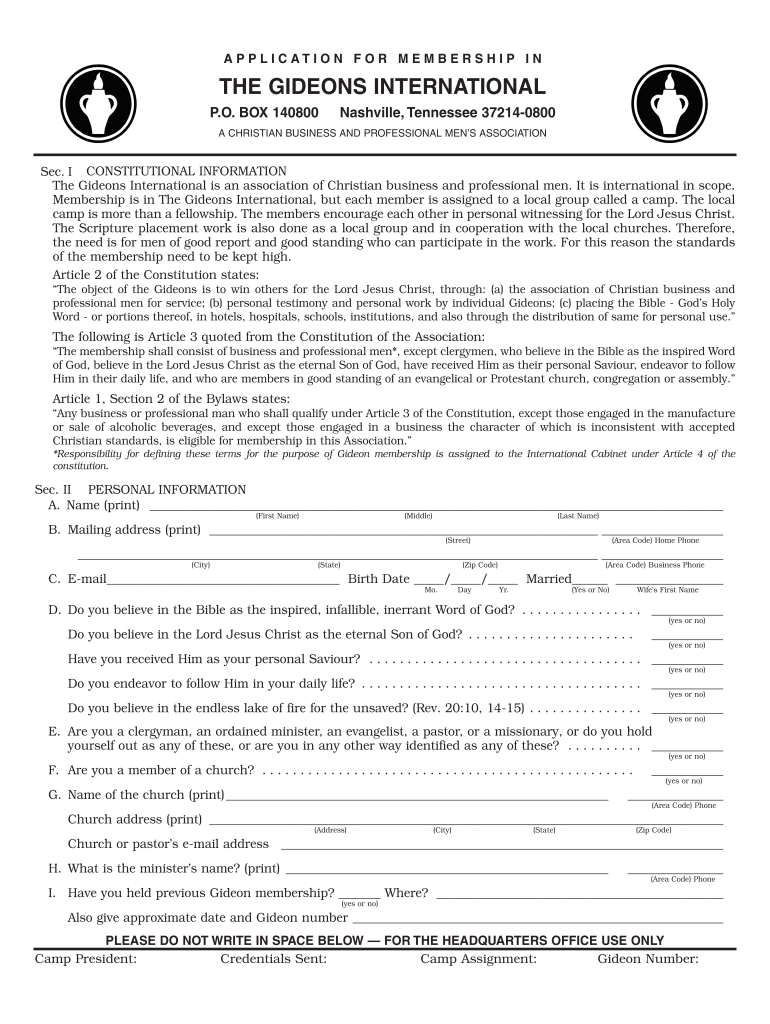
Begin by filling out Section II: Personal Information. Enter your full name, mailing address, and contact details accurately. Ensure that you provide a valid email address for communication.
Respond to the belief statements regarding the Bible and your faith in Jesus Christ. These are crucial for membership eligibility, so answer truthfully.
In Section III: Occupational Information, specify your business or professional details. Indicate your role and responsibilities clearly to reflect your qualifications.
Complete Section IV: References by providing names and addresses of two Christian professionals who can vouch for you. This helps establish credibility within the community.
Finally, review all sections for accuracy before signing in the Declaration section. Choose your membership type and payment method, ensuring all required fields are filled.
Start using our platform today to streamline your application process for free!
Fill out gideons international member sign online It's free
2025-2026 Bill 4957 Text of Previous Version (Jan. 29, 2026)
Jan 29, 2026 Gideons International, and is a past president of the Chester Sertoma Club. He also is the recipient of the states highest civilian honorRead more
Aug 10, 2010 Gideons are active in more than 190 countries around the world. Members come from many Protestant/evangelical denominations. Last year, NicholsRead more
Cookie consent notice
This site uses cookies to enhance site navigation and personalize your experience.
By using this site you agree to our use of cookies as described in our Privacy Notice.
You can modify your selections by visiting our Cookie and Advertising Notice.