Type text, add images, blackout confidential details, add comments, highlights and more.

02. Sign it in a few clicks
Draw your signature, type it, upload its image, or use your mobile device as a signature pad.

03. Share your form with others
Send bartender evaluation via email, link, or fax. You can also download it, export it or print it out.

How to use or fill out bartender evaluation with our platform
Ease of Setup
DocHub User Ratings on G2
Ease of Use
DocHub User Ratings on G2
Click ‘Get Form’ to open the bartender evaluation in the editor.
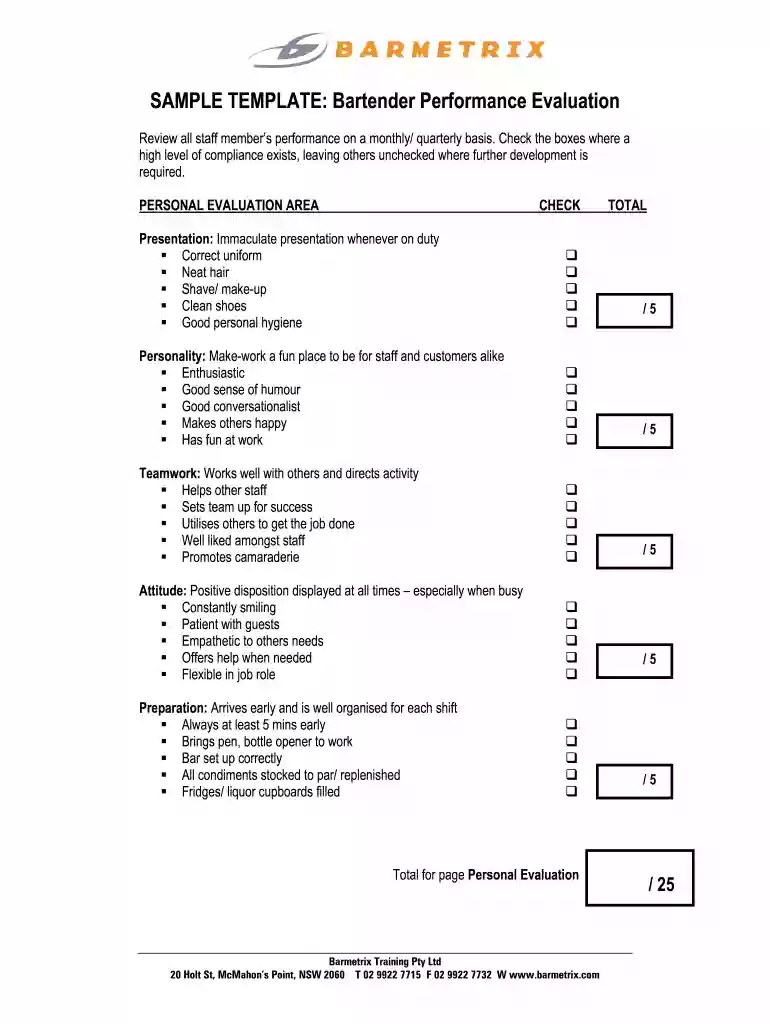
Begin with the Personal Evaluation Area. Review each criterion such as Presentation, Personality, Teamwork, Attitude, and Preparation. Check the boxes that reflect high compliance and leave unchecked those needing improvement.
Next, move to the Job Skills/Knowledge Area. Assess Bar Cleanliness, Bar Skills, Sales Ability, Product/Venue Knowledge, and Product Presentation. Again, check the boxes where performance meets expectations.
After completing both sections, calculate the totals for Personal Evaluation and Job Skills & Knowledge. Ensure all scores are accurately summed up for a comprehensive overview.
Finally, save your completed evaluation. You can easily share it via email or export it directly from our platform for further distribution.
Start using our platform today to streamline your bartender evaluations effortlessly!
Cookie consent notice
This site uses cookies to enhance site navigation and personalize your experience.
By using this site you agree to our use of cookies as described in our Privacy Notice.
You can modify your selections by visiting our Cookie and Advertising Notice.