Type text, add images, blackout confidential details, add comments, highlights and more.

02. Sign it in a few clicks
Draw your signature, type it, upload its image, or use your mobile device as a signature pad.

03. Share your form with others
Send te9 form online via email, link, or fax. You can also download it, export it or print it out.

How to use or fill out te9 form with our platform
Ease of Setup
DocHub User Ratings on G2
Ease of Use
DocHub User Ratings on G2
Click ‘Get Form’ to open the te9 form in the editor.
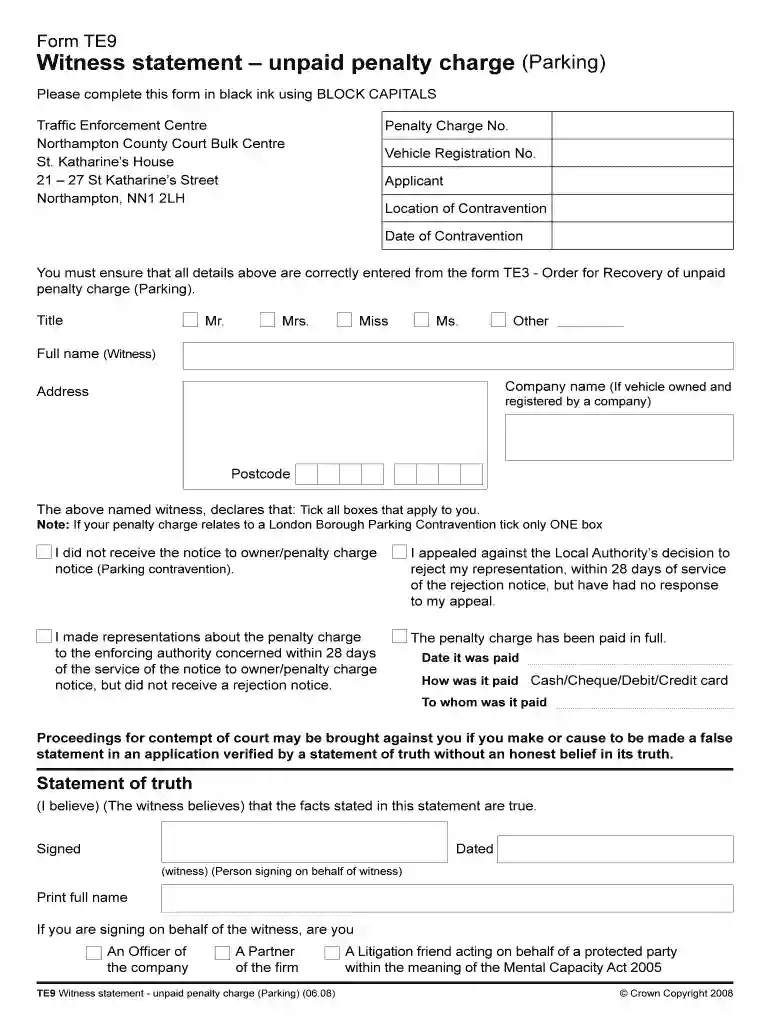
Begin by entering the Penalty Charge Number and Vehicle Registration Number at the top of the form. Ensure these details match your Order for Recovery document (TE3).
Fill in your personal information, including your title, full name, company name (if applicable), and address. Use BLOCK CAPITALS and black ink for clarity.
In the witness declaration section, tick all boxes that apply to your situation regarding the penalty charge notice. If it pertains to a London Borough Parking Contravention, select only one box.
If you have paid the penalty charge, provide the date of payment, method (cash, cheque, etc.), and to whom it was paid.
Complete the Statement of Truth by signing and dating where indicated. If signing on behalf of someone else, specify your relationship to them.
Once completed, send your form to the Traffic Enforcement Centre at Northampton County Court Bulk Centre or via email as instructed.
Start filling out your te9 form online for free today!
Field Engineering Theory of Operation System/360 Model
This manual describes the basic data flow, machine instruotion, and channel operations of the IBM 2040. Processing Unit. The basic numbering systems used.Read more
Cookie consent notice
This site uses cookies to enhance site navigation and personalize your experience.
By using this site you agree to our use of cookies as described in our Privacy Notice.
You can modify your selections by visiting our Cookie and Advertising Notice.