
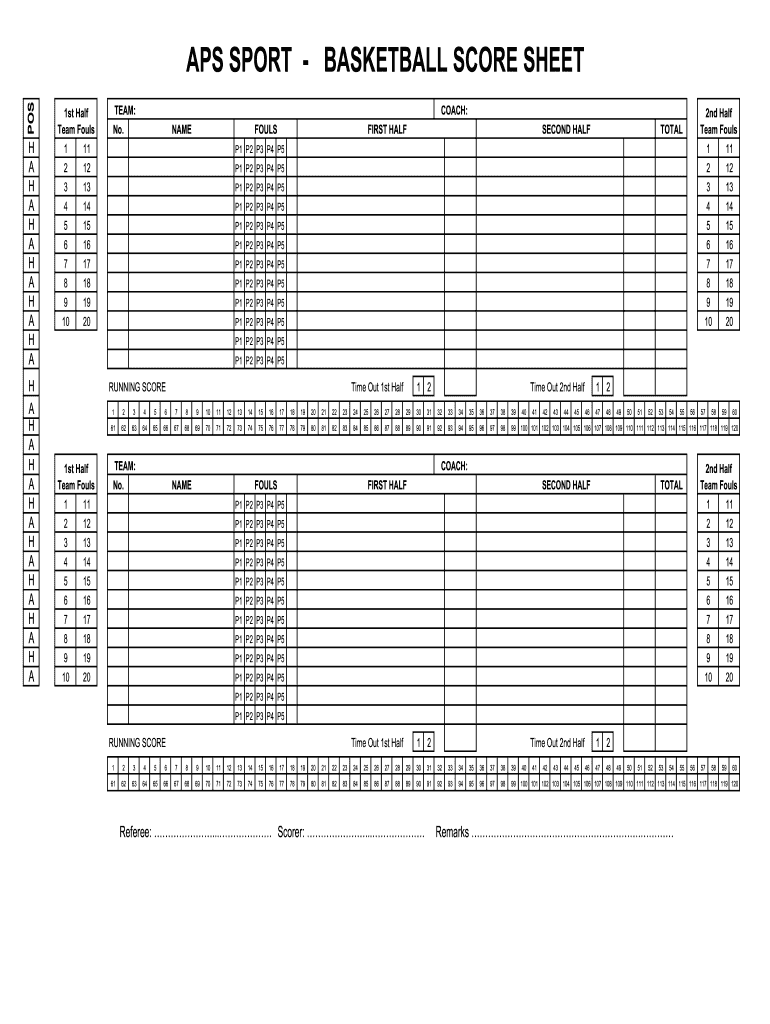







Definition & Meaning of the Basketball Score Sheet Excel Download
A basketball score sheet in Excel format serves as a comprehensive tool used for recording and tracking critical data during basketball games. This sheet may include sections for player names, fouls, timeouts, and ongoing scores. For coaches, referees, and statisticians, the score sheet is vital in managing and analyzing game statistics, ensuring accurate record-keeping, and assisting in strategic decisions. Excel offers the added benefit of automated calculations and organizational features that streamline the data entry process.
The primary focus of such a sheet is on enhancing game management by providing a structured approach to data tracking. Users can analyze performance metrics, compare player statistics, and maintain a detailed account of each game’s events, which can be critical for future training and game preparations.
How to Use the Basketball Score Sheet Excel Download
Using a basketball score sheet in Excel requires a few simple steps. First, after downloading the file, familiarizing oneself with its layout is essential:
- Log Player Information: Enter player names, jersey numbers, and positions in the designated fields.
- Record Scores and Fouls: Utilize the columns to input scores after each basket and document fouls, noting the type (e.g., personal, technical).
- Track Timeouts: Keep count of team timeouts in specific sections for better management during games.
- Calculate Totals: Leverage Excel’s functions to automatically calculate total points, fouls per player, and team totals for easier analysis.
With practice, users can efficiently update the score sheet throughout the game, allowing for immediate assessments during and after play.
Key Elements of the Basketball Score Sheet Excel Download
The basketball score sheet Excel download includes various essential components to ensure effective tracking:
- Player Information: Fields for players' names, numbers, and positions.
- Scoring Sections: Columns allocated for each quarter or half for recording points scored.
- Fouls and Timeouts: Areas designated for logging each player's fouls and the number of timeouts taken.
- Statistics Summary: Automated fields that summarize key statistics like points per player and team totals.
These elements work together to provide a holistic view of game progress, assisting coaches and teams in fine-tuning their strategies.
Who Typically Uses the Basketball Score Sheet Excel Download
The basketball score sheet Excel download is utilized by various stakeholders involved in basketball:
- Coaches: For assessing player performance and making strategic decisions based on game statistics.
- Referees: To monitor fouls and track game order ensuring fairness and compliance with regulations.
- Statisticians: For recording accurate game data, used in reporting and analysis for teams and players.
- Players: Sometimes, players review their statistics to understand areas for improvement and development.
Understanding the diverse user base highlights the sheet's importance in facilitating effective communication and data management within basketball environments.


Steps to Complete the Basketball Score Sheet Excel Download
Completing the basketball score sheet in Excel is a straightforward process that can be broken down into specific steps:
- Download and Open the Excel File: Locate the score sheet, download it, and open it on your computer.
- Input Player Data: Fill in the player positions, numbers, and names in the appropriate sections.
- Track Game Progress: Update scores and fouls live as the game unfolds, ensuring accurate and real-time data collection.
- Finalize Statistics: After the game, review the data entries and use Excel functions to double-check totals and averages.
Following these steps ensures that all necessary gameplay information is captured effectively, minimizing errors.
Important Terms Related to the Basketball Score Sheet Excel Download
Understanding key terminology enhances the effectiveness of using the basketball score sheet:
- Fouls: Actions that violate rules, categorized into personal, technical, and unsportsmanlike fouls.
- Timeouts: Breaks taken by teams, affecting game strategy and player organization.
- Scoring: Refers to the successful points recorded, essential for determining game outcomes.
- Assist: A significant basketball play in which one player passes to a teammate, leading to a score.
Familiarity with these terms provides a foundational understanding enabling more effective usage and analysis of the score sheet.
Examples of Using the Basketball Score Sheet Excel Download
Practical application of the basketball score sheet can vary based on team context and goals:
- Youth Basketball Leagues: Coaches utilize the sheet to not only track scores but also to mentor young players by discussing their performance metrics.
- High School Teams: Statistics tracked via the score sheet help coaches identify standout players and strategize for upcoming games based on performance data.
- Amateur Tournaments: For refs and statisticians, the sheet serves as a reliable source to ensure proper documentation of game events and outcomes, promoting transparency.
These examples illustrate the versatility of the score sheet across different levels of play and its potential to enhance game management and performance evaluation.




