Gar rental application 2026

Get Form
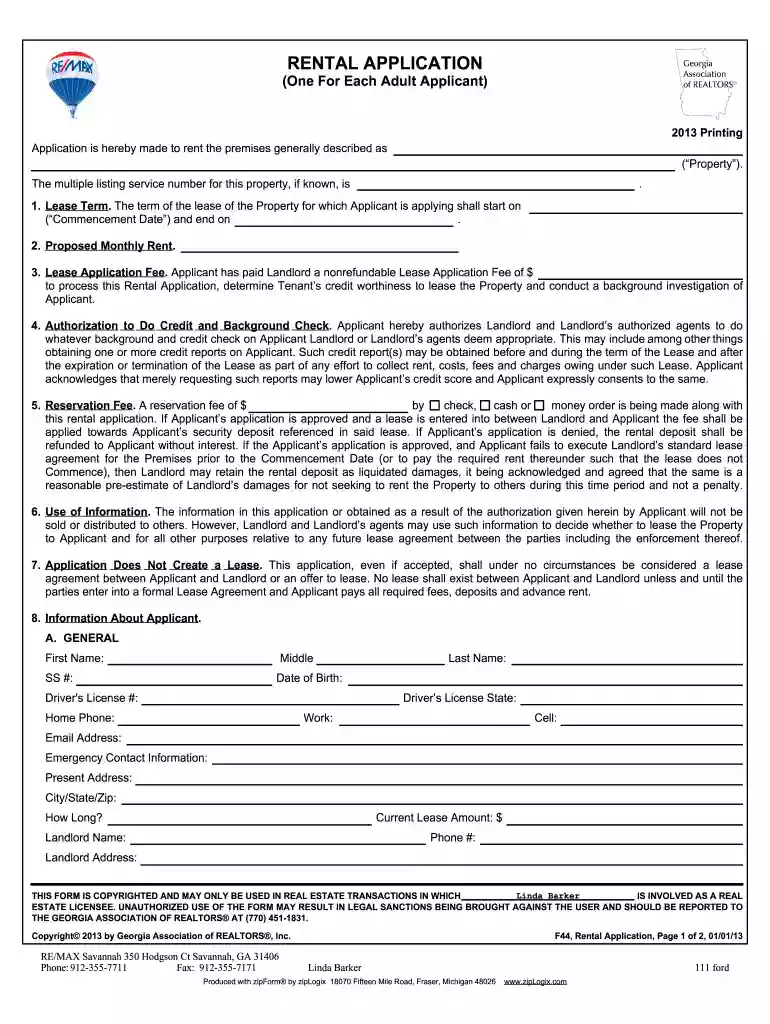
gar forms Preview on Page 1

Here's how it works

01. Edit your gar forms online
Type text, add images, blackout confidential details, add comments, highlights and more.

02. Sign it in a few clicks
Draw your signature, type it, upload its image, or use your mobile device as a signature pad.

03. Share your form with others
Send gar forms free via email, link, or fax. You can also download it, export it or print it out.

How to use or fill out gar rental application with our platform

Form edit decoration
9.5
Ease of Setup
DocHub User Ratings on G2
9.0
Ease of Use
DocHub User Ratings on G2
  1. Click ‘Get Form’ to open the gar rental application in the editor.
  2. Begin by filling in the property details, including the lease term and proposed monthly rent. Ensure you specify the commencement date clearly.
  3. Enter the nonrefundable lease application fee amount you have paid. This is crucial for processing your application.
  4. Authorize a credit and background check by providing your consent. This section is important for landlords to assess your eligibility.
  5. Complete the applicant information section, including personal details like name, contact information, and employment history.
  6. If applicable, provide details about any pets and previous landlord references. Be thorough to avoid delays in processing.
  7. Finally, review all entered information for accuracy before signing and submitting your application through our platform.

Start using our platform today to fill out your gar rental application easily and for free!

be ready to get more

Complete this form in 5 minutes or less

Get form

Got questions?

We have answers to the most popular questions from our customers. If you can't find an answer to your question, please contact us.
Contact us

Signing documents on a mobile device is fast, easy, and doesn’t require software installation when you have an account with DocHub. Sign in from any browser, fill in your empty fields with your data, and click on Sign → Create your signature. You can draw your electronic signature the same way you usually do on paper, add its image to your gar application, or type in your name and stylize its look. No matter what option you choose, your paperwork will be valid.

If you want to edit your gar form online swiftly, it does not matter what browser you use. DocHub’s straightforward editing tools are available using any internet browser. Simply open the appropriate tab within our editor, add your file, and fill it out without stress.

F913 Lease for Residential Property (Not to Be Used for Lease/Purchase Transactions) F916 Lease for Lease/Purchase Agreement Exhibit. F917 Tenants Brokers Notice to Seller of Landlords Obligations Regarding Lead-based Paint. F918 Lead-Based Paint Exhibit (Leases) F919 Consent to Take Pictures and Video of Property.
Rejection is almost always guaranteed for applicants with insufficient income-to-rent ratios. Most landlords require renters to have income that is double or triple the monthly rent. If they cannot meet this requirement, rejection should not come as a shock.
It generally takes 3 business days to process an application, and sometimes longer if additional information is required. Applications are processed by a third-party company, Findigs (findigs.com). The application fee of $75.00 is paid directly to Findigs and is non-refundable under any circumstance.

Security and compliance

At DocHub, your data security is our priority. We follow HIPAA, SOC2, GDPR, and other standards, so you can work on your documents with confidence.

Learn more

People also ask

Theres no universal credit minimum, but a score of 600+ is generally considered acceptable; scores above 700 are low risk; below 600 may require additional support.
Georgia Real Estate Commission approved schools may purchase GAR Training Forms for a fee of $254.00.

gar forms list pdf