Crs referral form 2026

Get Form
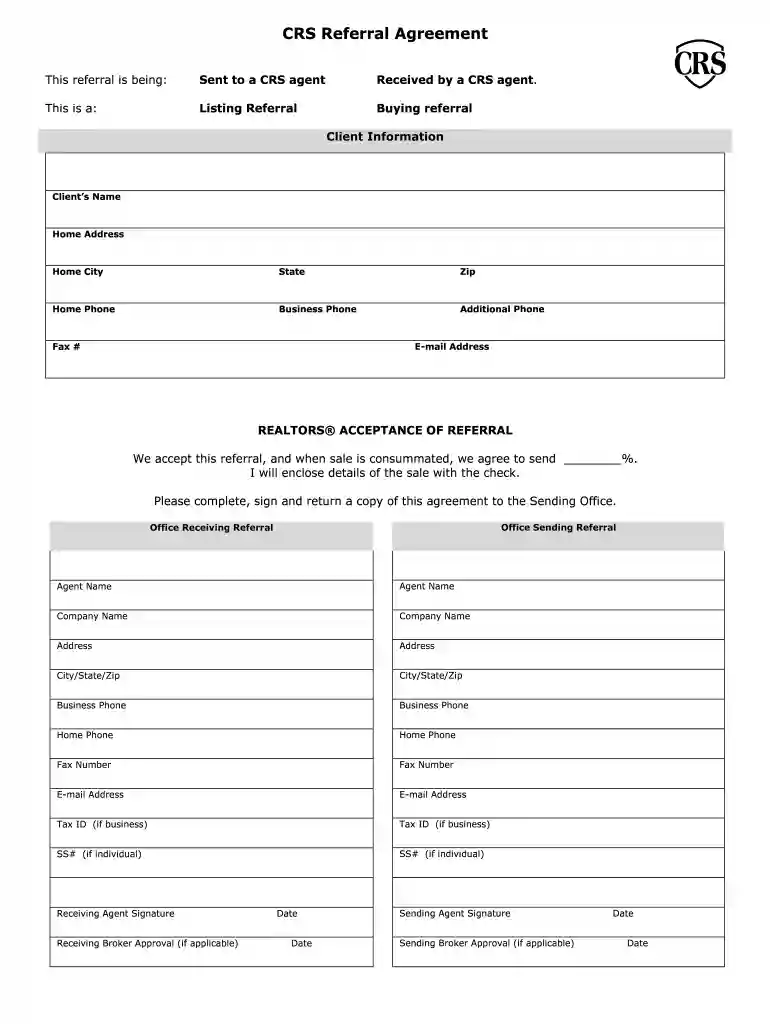
crs referral form Preview on Page 1

Here's how it works

01. Edit your crs referral form online
Type text, add images, blackout confidential details, add comments, highlights and more.

02. Sign it in a few clicks
Draw your signature, type it, upload its image, or use your mobile device as a signature pad.

03. Share your form with others
Send crs form template via email, link, or fax. You can also download it, export it or print it out.

How to use or fill out crs referral form with our platform

Form edit decoration
9.5
Ease of Setup
DocHub User Ratings on G2
9.0
Ease of Use
DocHub User Ratings on G2
  1. Click ‘Get Form’ to open the CRS Referral Form in the editor.
  2. Begin by selecting whether the referral is being sent to or received by a CRS agent. Check the appropriate box for 'Sent to a CRS agent' or 'Received by a CRS agent'.
  3. Indicate the type of referral by checking either 'Listing Referral' or 'Buying Referral'.
  4. Fill in the Client Information section, including the client’s name, home address, city, state, zip code, and phone numbers. Ensure all fields are completed accurately.
  5. In the REALTORS® Acceptance of Referral section, specify the percentage agreed upon for commission and confirm your acceptance by signing where indicated.
  6. Complete both Office Sending and Receiving Referral sections with relevant details about each office and agent involved.
  7. For Buyer Client Profile and Listing Client Profile sections, provide detailed information regarding preferences and property specifics as required.
  8. Finally, ensure all signatures are obtained from both sending and receiving agents before submitting the form.

Start using our platform today to fill out your CRS Referral Form easily and for free!

be ready to get more

Complete this form in 5 minutes or less

Get form

Got questions?

We have answers to the most popular questions from our customers. If you can't find an answer to your question, please contact us.
Contact us
How to write a letter of referral Include both addresses. Write a brief introduction. Give an overview of the applicants strengths. Share a story of the applicant. Add a closing statement. Leave a signature.
A referral form should include the name and contact information of the person making the referral, the name and contact information of the person or business being referred, and any relevant details about the referral.
Your referral letter should be concise and to the point. Highlight how you know the candidate, why theyre qualified for the role, and the value they can bring to the company. Be professional and avoid overly effusive praise.
Template 10: Hi, [Name]. Ready to join the [your business name] family? Your friend, [current customer name], recently purchased with us. Be sure to include a phone number on your referral forms, so you can send texts like these to potential customers when their contact info is submitted.
The NHS e-Referral Service (e-RS) combines electronic booking with a choice of place, date and time for first hospital or clinic appointments. Patients can choose their initial hospital or clinic appointment, book it in the GP surgery at the point of referral, or later at home on the phone or online.

People also ask

[Colleagues Name] and I have known each other for [length of time] and I have been impressed with their skills and work ethic and believe they would be a great fit at [Company Name]. [Colleagues Name] has [relevant skills and experience] that make them an ideal candidate for the role.
How to ask for a referral in 6 steps Step 1: Choose the appropriate medium. Step 2: Identify the right person to ask. Step 3: Provide context. Step 4: Make it easy for them to say yes. Step 5: Give them an out. Step 6: Follow up and express gratitude.

crs referral