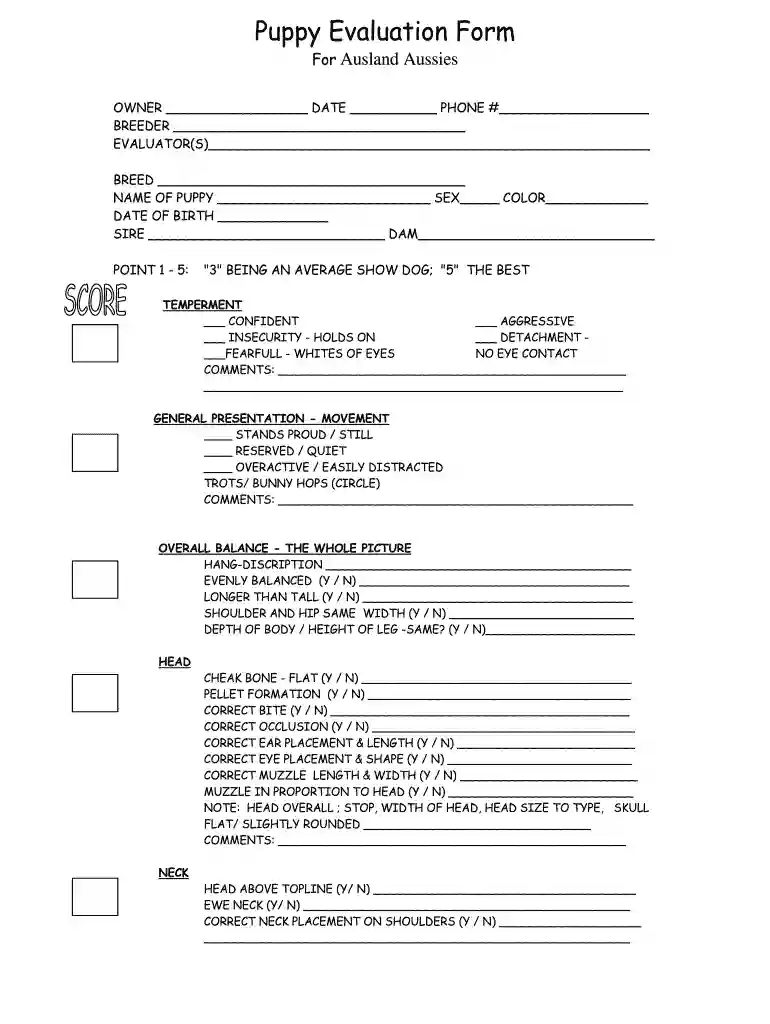
Dog assessment form 2026

Get Form
dog evaluation form Preview on Page 1

Here's how it works

01. Edit your dog evaluation form online
Type text, add images, blackout confidential details, add comments, highlights and more.

02. Sign it in a few clicks
Draw your signature, type it, upload its image, or use your mobile device as a signature pad.

03. Share your form with others
Send dog assessment form via email, link, or fax. You can also download it, export it or print it out.

How to use or fill out dog assessment form with our platform

Form edit decoration
9.5
Ease of Setup
DocHub User Ratings on G2
9.0
Ease of Use
DocHub User Ratings on G2
  1. Click ‘Get Form’ to open the dog assessment form in the editor.
  2. Begin by filling in the owner’s details at the top, including your name, date, and phone number. This information is crucial for identification.
  3. Next, enter the breeder's name and evaluator(s) to ensure proper documentation of the assessment process.
  4. Fill in the breed and name of the puppy, along with its sex, color, and date of birth. Accurate details help in tracking and evaluating specific traits.
  5. Proceed to assess temperament by selecting a score from 1 to 5. Provide comments on behavior such as confidence or aggression for a comprehensive evaluation.
  6. Continue through each section, including general presentation, overall balance, head structure, neck placement, front assembly, depth of chest, rear assembly, topline, and coat quality. Use 'Yes' or 'No' options where applicable and add comments for clarity.

Start using our platform today to easily complete your dog assessment form online for free!

be ready to get more

Complete this form in 5 minutes or less

Get form

Got questions?

We have answers to the most popular questions from our customers. If you can't find an answer to your question, please contact us.
Contact us

Sign in to your DocHub account and add your puppy evaluation form to our editor using one of its upload methods - from your device, cloud storage, secure URL, or your DocHub folders if you have already managed your document before. Open our editor, click the Sign key in the upper toolbar, and decide on your signing method. You can use a picture of your handwritten signature, draw it, type in your name, or utilize a QR code as an alternative.

If you need to edit your dog behavior assessment checklist online easily, it does not matter what browser you use. DocHub’s simple editing instruments are accessible using any internet browser. Simply open the appropriate tab in the editor, add your document, and fill it out without stress.

Place the back of your hand on the pavement. If you cant keep it there for five seconds, its too hot to walk your dog. If you didnt know about this rule, chances are your friends dont, either.
Whether its a loud noise, a new environment, or an unfamiliar person, a dogs response to fear is instinctive and can manifest in four primary ways, known as the 4 Fs of Fear Response: Fight, Flight, Freeze, and Fidget (Fool Around).
A pet assessment consists of two key parts, including a questionnaire and having direct interaction with the pet, which are both completed by the Supervising Social Worker. This report collects essential information about the pet while also requiring the Social Worker to observe the pets behaviour firsthand.

Security and compliance

At DocHub, your data security is our priority. We follow HIPAA, SOC2, GDPR, and other standards, so you can work on your documents with confidence.

Learn more
ccpa2
pci-dss
gdpr-compliance
hipaa
soc-compliance
be ready to get more

Complete this form in 5 minutes or less

Get form

People also ask

The Two-Week Shut Down is a time familiar to a dogs mind. It mimics the whelping box when first born, when the puppys eyes are not open and it relies totally on the mothers ability to take care of it. By smelling, sensing, and listening, the puppy starts his journey into the new scary world.

barq rescue