Type text, add images, blackout confidential details, add comments, highlights and more.
02. Sign it in a few clicks
Draw your signature, type it, upload its image, or use your mobile device as a signature pad.
03. Share your form with others
Send rma form meaning via email, link, or fax. You can also download it, export it or print it out.
How to use or fill out RMA Request Form with our platform
Ease of Setup
DocHub User Ratings on G2
Ease of Use
DocHub User Ratings on G2
Click ‘Get Form’ to open the RMA Request in the editor.
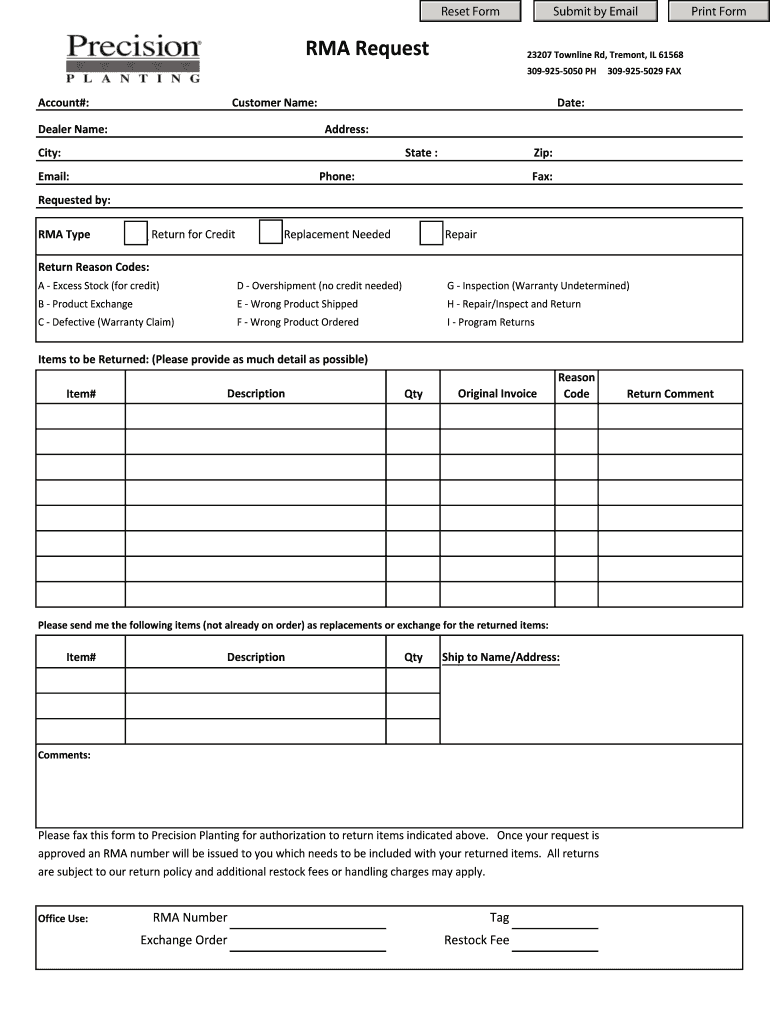
Begin by entering your Account Number, Customer Name, and Dealer Name in the designated fields. This information is crucial for processing your request.
Fill in the Date and your Address details including City, State, Zip Code, and Phone number. Ensure accuracy to avoid delays.
Select the RMA Type by checking one of the options: Return for Credit, Replacement Needed, or Repair. This helps categorize your request.
Provide a detailed list of Items to be Returned. Include Item Number, Description, Quantity, Original Invoice number, and Reason Code from the provided list.
If you require replacements or exchanges, fill out the corresponding section with Item Numbers and Descriptions.
Add any additional Comments that may assist in processing your return effectively.
Once completed, fax this form as instructed for authorization. Remember to include the RMA number once issued with your returned items.
Start using our platform today to streamline your RMA process for free!
RMA meaning in bankingRMA meaning in financeRMA meaning PCRma meaning militaryRMA meaning shippingRMA meaning engineeringRMA meaning ArmyRma meaning in manufacturing
Security and compliance
At DocHub, your data security is our priority. We follow HIPAA, SOC2, GDPR, and other standards, so you can work on your documents with confidence.
The United States Department of Agricultures (USDA) Risk Management Agency (RMA), created in 1996, serves Americas agricultural producers through effective,Read more
Cookie consent notice
This site uses cookies to enhance site navigation and personalize your experience.
By using this site you agree to our use of cookies as described in our Privacy Notice.
You can modify your selections by visiting our Cookie and Advertising Notice.