




01. Edit your acting audition score sheet template online
Type text, add images, blackout confidential details, add comments, highlights and more.

Type text, add images, blackout confidential details, add comments, highlights and more.

Draw your signature, type it, upload its image, or use your mobile device as a signature pad.

Send audition evaluation template via email, link, or fax. You can also download it, export it or print it out.
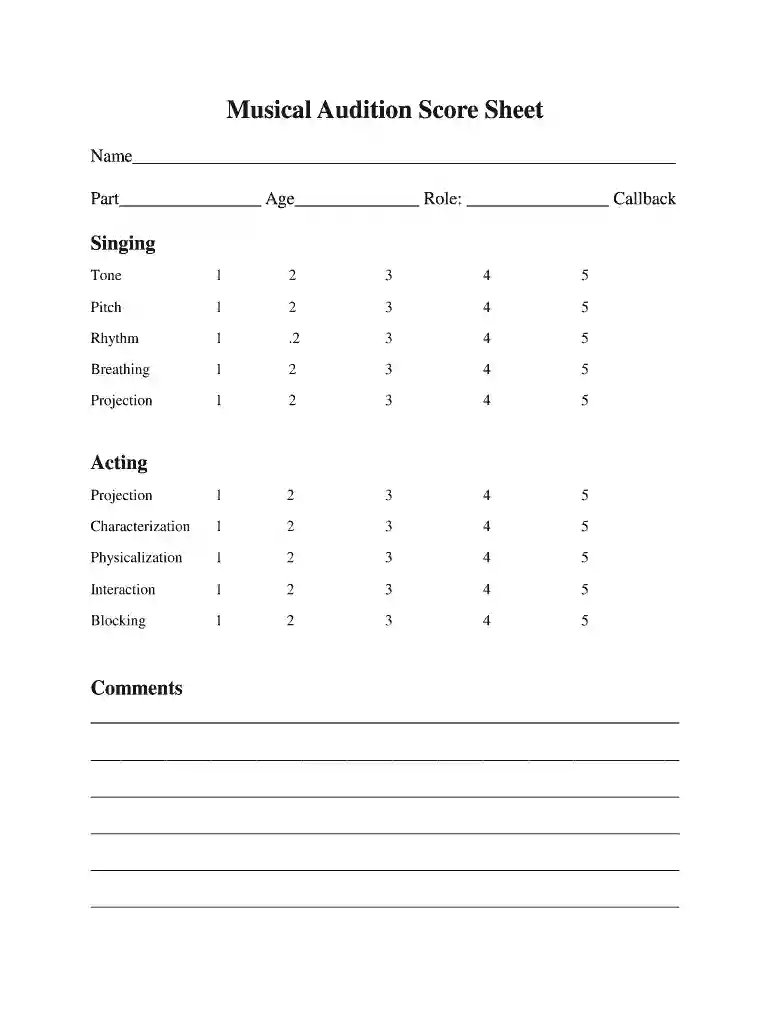
An acting audition score sheet template serves as a standardized tool for evaluating performers during auditions. This document is essential in assessing various aspects of an audition and provides a clear framework for reviewers. It typically includes criteria such as acting ability, vocal performance, physicality, and overall presentation. Each of these elements can be scored systematically to ensure fairness and clarity throughout the audition process.
An effective audition evaluation template incorporates several evaluation criteria to give a comprehensive assessment of the performer.
Each criterion can be rated on a scale, such as one to five, allowing for nuanced feedback.
Each section of the audition score sheet should include both a scoring mechanism and space for comments. This allows evaluators to record their numerical assessments directly alongside qualitative notes.
Providing feedback based on the scoring sheet can be instrumental for performers looking to refine their skills.
Utilizing a standardized audition score sheet offers numerous advantages for casting directors and evaluators.
This score sheet can be adapted for various audition settings.
In each case, adjust the scoring and comments sections to reflect the unique nuances of the specific audition context, ensuring relevance and targeted feedback for performers.
Having a well-constructed acting audition score sheet template not only enhances the audition experience for both judges and performers but also contributes to more organized casting processes. By systematically evaluating talent based on defined criteria and providing actionable feedback, the template becomes an invaluable asset in shaping successful auditions.
Managing your paperwork with DocHub this way is extremely straightforward after you have downloaded its extension for Google Chrome. Go to the Chrome Web Store and install DocHub - Sign PDF from Gmail to obtain it. Give our tool access to your Google account, and then open an email with the theater audition evaluation form attached and point to the file with your cursor - the DocHub extension button will automatically appear there. Click on it to open your file in our editor. Make any necessary modifications, complete the blanks, and click Sign to create your legally-binding electronic signature.
Using a swift editing platform like DocHub, you do not need anything but a browser and internet connection to edit your audition score sheet online quickly. Upload your document or get the appropriate form in DocHub’s catalog, open our editor with one click, and finish it electronically. To revise your forms anytime, register a free profile with DocHub.
At DocHub, your data security is our priority. We follow HIPAA, SOC2, GDPR, and other standards, so you can work on your documents with confidence.


