Type text, add images, blackout confidential details, add comments, highlights and more.
02. Sign it in a few clicks
Draw your signature, type it, upload its image, or use your mobile device as a signature pad.
03. Share your form with others
Send etrade dtc number via email, link, or fax. You can also download it, export it or print it out.
How to use or fill out etrade dtc transfer with our platform
Ease of Setup
DocHub User Ratings on G2
Ease of Use
DocHub User Ratings on G2
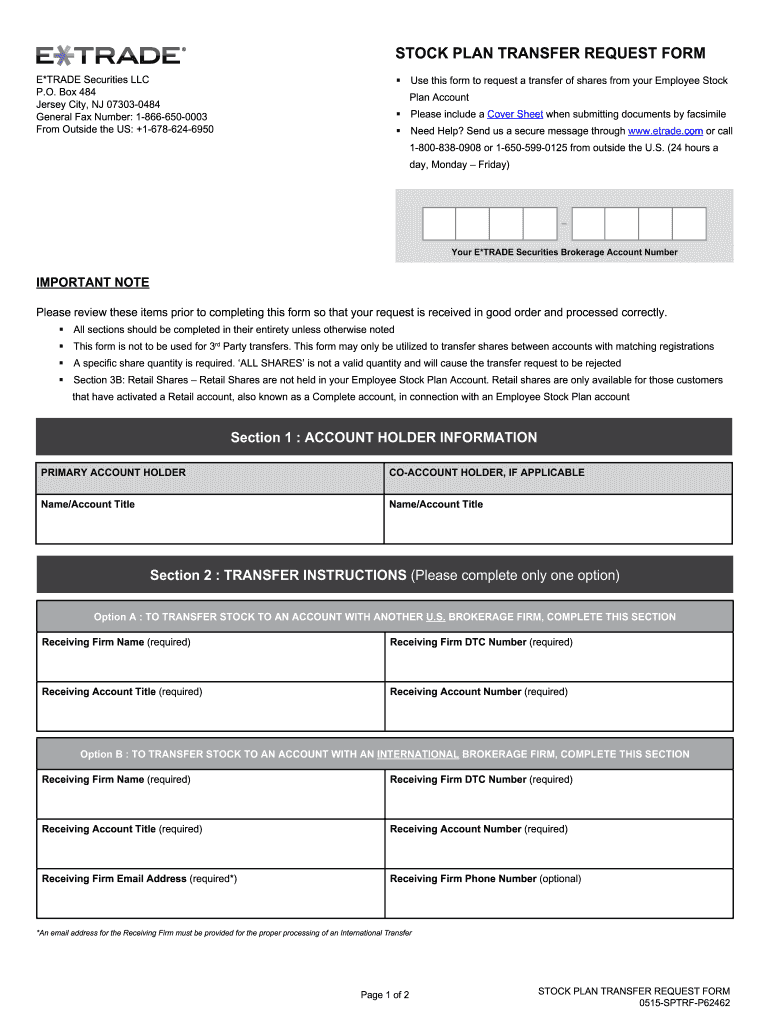
Click ‘Get Form’ to open the etrade dtc transfer document in the editor.
Begin by filling out Section 1, which requires your account holder information. Ensure you include both primary and co-account holder names as applicable.
Proceed to Section 2 for transfer instructions. Choose either Option A for transfers to another U.S. brokerage firm or Option B for international transfers. Fill in all required fields, including the receiving firm's name and DTC number.
In Section 3, provide detailed share information based on the type of shares you are transferring. Specify stock plan shares or retail shares, ensuring you enter exact quantities as 'ALL SHARES' is not acceptable.
Finally, complete the account holder signatures section at the end of the form. Both primary and co-account holders must sign and date the document before submission.
Start using our platform today to streamline your etrade dtc transfer process for free!
Etrade dtc transfer timeEtrade dtc transfer feeEtrade DTC numberEtrade dtc transfer redditEtrade dtc number 0385Etrade DTC number 0015E*TRADE transfer money to bank accountEtrade wire transfer out
Security and compliance
At DocHub, your data security is our priority. We follow HIPAA, SOC2, GDPR, and other standards, so you can work on your documents with confidence.
Go to your TreasuryDirect account. Choose the Manage Direct tab. Identify the security or securities you want to transfer. Choose External Transfer. OpenRead more
Harvard cannot transfer stock on your behalf. Upon submission of this form, you will receive a copy of the DTC instructions. Are you a registered userRead more
Cookie consent notice
This site uses cookies to enhance site navigation and personalize your experience.
By using this site you agree to our use of cookies as described in our Privacy Notice.
You can modify your selections by visiting our Cookie and Advertising Notice.